
Miscellaneous Ramblings
Adding 'Lost' OS 9 Features to Mac OS X
Charles Moore - 2006.07.12 - Tip Jar
I've been very happy in OS X since Panther (OS X 10.3) debuted in 2003, at which point I found that I missed more OS X features when running in OS 9 than I did Classic features when booted from OS X. I've gotten addicted to preemptive multitasking, virtual crash free-ness, Spotlight, and perhaps most of all the superior Web browsers that are available for OS X.
However, there are OS 9 features not available in OS X that I miss. Happily there are a number of third-party workaround solutions available.
WindowShade X
For example, Unsanity Software makes several different "haxie" applications that add OS 9 features to OS X. My hands-down favorite is WindowShade X, which is one I really couldn't get along without. The current version is WindowShade X 4.0.2, which works with OS X 10.3 or newer and supports 10.4.
With WindowShade X, when you double-click a window title bar or try to minimize a window, it will enable actions that can be different from the default OS X behavior (collapsing the window into the Dock, which I detest). WindowShade X has five alternative minimize modes: WindowShade, Minimize-In-Place, Make Window Transparent, Float on Top, Hide Application, and Do Nothing. These actions can be set on per-application basis, so you can configure your workspace in the way that is most convenient for you. Personally, I pretty much prefer windowshading across the board.
$10 demoware
Other Unsanity OS 9 retro haxies include:
FruitMenu
FruitMenu 3.6.1, which restores the ability to customize the Apple Menu and contextual menus, and lets you edit the contents of the menus to suit your needs and taste.
FruitMenu features include:
- Put any folders and files in your Apple and contextual menus.
- Put complete disks in your Apple and contextual menus for easy navigation.
- Assign hot keys to your files, folders, and commonly used tasks.
- Access individual System Preferences immediately from a submenu.
- See your IP Address in the Apple or contextual menu.
- Speed up your system by disabling menu fadeout effect.
- Open any document with application of your choice through the contextual menu.
- Move any file or folder into your desired location.
- Preview graphics file right into your menu.
- Reveal and Get Info on files right from your Apple and contextual menus.
- Create individual configurations of Apple and Contextual menus for different applications.
- Use less-cluttered, faster implementation of Recent Applications, Documents and Folders than Apple's.
- Set desktop picture instantly with a single click.
- Browse contents of the selected folder in a menu, instantly.
- Organize the Apple menu the way you want or need.
- Easy to configure as it comes in usual Preference Pane form, accessible through System Preferences.
FruitMenu will display the contents of the FruitMenu Items folder inside of your Library folder, launch applications and shell scripts from the Apple Menu and contextual menus, to allow easy file navigation and launching. You can also assign hotkeys to particular Apple menu items.
$10 demoware
Xounds
Xounds 2.3.1 brings back Appearance Sounds to Mac OS X. Xounds will convert your existing Mac OS 8 or 9 sound sets. This is a feature that I can live without, but if you're smitten with Appearance Sounds, there's no reason to deprive yourself.
$10 demoware
 DragonDrop
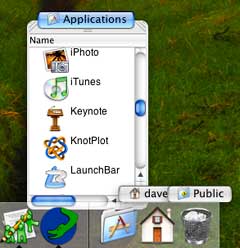
David Adamson's freeware DragonDrop is intended to reintroduce some of the functionality of OS 9 tabbed windows (a.k.a. pop up folders). Drag any file or folder over DragonDrop's icon in the Finder or the Dock, and drop it. A window will appear, showing the contents of the folder you dropped, or of the folder containing the file that you dropped.
Drop Drawers X
Other pop up folder replacements include Drop Drawers X 1.6.6 which provides floating pullout, snap-shut drawers on the sides of your screen to store text, URLs, aliases, scripts, pictures, sounds, movies and anything else you like.
Features include:
- Highly customizable interface with colors, fonts and transparency.
- Image and movie files shown as QuickTime image thumbnails.
- Auto insertion of text (or anything else) into any application.
- Drawers can be positioned easily on any side of any screen.
- All drawer items can have key shortcuts assigned.
- Optional speech recognition for drawer items.
- Drawers can be password-protected.
- Sophisticated arrange and clean up options.
- Patterns and pictures for drawers and tabs.
- Drawers have optional configurable grids.
- AppleScript editor and compiler built-in.
- Tool Tips show hidden names of items.
- Comprehensive documentation and tutorial.
$20 demoware
 Classic
Menu
Classic
Menu
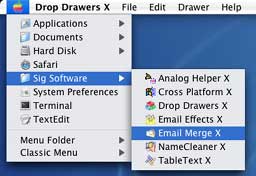
Also from Sig Software is Classic Menu 2.7.5, which brings the functionality of the Classic Apple Menu to OS X, displaying the files and folders in the Classic Menu Items folder and allowing up to ten levels of hierarchical menus of folder contents. The standard OS X Apple Menu remains accessible, either by clicking in a user-specified area of the apple icon or holding down a customizable modifier key.
$10 shareware. A bundle of Classic Menu and Drop Drawers X is available for $25.
Dock-It
Gideon Software's Dock-It 2.4.7 is a multifunctional dock and Finder enhancer for Mac OS X Major Features include :
- Create more than one Dock.
- Docks can be used to hold files, folders, applications, scripts etc.
- Dock-It shelf space can be used to streamline drag and drop of files/folders.
- Dock-It shelf space can be used to streamline copy and pasting of text clippings and URLs.
- Streamline drive access by placing all mounted drives in a dock. No more moving windows just to get at your desktop to open your hard drive.
- Navigate folder contents without opening a single finder window.
- Works with your favorite "Get Info" utility - you aren't locked into one.
- Multiple Monitor aware.
- Docks can be customized with custom colors or background images and transparency.
- Built in Applets
- Preference Applet - fast access to all your system preferences.
- Clipping Applet - Once place for all your image and text clippings.
- Clock Applet - Time in the dock.
- Shelf Applet - Pause complex Finder file operations
- Backward compatible with all your favorite Mac OS X docklings (PowerPC Macs only)
Dock-It's shelf space can be used to streamline drag and drop of files/folders and copy and pasting of text clippings and URLs.
Requires Mac OS X v10.2 or later.
Dock-It is $10 shareware.
Sometimes, you can have your cake and eat it too. Enjoy!
Further Reading
- More ways to add OS 9 features to OS X, modem problems with MacBook and USB modem, Opera problem, and more, Charles Moore, Miscellaneous Ramblings, 2006.07.17. Also potential problems using Target Disk Mode to install the OS, using Classic on Intel Macs, value of Pismo G4 upgrades, "Tiger" on a G3 iMac, better laptop ergonomics, and more.
Join us on Facebook, follow us on Twitter or Google+, or subscribe to our RSS news feed
Charles Moore has been a freelance journalist since 1987 and began writing for Mac websites in May 1998. His The Road Warrior column was a regular feature on MacOpinion, he is news editor at Applelinks.com and a columnist at MacPrices.net. If you find his articles helpful, please consider making a donation to his tip jar.
Links for the Day
- Mac of the Day: PowerBook 1400, introduced 1996.10.01. Considered by many the best pre-G3 PowerBook with a small footprint and great keyboard.
- Support Low End Mac
Recent Content
About LEM Support Usage Privacy Contact
Follow Low End Mac on Twitter
Join Low End Mac on Facebook
Favorite Sites
MacSurfer
Cult of Mac
Shrine of Apple
MacInTouch
MyAppleMenu
InfoMac
The Mac Observer
Accelerate Your Mac
RetroMacCast
The Vintage Mac Museum
Deal Brothers
DealMac
Mac2Sell
Mac Driver Museum
JAG's House
System 6 Heaven
System 7 Today
the pickle's Low-End Mac FAQ
Affiliates
Amazon.com
The iTunes Store
PC Connection Express
Macgo Blu-ray Player
Parallels Desktop for Mac
eBay

