
The Low End Mac Mailbag
Leopard on Old Macs, Leopard Nightmares, Bargain Macs for Kids, and More
Dan Knight - 2008.06.04 - Tip Jar
- Leopard on Old G4s
- Leopard Nightmares
- Low End Mac Bargains for Kids
- Installing Mac OS 9.2.2. on a MDD G4
- Using PC Disk Images on a Mac
- Using an ImageWriter II with OS X 10.4
Leopard on Old G4s
From Chris Kilner:
Hi Dan:
The SE/30 was much more powerful (and desirable) than the Classic, but my Classic has survived more than a few hard drive issues because of its unique boot ROM (Cmd-Opt-x-o) that allows it to boot without a disk . . . it's fun to pull it out and play with every once in a while.
Benny Li said that Carl's article "stuck a wrong chord" with him and asked about running iLife, Google Earth, Office, VLC, QuickTime Player, Flash plugin, iChat AV, Preview on a hotrodded DA G4 - well a hotrodded dual 533 should run that stuff just fine, since my daughter runs iLife (specifically iPhoto and iMovie from iLife 05, iTunes 7), Google Earth (even the flight sim), Word v.X (she prefers TextEdit), VLC, QT 7, iChatAV (audio), Front Row and Flash 9 under Leopard on her much slower 450 MHz Sawtooth (that has been "hotrodded" with an 80 GB hard drive from an eMac, 768 MB RAM, and a $25 GeForce 4MX video card).
I think Carl's point is that it doesn't take much to run the latest OS on "obsolete" Macs. I'll be the first to admit that Leopard doesn't run well on stock Macs from eight years ago (I tried it on a stock Sawtooth and Cube), but with a newer 7200 RPM hard drive, a Quartz Extreme or Core Image AGP video card, and more than 512 MB of RAM, users can take advantage of Leopard.
Benny's comments on the 2004 Dell only help illustrate how much longevity Macs have - most 2004 Dells would need "hotrodding" to run Vista, whereas Power Mac G4s, like my son's 867 MHz Quicksilver from 2001, can run Leopard with the mere addition of some RAM.
In regard to Isa's 350 MHz G4, Headgap Systems sells a budget $49.77 600 MHz upgrade (these are 533 MHz cards from DA G4s that have had resistor modifications to run at 600 MHz on 100 MHz system busses - the lower core voltage and bus speed allows the chips to be safely "overclocked").
Regards,
Chris
Chris,
Thanks for writing - I wasn't aware that Headgap Systems offered low-end G4 upgrades. I've emailed them for specific details and will update our Guide to CPU Upgrades for AGP G4 Power Macs to include them. If I had a 350-450 MHz Sawtooth Power Mac, I'd find these upgrades very tempting: $13 shipped for 400 MHz and $25 for 500 MHz.
I'm impressed at the hoops readers have jumped through to get Leopard installed and running on unsupported hardware - Pismos with G4 upgrades, 350 MHz Sawtooth Power Macs, and even one eMac with only 384 MB of RAM installed. The fact that you can run Leopard at all on a 1999 Power Mac G4 with sufficient RAM (albeit officially unsupported) is a good reminder of the longevity of Apple hardware.
At present, I'm trying to spend some time in Leopard every day to familiarize myself with it. I love the idea of a built-in backup program, and it even warns you about the danger of backing up to a second partition on your main drive. (For now, it's the easiest way to test Time Machine. Once I make the switch to Leopard, I'm sure I'll back up to a separate drive.)
At this point, the biggest obstacle is my continued dependence on Claris Home Page, which requires Classic Mode or emulation. Classic Mode works beautifully on Tiger, and while I can run Home Page using SheepShaver, it locks up when I try to upload site changes, which is one of the features I depend on.
Dan
Leopard Nightmares
From John Campbell:
My taste for Apple is souring with OS X 's latest incarnation. As a worthy beneficiary of PC Connection's 24" white iMac clearance (done in order to greet its aluminum "successor") I received the signature white design, matte screen, the classic keyboard, a Mighty Mouse for a price that was too sweet for my wife to even pass up . . . but there was something else I didn't quite expect: A CPU Drop-in disc of Leopard! All new for $1,299, tax free . . . it was quite the bargain, even if you didn't figure in the cost of a Leopard upgrade.
But I'm starting to think my install(s) of Leopard actually decreased its overall value. I investigated the bulletin boards for a couple of reasons:
- Speed (or lack thereof) - This is the primary concern. Boot times match or exceed the worst boot times of XP before SP1. Also, general performance of iMac is sluggish. My PowerBook G4 (Tiger) outdoes it in boot speed and is less choppy. HD videos run fine, and videos transcode and encode with better speed than any computer I've been on, but the iMac feels like a unitasker and is slow to switch and load apps and windows.
- Crashes - I almost don't like posting to forums, because Mac zealots will berate you if you're seemingly the only one with a problem because you've blasphemed their deity. But yes, crashes happen more frequently in this OS than I've ever experienced on any Mac. I realize that mine is somewhat of an isolated incident, but just how isolated is it compared with the innumerable amount of configurations that exist for Windows machines? If we compare the relative number of configurations available in the Mac world, Apple can pretty much test every incarnation of current hardware with Leopard (something impossible with the PC/Win world). And yet, even PowerPC Macs don't seem to be having the problems to the degree that my Intel Mac has (At least PowerPC issues would make more sense).
What I've done so far:
The first time, I ran it as an upgrade rather than a clean install. Looking through forums, I realized this is not ideal. Because of this newfound revelation, I chalked up poor performance to this issue more than anything else.
I set aside what little time I have between work and school to find that Leopard disc, opted for the reinstall option, while nervously praising the Apple logo, hoping against my newfound skepticism that "It just works" is more than a tagline for suckers and gullible sheep. I did my best to suppress my doubt, fearing that I will make the fruity technology angry, summoning a gang of condescending assholes to my front door who resemble Justin Long.
With fingers crossed and other appendages knotted, the long process yielded no discernible differences in speed or stability. A brilliant 2nd demonstration of "It just works," right?
My worry is that this Leopard issue will never be resolved, since I appear to be the only one experiencing it (but I know I am not, because I found one other person online with the issue . . . his solution? downgrade to Tiger). I'd like to use all of the features for Leopard, and many newer programs are being written exclusively for the newer OS. I'd like to use Boot Camp, and eventually use Bento, and continue using builds of XBMC.
I know this is quite a tirade, but do you have any suggestions? I thought my computer was an amazing deal, but now I'm starting to think my Apple is a more of a lemon.
John,
I'm still living with Tiger very happily, although I have been making time to get familiar with Leopard. At present, I don't see a compelling reason to leave Tiger behind, and Classic Mode gives me a compelling reason to stick with it. Tiger is rock solid.
I'm shocked at the number of problems in the initial release and early updates to Mac OS X 10.5. You'd think that with 30 months between Tiger and Leopard, Apple would have done a much better job troubleshooting in the beta stage. Here we are at version 10.5.3, and the number of bug fixes have finally brought us to what we'd expect Apple to provide in a point-zero or point-one release. People are already making lists of things they hope will be fixed in 10.5.4.
It's possible you have hardware or firmware issues. If you have a nearby Apple Store, schedule a session with a Mac Genius to look over your iMac, just to make sure firmware is up to date and there are no hardware problems.
My advice: If it's Leopard and not the iMac, stop being Apple's guinea pig. Go back to what works. Maybe keep Leopard on a separate partition or an external drive so you can get familiar with it and install updates until it's reliable enough for you. (This is starting to sound like advice for Windows Vista users, isn't it?)
Dan
Low End Mac Bargains for Kids
From John Benge:
Hi Dan,
I thought I'd share my recent good fortune with the Low End Mac readers (if this is worth publishing).
A while back I gave my daughter a G3 iMac, a blue 600 MHz model. As great as it was, it had two fundamental flaws: it wasn't pink, and it dragged its heels a bit with some modern software, Skype video calls, for instance.
 So I had in mind to pick up a
more modern Mac off of
eBay. I had shortlisted a few models - eMac, G4 iMac, or possible G5 iMac. Of course I also wanted to
spend as little as possible. The robustness of an LCD screen in a
child's bedroom was also a point to consider.
So I had in mind to pick up a
more modern Mac off of
eBay. I had shortlisted a few models - eMac, G4 iMac, or possible G5 iMac. Of course I also wanted to
spend as little as possible. The robustness of an LCD screen in a
child's bedroom was also a point to consider.
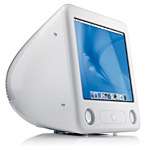
After a couple of months of tracking Macs on eBay, an opportunity arose to bid on something. An eMac had been listed: the ad was minimal, the picture looked scruffy, the listing would end at an odd time, so less chance of people sitting watching it. Best of all it was a 1.42 GHz eMac. I had to have it, and I did. I really wanted a 1.42 GHz eMac for the Leopard support (especially Core Graphics), but a 800 MHz, 1 GHz, or 1.25 GHz would have been perfectly acceptable.
I got the eMac for a grand total of £109! What a bargain! These models often go for over £250, and refurbished models from Apple dealers seem to sell in the £300-400 range here in the UK.
It turned out to be a well specced machine too, 512 MB RAM, a SuperDrive, 160 GB 7200 rpm hard drive, AirPort Extreme. So no sooner than it had arrived I was busy installing Leopard (10.5.3), iWork, iLife, and of course a few of my daughter's favourites - Doozla and Lua Lua. I also attached an iSight I had spare so she could video Skype with the grandparents and popped in a spare 512 MB RAM I had.
And the real surprise was just how sprightly this old Mac was under Leopard; it should last in my daughter service for many years.
Of course the downside is that it's white. not pink. I guess you can't have everything.
Kind Regards
John
John,
Thanks for sharing your findings. G3 Macs are great for the Classic Mac OS and good right up through Mac OS X 10.4 "Tiger", but the benefits of the AltiVec velocity engine in the G4 and later make newer Macs much better suited for digital video, iMovie, YouTube, and all that.
My last Mac before my current dual 1 GHz Power Mac G4 was a 1.25 GHz eMac, and I was quite happy with it. The second CPU in the Power Mac, room for 2 SuperDrives and several hard drives, and PCI slots for adding USB 2.0 cards make this a much more flexible, somewhat more powerful machine, but the eMac was fully satisfactory.
Okay, the big white bulb isn't the prettiest machine Apple has ever made, but there never was a pink iMac or eMac. With the 17" display, which handles 1280 x 960 very nicely, and G4 power, it's a great low-end budget Mac.
Dan
Installing Mac OS 9.2.2. on a MDD G4
From Mika Pohjola:
Dear Dan,
I've been reading Low End Mac for six years now, and I love your environmentally and economically sound aesthetics regarding computers. I wish Low End Mac was made the mainstream attitude for all computer users, especially as the Macs (and not the least the software!) are such long lasting machines.
 I usually find
answers to my questions easily on your site or everymac.com, but
haven't been able to solve this one:
I usually find
answers to my questions easily on your site or everymac.com, but
haven't been able to solve this one:
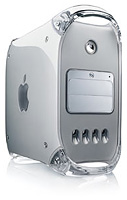
Most used Power Mac G4 MDD computers (with bootable OS 9.2.2 compatibility) are sold today without the original Software Restore CDs. The latest standalone OS 9.2.2 CD was released for computers introduced in March 2002 or before. There are MDD computers, particularly the 2003-model, a reissued Power Mac G4/1.25 GHz, which apparently cannot be booted to OS 9.2.2 without the original CD that came with the computer.
Where can such model-specific Software Restore CDs be purchased?
I'd be grateful to get links to online stores which sell this type of software. So far I haven't been lucky finding one.
Thank you very much in advance, and I look forward to keep reading your site.
Best,
Mika
Mika,
We Love Macs is the only online vendor I've been able to find that claims to have the version of Mac OS 9.2.2 that works with MDD Power Macs - $99.95.
Dan
Using PC Disk Images on a Mac
From Carl Nygren:
Hi Dan,
We've all probably run into some disk images on the Internet. Disk Utility handles most of them fine, such as ISO, DMG and IMG.
Well, if you run into Windows-only CloneCD images (.ccd and .img), you're out of luck. You can't just mount the .img, since it needs the .ccd to "unlock" it. Toast or Burn won't read these files either.
Impossible? Nah. I figured out a good way.
Just rename the .ccd file to yourfilename.cue, and the .img to yourfilename.bin. See where I'm going? Now, spare 700 KB and download Burn. Open the new .cue, and you're all set!
Hope anyone found this useful.
Carl
Using an ImageWriter II with OS X 10.4
From Al Pawlowski:
Just recently wanted to fire up my old ImageWriter II (has Apple LocalTalk adapter) and connect it to my OS X 10.4.11 system. Found info on web for doing the connection, but was stumped by the fact that my the AppleTalk browser of my Mac's "add printer" (setup) function would not see the IW II, even though I knew it was on-line and working (I could print to it via Classic OS). After much searching and, finally, reading the instructions for the foomatic drivers (available from linux.org), I figured out the problem. Since I have not seen that posted anywhere, I thought you might want to put something on your site that might help someone.
The key is the printer has to be powered up and connected via LocalTalk on ethernet (using LocalTalk bridge such as ASANTE, Farallon, or Sonic) or serial (using USB to serial adapter and 232 d shell to DIN serial cable), when you run the foomatic driver installer. The installer sees connected ImageWriters and adds them itself to your OS X list of printers. They do not show in the Add Printer browser window under AppleTalk.
Also, though I did find it already on the web, you can determine if you have a good LocalTalk over ethernet connection to your printer using the Terminal command "atlookup" which lists all AppleTalk devices seen by OS X.
Al Pawlowski
Al,
Thanks for the info. ImageWriter support was one of the early casualties of Mac OS X - nice to know that those old workhorses can still be used.
Dan
Join us on Facebook, follow us on Twitter or Google+, or subscribe to our RSS news feed
Dan Knight has been publishing Low End Mac since April 1997. Mailbag columns come from email responses to his Mac Musings, Mac Daniel, Online Tech Journal, and other columns on the site.
Today's Links
- Mac of the Day: PowerBook 1400, introduced 1996.10.01. Considered by many the best pre-G3 PowerBook with a small footprint and great keyboard.
- Support Low End Mac
Recent Content
About LEM Support Usage Privacy Contact
Follow Low End Mac on Twitter
Join Low End Mac on Facebook
Favorite Sites
MacSurfer
Cult of Mac
Shrine of Apple
MacInTouch
MyAppleMenu
InfoMac
The Mac Observer
Accelerate Your Mac
RetroMacCast
The Vintage Mac Museum
Deal Brothers
DealMac
Mac2Sell
Mac Driver Museum
JAG's House
System 6 Heaven
System 7 Today
the pickle's Low-End Mac FAQ
Affiliates
Amazon.com
The iTunes Store
PC Connection Express
Macgo Blu-ray Player
Parallels Desktop for Mac
eBay

