
The Low End Mac Mailbag
Norton Warnings, .mac Deals, Apple vs. Microsoft Upgrades, Screen Problems, Complainers, and More
Dan Knight - 2003.04.28 - Tip Jar
- Careful with Norton and OS X
- Deals on .mac
- More on Disk Warrior vs. Norton
- Apple vs. Microsoft Upgrades
- PowerBook Screen Problems
- Not Linux, OS X
- More on Complainers
- Regarding Panther
- Gigabit Ethernet Cards
- Girly iBook
- Thanks for the Tips
- Third Tray on HP LaserJet
Careful with Norton and OS X
Following our discussion in OS X Jaguar Upgrade, Matthew Wakeman writes:
Thanks for the reply!
I realized after I read through the whole link that you had already covered it.
I have a Ti 667 DVI, and that timeframe for installation sounds about right (sometime in May or June I have to do a full system reinstall; what fun).
One thing I have noticed with 10.2 in general is that repairing disk permissions is vital after every software update - I have had all kinds of mysterious AirPort & application issues disappear just as mysteriously after repairing disk permissions, so much so that I run it after every software install and software update now.
Sounds tedious, but it doesn't take too long, and it can run in the background.
Optimizing the hard drive is probably a good plan; I'm sure you've heard all the warnings about Norton & OS X in terms of drive optimization.
I haven't had the time to optimize the hard drive yet. I'd planned on using Norton Speed Disk, which has special settings for OS X and mixed OS volumes. I hadn't heard of any problems with Speed Disk and X.
And I agree that repairing disk permissions seems to be a crucial step after OS updates these days. Apple should address that. Macs have always been about ease of use.
Deals on .mac
Following up on our exchange in Re: You don't pay much attention to history, Doug Petrosky writes:
Note, if you want the functionality of .Mac and don't want to spend $100, you might keep your eyes open for sales on it. Apple was selling it for $69 earlier this year. I too would like to see the cost of .Mac stay closer to $50/year than $100. I also think the real problem we are talking about is secrecy. Apple tries to keep things under wraps too much some times to protect sales of their hardware, but there is no reason to do this with their software. Everyone knows that 10.3 will ship between July and September, but nobody knows how much it will cost. If they don't want to hurt 10.2 sales, they can announce that it will be free, announce a free upgrade period, or offer discounts to people who purchase 10.2. Hell, they could even offer a subscription service tied to .Mac (I'd pay my $100+/year happily, or $250 for the household (with 2 .mac accounts + $50/ additional up to 5).
My guess is that more sales are lost, because people wait for announcements to purchase ether the next great thing (at a price that will stay for 6+ months) or they purchase the product that just dropped $1000 because of the next great thing. Apple has to lower bar for buyers remorse. Losing $1000 in value in 6-9 months is bad enough, but that is just the industry. Losing $1000 in a month because Apple doesn't want to hurt sales, probably has the opposite affect.
I'll have to keep my eyes open for .mac bargains. Since I use it almost exclusively for email, I can only justify $49 for the first year on the assumption that Apple is catching most of my spam for me. That seems to be the case, and by saving my 5-10 minutes per day deleting spam, it provides a decent return on the investment.
We'll probably have to wait until September to learn the fee structure for Panther. I would prefer to pay a single annual fee for .mac and OS upgrades, too.
More on Disk Warrior vs. Norton
In response to Disk Warrior would have found it, Anonymous Brody writes:
Well Disk Warrior fixes the directory plain and simple. And that usually is the only fix someone needs in the case of a ? disk. I have more than enough evidence to say that Norton though creates many of those flashing ? disk cases in the first place. And for people without a backup that can even be more traumatic.
See my thread here:
http://discussions.info.apple.com/WebX?14@136.DTtaao7jkzB.994848@.3bc06e88
Fixing individual files can be all very well and nice, assuming it didn't accidentally wipe out the directory, too. It is better to recover from backup, delete preference files that go bad, and run Disk Warrior than risk my disk on Norton.
I wasn't talking about using Norton to repair a damaged file, only using it to discover the damaged file so I'd know which one(s) to replace. The versions of Disk Warrior and TechTool I've used so far can't do that.
Norton remains a useful tool, but after my bad experience, it's my tool of last resort. If nothing else has discovered the source of the problem, then I'll take my chances with Norton.
Apple vs. Microsoft Upgrades
Peter da Silva muses:
I'm someone who has only switched because of OS X. I only have a previous version of Mac OS because I needed it to install OS X on my Sonnet G3 card.
Some comments...
1. "Linux is . . . the only cross-platform OS going today".
Not so. BSD is not only available on at least as many platforms as Linux, it's also the biggest selling cross-platform OS on the market today - thanks to Mac OS X. It's also the only version of Unix sold by Microsoft (Interix, part of Windows Services for Unix, seems to be pretty much a port of OpenBSD to run on top of the NT kernel).
2. "Microsoft . . . only dings you every two years"
This is a fair cop. Microsoft provides service pack upgrades that let you run newer software on older versions of Windows. The upgrade treadmill works the other way: If you upgrade [the OS], you find you need to upgrade Office, and then you have to upgrade all the other versions of Office in the building.
Apple needs to either provide a less expensive upgrade path for OS X or service packs.
One other problem - you don't need to chain installs to get your new version of Windows installed. You only need to switch CDs during the install to demonstrate you have the older CD.
Apple really needs to do everything they can to get people off the hoary old Mac OS onto Mac OS X. Like I said, if it wasn't for Mac OS X, I wouldn't be using a Mac now. The old System just feels so klunky for someone used to Unix and Amiga....
3. I don't see Apple giving up control by porting Mac OS X to an Intel platform. With the Open Source Darwin as a base, it wouldn't take an enterprising programmer that long to come up with a way to boot Mac OS X on commodity Wintel platforms, the way OWC managed to get it running on my 7600.
4. The guy with the 7300/200: OWC has the Sonnet G3/400 upgrade for $100. That's less than the OS costs, and it'll make OS X quite as peppy as OS 9.1 on your current box - without the annoying OS 9 pauses and lockouts when applications are too busy to engage in the great multitasking charade. If you're willing to fork out $129 for OS 9.1, why not $100 for a G3?
Hypothetical OS 9.5 upgrade: $129
Okay, $155 is more than $130, but you get a heck of a lot more for your money. No, it's not Jaguar, but it's miles beyond 9.1.
My second Mac is a 7200/120, which is pretty good for a 7200, but it's completely OS X-incapable. I wish I had too put up with a 7300/200 (or, I should say, a 7300/400-to-be).
The classic Mac OS may feel klunky for someone used to Unix or Amiga, but to those who have worked with Macs for 5, 10, or 15 years, it's a comfortable old shoe. It's far from perfect, but it's pretty stable, pretty fast, and very familiar to millions of Mac users.
Mac OS X may feel slow and look full of "eye candy" to longtime Mac users, but it's remarkably stable (one kernel panic here - during an OS upgrade) and creates new types of efficiencies (faster waking from sleep, less need to reboot and wait for that, etc.).
I don't see Apple porting to Wintel hardware, but I wouldn't rule out OS X running on Itanium or AMD's x64 processors. No, it wouldn't be able to run current Mac software, but it could become the leading *nix for those new hardware platforms. Vendors could decide which OS X apps were worth porting to the new CPUs. If Apple were to do this, I suspect we'd eventually see OS X versions of software designed to install on different types of hardware.
I have to agree with you on the value of G3 upgrades. We have three SuperMacs in the house with G3 upgrades. They range from 250 MHz to 400 MHz. I'm hoping to try an unsupported installation of OS X on the one I use for network backup, since that will allow me to RAID two FireWire drives together and create a huge backup set.
Still, although I'm sold on OS X, not everyone has the hardware for it, nor would every Mac user profit by upgrading until there's a compelling reason (usually a program, sometimes just the need for an up-to-date computer) to do so.
PowerBook Screen Problems
After reading How to Survive While Your Mac Is Gone for Repair, Charles Eicher comments:
I think I have the same problem as you. I call this problem "the Pink Screen of Death" because the darkened areas have a pink tinge. You might not see the pink, but I'm a color retoucher, so I'm really picky.
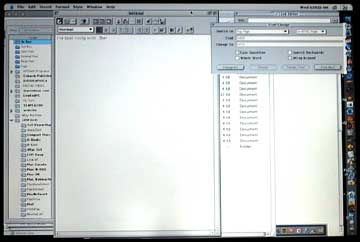
My understanding is that it's a problem with the ribbon cables that carry power to the LCD: They get crimped and don't conduct electricity properly. My suspicion is that some assembly line workers torqued down on some internal screws a bit more than required and a whole slew of Pismos went out with damaged ribbon cable yokes.
The problem is where the flat cable goes through the hinge, and to fix it you need to disassemble the hinge and clutch and replace the flat cable. I hear it's a real bitch to repair, even though the parts aren't too expensive. But I've heard a lot of different things about this problem.
I think there was some discussion of uneven screen brightness on Pismo PowerBooks somewhere like MacInTouch, I started developing this problem on my Pismo about 1 month past the 1 year warranty, so I got screwed.
The latest info I have is that Apple does a flat-rate fix-anything deal on Pismos for about $350, but there are some limitations. I was told major parts, like a new LCD, aren't covered in the flat rate (call 800-SOS-APPL for the details). Both my batteries (main and internal clock bat) are dead, so if I need to buy $200 of batteries on top of a $350 repair, I don't think it's worth sinking that money into a G3/500. What do you think?
I've never noticed a color tinge or fringing around the dimmer section of my screen, but there is an annoying darkening just left of center - and a more subtle darkening to the left of that (see photo above). I don't know the cause; I'll let Apple figure it out.
PowerBook batteries are one thing that hasn't become cheaper over the years, but unless you plan to replace your Pismo with a newer 'Book, it's probably worth the cost to keep it going for another year or two.
Not Linux, OS X
After writing that he didn't plan on buying a new Mac for a while (see New Mac Plans on Hold), Ken Cavaliere-Klick changed his mind:
Update to all my soft ranting: Just as I was about to order up Yellow Dog Linux, the Bondi fried yet another analog board. My fallback computer is my old IBM running Windows 95, and Tekserve is not all that far from me. Of course, Windows 95 can't do a thing with a Mac anything. I was caught between a rock and a hard place.
In went the Bondi for a new board that was fortunately covered by the last repair warranty. But a week is a long time to wait when you're in the middle of something Mac. Hauling the Bondi with a healing dislocated shoulder made me realize how heavy that thing is. I also realize how pointless it was to keep the old IBM around.
Long story made short: I came home with an "orphan" iBook. So much for Linux, I'm on X. And the Bondi is back. Backpedaling a wee bit, I can see the age in the Bondi a bit better now. It still zips along in 9.2.2 just fine. Jaguar is okay - not great, but okay. I can come up with a decent list of areas that need improvement now. Things that are no trouble in 9.2.2 are big issues in Jaguar. But this is all old news.
At my last job, when I compared the cost of a Power Mac and 17" monitor with that of the then-current PowerBook, I came to the conclusion that if there was any chance the user might ever have to take a computer home, to a trade show, or elsewhere in the field, it made more sense to buy a PowerBook than a desktop computer.
With today's 1024 x 768 iBook displays, that's more true than ever. I'm sure part of the reason Power Mac sales are down is the affordability of the iBook and power of the PowerBook G4. Unless you need dual processors, a big screen, or a lot of internal drives, it's harder than ever to justify a Power Mac these days.
Anyhow, congratulations on your iBook and moving to OS X. It may take several weeks (or even months) to get used to it, but once you have hardware that really up to the OS, Jaguar is wonderful. But it's definitely different enough that most Mac users take a while to adjust.
More on Complainers
Responding to my reply in his Rant Against Complainers, Jim Harris writes:
Hmmm, seems to me the one complaining here was you and the people who posted comments on the site. I'm trying to make you people realize that we live on planet earth, not la-la land. Check your sources and back up your complaints properly:
- eMacs were fixed under warranty and still are being fixed under warranty for video problems.
- 10.2.4 was updated by 10.2.5 for free fixing the issue of date and time!
- Pathetic 3% market share? Do you have any idea what .5% of the PC market share is worth?
- Disgruntled users? Since you seem to only meddle with that type of person, that is all you will see. I, fortunately, mostly see those who are content users, and many switchers to boot. The number of success stories far outweigh those who had problems (and those who had problems, for the most part, were resolved to the user's satisfaction).
- Apple products are worthy of their cost: All I have to do is mention their entire product line to prove that. And all the 'free' software we get.
- Check the latest data. Apple ranks very high in customer service and quality.
By the way, an investment is something that will yield a greater return than invested or something that will retain its value. Computer hardware and software continually depreciate until it becomes obsolete. Not an investment.
When you pay more for an Apple (which is a whole other debate) you do get more! If you don't think so, I hear Dell has great deals.
Lastly and once again, for your own sake, listen to what you are complaining about and try to live happier lives. Which is my point in its entirety.
So we shouldn't complain about video problems that afflict a high number of eMacs because they're being fixed under warranty?
The fix for the annoying date/time bug was free, so nobody should complain about it?
Should we rejoice because Apple has been marginalized from the days when they accounted for over 10% of all new computers sold to the point where they barely manage to keep selling a constant 3 million units per year? Apple's stated goal is to grow market share, not shrink it.
I know a lot of content Mac users, many of whom participate on our email lists helping others solve their problems. But some are disgruntled - not just frustrated - when they run into one problem after another, especially the techs who support Macs for a living.
The question isn't how well does Apple handle problems after they occur, but why should there be such a spate of problems at all. Why should so many eMacs have video problems? How does a date/time bug get through OS development - one that didn't exist in 10.2.3?
Computer hardware is an investment that can yield great returns. Although it may depreciate in terms of dollar value, its value is as a tool that allows one to be productive. A mechanic invests in good tools; so does a writer. An investment need not be something that returns economic benefit in and of itself; it can also enable one to earn more.
On that topic, I guess my Apple stock isn't an investment, either, since it has neither appreciated in value (it's down about $10 per share from when I bought it) nor is it retaining its value.
For those of us who don't live in la-la land, reliable hardware and a reliable operating system are important things. They should be reliable from the box, not requiring a video fix or software update. Apple build a reputation for offering quality that was worth a premium price; recent problems undermine that decades-long reputation.
Regarding Panther
Larry Rosenstein writes:
Regarding Panther...
Also, Jaguar still has a lot of life left in it. So even if Panther is technically ready by July, the marketing aspects might cause Apple to hold back on the launch.
I think Paul has it reversed. The technical aspects of Panther will tend to hold it back, and the marketing aspects will tend to ship it sooner.
The reason is that OS upgrades are a major source of revenue for Apple. So from the marketing side, sooner is better. From the technical side, the issue is getting the bugs out, which always takes longer than expected.
I don't think Panther will be ready by July, however. WWDC in June will be the first developer release, and I think Apple will want a couple of month of developer feedback before finalizing it.
In response to my correction in You don't pay much attention to history, Doug Petrosky writes:
I will grant you that my memory slipped a bit with 7-7.6, but are you really trying to tell me that 8.1, 8.6, 9.1, 9.2, 10.1 where all minor updates? Apple has never charged for bug fixes and for over 5 years they have not charged for mid release OS's.
10.3 will be free!
I'm certain (as certain as anyone outside of Apple can be) that Apple will charge for Panther upgrades, for the reason mentioned above. The most telling sign is that the name is different, which indicates that this won't just be another release of Jaguar.
You can't extrapolate from 10.0 -> 10.1 -> 10.2 to say that 10.3 will be free. Remember that Apple was going to charge for 10.1; it was only because of user outcry over the quality of 10.0, that Apple relented and made the 10.1 upgrade free. 10.2.1 through 10.2.5 were the free bug fix upgrades, and 10.3 will definitely be paid upgrade.
Gigabit Ethernet Cards
Ed Hurtley writes:
Hi, I have searched high and low for a PCI gigabit ethernet card that is both copper (1000Base-T) and has OS X drivers. I have yet to find one. I was wondering if you (or any other LEM readers) know of any gigabit cards that work with OS X.
I have a beige G3 that is still using its built-in 10Base-T connection, and it will soon be used as a server, and I would like to plan ahead by putting gigabit in. (Initially it will use a crossover cable to a new Mac with built-in gigabit, with the 10Base-T going to a 10/100Base-T switch. In the future, when gigabit switches drop in price, it will end up on a gigabit network.)
I'm still living at the low-end of the network curve with a 10Base-T and 100Base-T network, so I haven't researched gigabit (1000 Mbps) ethernet at all. I'll post this in hopes that a reader can answer your question.
Girly  iBook
iBook
Having stumbled across The BarbiBook, Kate Gregory wonders:
Do you know where I could purchase the Dvorak Edition?
Thanks for a good laugh. I'd almost forgotten about the "BarbiBook." If it had actually existed, I'm sure Reese Witherspoon would have used one in Legally Blonde. ;-)
Thanks for the Tips
Mark Hooker writes:
Thanks for the personal response. I saw it in "Mail Bag" as well.
I very much appreciate the tip on the tax programs. You might want to repeat that next year. Why not write TurboTax and see if they will sponsor a banner or give you a free "Review copy" of the program next year (every little bit helps). Tell them who your audience is and that support for 8.1 is a big plus for that audience.
I am collecting parts to build myself a beige G3. It will probably end up in an ATX case, really it will be whichever case I can find locally in somebody's back room. Some of the rest of the parts will come from eBay (prices there have dropped to the point that I can think about it). Some will come from my own "junk box."
I did look at the iBox kit project but decided I would have to wait until the prices drop a bit more. Once Panther and the IBM PowerPC 970 chip and the Mach 5.0 BSD kernel hit the market, prices will start to fall again. I can wait. My "low end Mac" lets me do what I need to do just fine (and will do so a little longer now, thanks to your tax tip).
Thanks again and cheers.
Great timing. There's a discussion on Slashdot today that should interest you and anyone else interested in repackaging Mac motherboards in other cases, ATX Power Supply Adapter for Macs?
As for reviewing TurboTax - well, let me just say that I have a terrible tendency to put off doing taxes as long as possible. Before I can do personal taxes, I have to figure out how much Cobweb Publishing made or lost, and I hate working with accounting software. (I'd pay someone to do it, but there's no money in the budget for that.)
Then again, it might provide an incentive for me to do my taxes earlier next year. I'll give it some thought.
Third Tray on HP LaserJet
After reading about my frustration accessing the third tray on my LaserJet 2100TN, Jill writes:
Thought you might like to know that I did resolve the issue eventually! :) In Jaguar I opened up the Print Center and then did "get info" on the printer. There I found in one of the dropdown menus a menu called optional installs, or something like that. (This is from memory unfortunately because the computer isn't right in front of me.) There I was able to install the 3rd tray. Hopefully that will work for you too!
Print Center has got to be the most counterintuitive part of Mac OS X. It really makes me miss the good old Chooser. For instance, right now Print Center on my Mac shows my LaserJet twice:
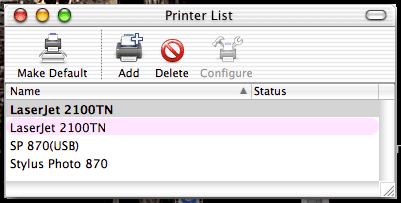
I have no idea why. And it has two listings for my Epson Stylus Photo 870 - one using the Apple supplied drivers and the other tied to the latest drivers from Epson. But there's no way I can tell which is which, nor will it let me use the delete button to delete the outdated entry.
Anyhow, I followed your advice, found Printer Info under the Printer menu in Print Center, selected Installable Options, and enabled Tray 3 - but it would be so much nicer if Apple didn't hide these things so well. Better yet if they could poll the printer to see what's installed.
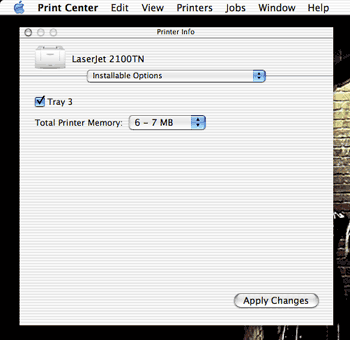
Oh well, at least now I know how to have access to all my printer trays in OS X. Thanks!
Another dozen down. Dozens more to go. Come back tomorrow for the next edition of the Low End Mac Mailbag.
Join us on Facebook, follow us on Twitter or Google+, or subscribe to our RSS news feed
Dan Knight has been publishing Low End Mac since April 1997. Mailbag columns come from email responses to his Mac Musings, Mac Daniel, Online Tech Journal, and other columns on the site.
Today's Links
- Mac of the Day: Mac IIfx, (1990.03.19. This 'wicked fast' 40 MHz Mac trumped the 33 MHz DOS world.)
- Support Low End Mac
Recent Content
About LEM Support Usage Privacy Contact
Follow Low End Mac on Twitter
Join Low End Mac on Facebook
Favorite Sites
MacSurfer
Cult of Mac
Shrine of Apple
MacInTouch
MyAppleMenu
InfoMac
The Mac Observer
Accelerate Your Mac
RetroMacCast
The Vintage Mac Museum
Deal Brothers
DealMac
Mac2Sell
Mac Driver Museum
JAG's House
System 6 Heaven
System 7 Today
the pickle's Low-End Mac FAQ
Affiliates
Amazon.com
The iTunes Store
PC Connection Express
Macgo Blu-ray Player
Parallels Desktop for Mac
eBay

