
Mac Daniel's Advice
Operation FlashBook: Running Tiger from Flash on a PowerBook G4
- 2007.05.29 (updated)
The future is flash. Certainly for portable devices it is, including laptops. Intel are promoting the use of flash memory in notebooks for faster data access and reduced power consumption. Apple will be integrating flash into their computers in time.
But as Dan Knight wrote last week in Silence Is Golden: Running Your Existing Notebook Using Flash Memory, you don't have to wait if you really want to try it for yourself - the biggest single reason why you might want to do that being the silence.
Yes, silence truly is golden.
My First Mac
Four years ago, I made the switch and bought a 12" PowerBook G4. It was my first Mac and also the first laptop I'd ever had which could serve as a serious desktop replacement. Three years of intense use as my computer of choice later, and the hard drive was showing signs of serious wear.
I began considering the options. The Intel transition was well underway, and the MacBook tempted me, but then I stumbled upon an idea. Reading here at Low End Mac about users who were already using flash for virtual memory on their older PowerBooks prompted me to do a little research.
My PowerBook does not have a PC Card slot, so I couldn't try the same technique. But then I found another way. By this time last year I had bought a CompactFlash to 2.5" IDE adapter (single card variety), a Crucial 1 GB flash card, and was on the trial run of my experiment.
Tiger needs more than 2 GB of space to even install, let alone run. Just 12 months ago flash prices were far higher than they are now, and 4 GB cards were hard to come by. The time wasn't quite right for my PowerBook, but I could always try with an older computer running smaller software first.
...I found the machine to be a fair bit faster and a whole lot quieter....
I didn't have an old Mac laptop to hand, so I tried with a 1999 era Windows laptop instead. (A 350 MHz K6-II by former Mac clone maker Umax, incidentally.) Windows installed without any ado, and I found the machine to be a fair bit faster and a whole lot quieter with 1 GB of flash instead of its original 4 GB hard drive. Impressed, I swapped the drives around again to compare and found that the machine would start around twice as fast with the flash than with the drive.
I then installed Mini vMac and used the now silent machine for classic Mac emulation over the next few months as an extended reliability test as well as a chance to check out a lot of interesting old software. The trial run was a success.
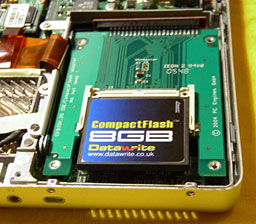 By October 2006, my PowerBook's hard drive had
finally entered its death throes. Fortunately the price of flash
had fallen as quickly as I had hoped, and I bought an 8 GB
card this time. In fact, it was the first of that size that I could
lay my hands on and was made by DataWrite.
By October 2006, my PowerBook's hard drive had
finally entered its death throes. Fortunately the price of flash
had fallen as quickly as I had hoped, and I bought an 8 GB
card this time. In fact, it was the first of that size that I could
lay my hands on and was made by DataWrite.
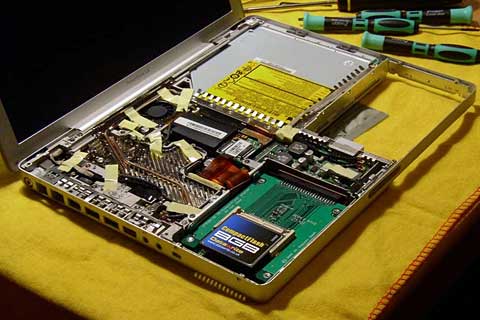
A 12" PowerBook is no easy machine to take apart, but that is precisely what you must do to replace the hard drive. After testing the new card in the adapter by putting them both in a 2.5" drive caddy, and armed with a good take apart guide, it was time to give the PowerBook its transplant.
Tiger in a Flash
Once all that was done, the PowerBook accepted the flash as a brand new hard drive. (Disk Utility rather cryptically listed it as a "7.6 GB SMI MODEL".) I booted from my Tiger install disc, made an HFS+ partition, and installed OS X. In order to save space, I went into advanced mode and made sure to be selective. For instance, deselecting language packs I'll never use saved well over a gigabyte, as I recall.
The complete installation took up a fraction under 3 GB.
So, how does Tiger behave when running from flash?
Half a year later I can give some of the answer. What I mean by that is (as Dan also discovered) CompactFlash cards can differ a lot from one another. There are certainly some great advantages that I've been enjoying compared to the old hard drive, even back when it was still in good shape. But there are complexities too. So bear with me.
The Good
Flash really is absolutely silent. I remember the 1980's computing experience, and having old school silence all the time you're at your computer while enjoying the benefits of a truly modern system is something I really appreciate. There's no difference now between the sound my laptop makes when on or off, no shuffles while reading or writing data, no whine so long as a platter turns. In fact, there's no sign that anything is happening at all if I pull the brightness down to switch the screen off - the computer can even play dead!
The silence surprised me the first few days I ran my PowerBook from flash. Computing while not hearing anything coming from your machine really is a different sensation. Coming from the world of loud PCs, expensive giant fans, copper coolers, and all sorts of other silly half measures just to creep closer to the idea of quietness: This is bliss.
The next advantage comes in battery life. My 4-year-old PowerBook can now run a good four hours plus from its original battery. Flash simply uses less power, so your battery can push that bit longer. This is a vital reason behind the computer industry's move to flash in next generation notebooks. For me, it's a nice little extra convenience.
My hard drive used to get quite hot, while the flash does not. Along with the processor and graphics chip, the hard drive was one of the PowerBook's sources of heat. Not any more. The aluminium palm rests still gradually warm whenever the machine is on, but that's the PowerBook's overall design, where its metal hull dissipates system heat without the need for a fan always being on. Previously, the left palm rest would be noticeably warmer than the right, which only covers the battery bay. Now they are more or less the same. The processor and logic board are closer to the left, which likely explains any remaining difference.
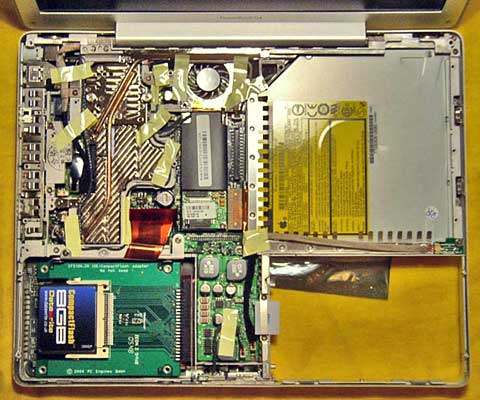
The computer's also lost a little weight, but not much. This again would be far more important for devices like the iPhone, iPod nano and, of course, the Mac Tablet some of us are always dreaming about!
My laptop's still well balanced, so it wasn't a serious change compared to the rest of the system.
The Bad
I'm running a modern computer from an 8 GB hard drive: That's not a lot of space! So yes, I'm very selective about what I install and how much room I still have left to play with. Right now, for instance, I'm using 4.4 GB in total, not counting virtual memory, which according to Activity Monitor weighs in at 768 MB on top of that.
Dan is impressed that I can run Tiger and Microsoft Office 2004 in so little space, but it's all simple attention to detail. I hate to run installers and not look through the options, what can I say? I made sure Office only installed Word and Excel, turned off all the extras I don't use, and it came to a grand total of around 1 GB of drive space.
Other than that, I use mostly small apps on this, my mobile computer. Firefox is my browser of choice, thanks to Google Browser Sync; Adium handles my messaging needs; and Apple's TextEdit is my first stop for text composition, as I like simplicity.
As for having enough space for my work files. I keep a flash drive handy, I use a lot of Web-based apps (including Google Docs and Spreadsheets), and have a couple of gigabytes still to spare when I need them. I suppose a certain Zen comes about when you know you have only so much space!
Flash is known for its speed. Unfortunately, I've not been seeing much of that. There is reason to believe it's down to my specific flash card more than anything else.
Back when I first installed Tiger on my PowerBook's original drive, startup would take about 70 seconds from power on to being fully loaded. With my current setup, it takes almost 20 minutes! Yikes. Of course, I use the obvious tactic to avoid that as much as possible and simply keep my laptop on sleep when I'm not using it, relying on Tiger's excellent stability and achieving uptimes of months at a go.
This flash card's slowness is a lot less noticeable in day to day operations like opening programs, but it's still there. Moving between panes in System Preferences takes a couple of seconds, Adium can take as long to open a new conversation window, and YouTube videos can stutter unless I let them fully load before playing, for example. (DVD playback is still fine, though.)
I can live with it, but it does annoy me since none of this was happening in my trial run with the earlier flash card. Amusingly, despite all this Spotlight is in fact quite a lot faster!
The Ugly
Now for the nasty bit. Not all flash cards were created equal. I had good luck with my original card from Crucial, but my PowerBook's 8 GB card has been tricky. It has the slowness problems noted above, but I also discovered that it can corrupt system data over time. It first struck me when a display font was showing up all wrong. This was not good news, and I feared that the flash had broken down somehow, but it seems to have been more complex than that. I like keeping backups, and reverting to one of those fixed the issue. Now that I was distrustful, though, I decided to use FireWire to remove any doubt.
My new routine is that when a Tiger update comes out, I shut down my PowerBook when convenient, hook up my FireWire drive, boot from it, and do the updates there, copying my work files while I'm at it. When finished, I hook the drive to my Intel Mac mini desktop on USB (it's a Combo drive) and put the PowerBook into FireWire target disk mode and connect it to the mini as well. Then I run Disk Utility on the mini and copy the 8 GB partition from the FireWire drive to the PowerBook's flash, overwriting any possibly corrupt data and updating the system. I also save a copy of the data to my mini as a .dmg image file in case I want to revert anything later. The current image file is a mere 1.7 GB; I guess it must use compression.
Incidentally, if I start my PowerBook in verbose mode (hold cmd-V at startup and you see Unix messages instead of the Apple logo), I see this ominous message many times over, which may well hint at what's going on to make for such a slow boot: "jnl: flushing fs disk buffer returned 0x5". Not being a Unix guru, I have no idea what it means, but I know it's not good. It doesn't actually stop anything from working, but it spells for a long startup process.
Is It Worth It?
Obviously, I had a choice between replacing my PowerBook's worn out hard drive with a new one or trying something completely different with flash. A new hard drive would have given me more space, better performance (if I went for faster spindle speed), and basically would have rejuvenated my PowerBook quite nicely. I thought about it. But I went for the flash approach because at the end of it all, silence really did appeal to me that much. My Mac was well out of warranty, and either approach needed some surgery anyway. I decided to go for the road less travelled by.
Mac OS X can run from flash. Flash can be fast if you have luck with your card. Flash cards are getting cheaper all the time, and if you want to, you can have a silent Mac. I would advise trying it with a spare machine, of course, as I have found it can be tricky.
Neither should you forget the power of backups and your Mac's ingenious design. If I had been doing this on Windows, for example, I would likely have needed specialist cloning software, but with the Mac all I required was Disk Utility, which is installed on every system, and a single length of FireWire cable.
My advice with flash cards in particular is to go with what you know. I had luck with Crucial in the first place, and the next time I take apart my PowerBook it will be to put in 8 or 16 GB of their flash so that I can install Leopard. My other card is labelled as being faster, but I have discovered quite the opposite in practice. But for now, 8 GB Crucial cards are as illusive as Leopard, so I'll wait before delving in again.
Would I give up my silent PowerBook for more speed? Not a chance. For me, this stone quiet Web browsing, writing, video watching, and Web apps thin client notebook is as close to perfect as any portable computer has yet come. Certainly there are faster ones, and it has its flaws, but I can improve it in the future - besides, this is still my first Mac, and it's doing me proud four years on.
Flash has some powerful advantages and is rising in capacity all
the time. One day we will all have flash based notebooks. But if
you want to, you can make one now. 
Update: I received a follow-up email from John Muir in Sept. 2010. He says, "I understand your desire to make a silent, handy, PowerBook using CompactFlash. Been there and done that....
"Unfortunately, there's a world of difference between the Classic Mac OS and OS X when it comes down to this idea. My experiment with flash-hosted Tiger eventually came a cropper as the flash card broke down through overuse. I'd been quite gentle in my day to day computing, but Mac OS X's virtual memory system wore the card behind the scenes. I was running with a reasonable amount of physical RAM, but OS X has a full virtual memory system - unlike Classic - and eventually overwhelmed the consumer grade flash.
"My habit as a laptop user is to keep my system running for days or weeks at a time, sleeping between sessions; a habit reinforced by the startup performance problems I experienced with my specific card from the get go. This would have meant a lot of load on virtual memory, even with my few apps and relatively large amount of free space. To see what I mean, hit Shift-Cmd-G in the Finder on your Mac just now and head to /var/vm/, which is where OS X keeps its swap files. If you've been up more than a few hours, there's often quite a lot in there, not least with tight physical memory.
"In essence, you get what you pay for with flash memory. Digital camera flash cards are designed for mild use compared with more expensive - but battle hardened - Solid State Drives. A costly SSD is a hard sell for even a G4 PowerBook, let alone a WallStreet, but a flash card hosted OS X may not be practical either.
"In my article, written some time before I had to give up with my experiment, I noted the performance issues and data corruption I was finding, and I blamed them on my specific card. Once Tiger became untenable, I pulled the adapter and put it back in the AMD K6-II laptop where I'd tested it and popped back the older 1 GB card. Alas, even it went on to show signs of degredation - with DOS-based Windows of all things - and that card was from a better make. This led me to doubt the practicality of any more experiments in CompactFlash, at least with systems backed by virtual memory.
Join us on Facebook, follow us on Twitter or Google+, or subscribe to our RSS news feed
Not sure if you should upgrade your old Mac or replace it? Check the Mac Daniel index to see if we've already addressed your problem.
Today's Links
- Mac of the Day: Power Mac G5 (Early 2005), (2005.04.27. At 2.7 GHz, the fastest G5 CPU Apple ever used, also 16x SuperDrive and it shipped with OS X 10.4 Tiger.)
- Support Low End Mac
Recent Content
About LEM Support Usage Privacy Contact
Follow Low End Mac on Twitter
Join Low End Mac on Facebook
Favorite Sites
MacSurfer
Cult of Mac
Shrine of Apple
MacInTouch
MyAppleMenu
InfoMac
The Mac Observer
Accelerate Your Mac
RetroMacCast
The Vintage Mac Museum
Deal Brothers
DealMac
Mac2Sell
Mac Driver Museum
JAG's House
System 6 Heaven
System 7 Today
the pickle's Low-End Mac FAQ
Affiliates
Amazon.com
The iTunes Store
PC Connection Express
Macgo Blu-ray Player
Parallels Desktop for Mac
eBay

