
Mac2Windows
Darwine: Mac Wine in New Bottles
- 2009.03.16 - Tip Jar
Apple's move to Intel CPUs opened up a range of ways for Mac users to make use of Windows applications. Apple released Boot Camp, allowing Macs to dual-boot to Windows partitions in addition to Mac OS X. Parallels Desktop, VMware Fusion, and the free VirtualBox let users run virtualized Windows (or other PC operating systems) at the same time as OS X.
But if all you want to do is run a Windows application or two, do you really need to take the time (and the system resources) to boot to Windows - whether restarting entirely a la Boot Camp, or starting up Windows in a window a la one of the virtualizers?
Depending on the application you want to run, there may be another way.
Wine is a longtime work in progress to allow Windows applications to run without Windows on Unix-like x86 systems. After 15 years of development, version 1.0 was finally released in June 2008. Standing (in typical tongue in cheek Unix recursive style) for Wine Is Not an Emulator, Wine offers a compatibility layer allowing many Windows applications - and their required library files - to run without needing to boot an entire Windows operating system.
It's been a long struggle to reverse-engineer Windows - to a large extent because much of Windows is poorly documented. Even though version 1.0 was officially released in 2008, it remains a work in progress - many Windows applications run fine, many work (sort of), but many, particularly graphics-intensive applications, not at all.
CodeWeavers has released a commercial product, CrossOver (with Linux and Mac OS X versions) built upon a Wine base. It's a good product for some uses, and they've supported the free, open source Wine project with code as well as releasing Chromium - a free version of Google's Chrome browser (which is otherwise not yet available for Mac OS X) built on top of a free CrossOver version.
While CrossOver is a commercial implementation of Wine with a Mac OS X version, Darwine is a free and open source project to allow the use of Wine on Mac OS X installations. The name combines Wine with Darwin, Apple's open source operating system project. Though originally aiming for PowerPC compatibility, Darwine is now limited (like Boot Camp, the various OS X virtualization programs, and CrossOver) to Intel-based Macs.
The project became dormant in 2006 but was revived, with version 1.0 being released in 2008, the same day as the official Wine release. Darwine will run under OS X 10.4 "Tiger" and 10.5 "Leopard". Tiger users will need to install X11 from their Tiger installation disc; X11 is already installed as part of Leopard.
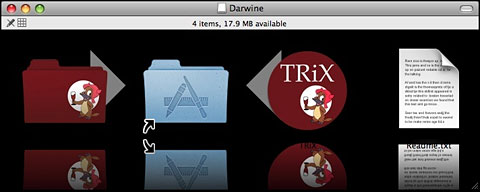
Install Darwine by dragging it to the Applications folder.
Installation is simple - drag the Darwine folder (on the left) to the Applications folder.
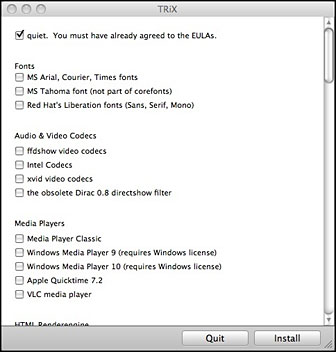 But wait, what's the TRiX
thing, with the arrow also pointing to the Applications folder? There's
no mention of it on the kronenberg.org page or in the ReadMe included
in the installed Darwine folder. It turns out that TRiX is a GUI
front-end for Winetricks, a script to automate the downloading and
installation of a variety of free and legal Windows libraries and
add-ins needed to allow some Windows programs to work properly. These
include Microsoft's core fonts, Visual Basic, C++, and .net runtime
files, various audio and video codices, and more.
But wait, what's the TRiX
thing, with the arrow also pointing to the Applications folder? There's
no mention of it on the kronenberg.org page or in the ReadMe included
in the installed Darwine folder. It turns out that TRiX is a GUI
front-end for Winetricks, a script to automate the downloading and
installation of a variety of free and legal Windows libraries and
add-ins needed to allow some Windows programs to work properly. These
include Microsoft's core fonts, Visual Basic, C++, and .net runtime
files, various audio and video codices, and more.
I would recommend running TRiX and using it to add bits and pieces as you find you need them.
Fiddling with TRiX
Working with Darwine, TRiX, and various Windows applications will probably involve some trial and error. For example, I wanted to use the very good free Windows graphics application, Irfanview; I haven't found a free program for OS X that offers the same range of features for making quick crops, resizes, rotations, and conversions with a wide range of graphics file formats.
With Darwine (and some subset of the TRiX add-ins) installed, running a Windows program is simple; when I downloaded the Irfanview installer onto my desktop, it appeared with a WineHelper standard icon; double-clicking it opened a bunch of Windows - and ran the program . . . or didn't.
Prior to fussing with TRiX, Irfanview simply wouldn't run in Darwine.
After using TRiX to install the various fonts and DCOM (described in the TRiX list as helpful for some Windows installers), the Irfanview installer ran - but the program itself didn't start up. After (more or less randomly) installing more features through TRiX, Irfanview now runs. (Sorry, I didn't keep track of precisely what I installed, and TRiX doesn't show what features are already installed, so you'll have to do your own experimentation).
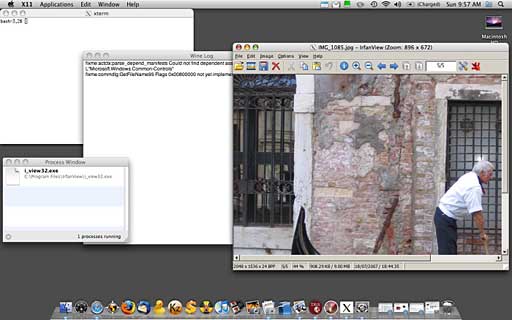
Running a Windows app on an Intel-based Mac with Darwine.
As you can see, opening a Windows program pops up a variety of windows - as mentioned, Darwine makes use of the X11 graphics layer; that's what's listed as running in the top menu bar. Along with the actual program window, there's an xterm window, a Wine Log window, and a Process Window - all of which can be more or less ignored, but which add significantly to screen clutter. (That doesn't happen when I use Wine on my Linux systems - it would be nice if this clutter could be hidden more efficiently in Darwine.)
Note: I used Irfanview, running under Darwine on my MacBook to resize the screen capture pictured above, saving the edited graphic to my Mac's desktop.
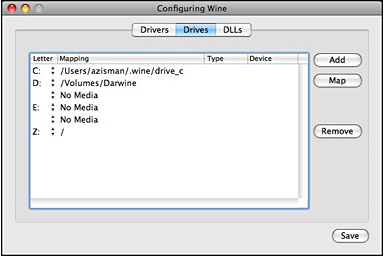
Clicking the Process Window or Wine Log window makes WineHelper the application listed on the menu bar and gives access to its Preferences and Configuration dialogues. I haven't found need to modify any of the preferences. The Drives tab in the configuration window is handy for seeing where Darwine has mapped standard Windows drives.
As you can see, the Windows C: drive is, by default, mapped to a drive_c folder within a hidden .wine folder in my Home folder. Drive Z: is perhaps more interesting - by default, it's mapped to the root of the Mac's hard drive. Knowing that makes it possible to navigate in Windows programs to find, for instance, the Mac desktop, Documents, Pictures, or other folders.
It was easy to select Z:, click on the Map button, and reset that to point to my Home folder, giving quicker access to those folders within Windows applications.
Installing Irfanview left an icon on my Mac desktop which (after some fussing with TRiX as described above) started the program - I moved that icon into my Mac's Applications folder. In general, though, Windows programs install themselves into a C:\Program Files folder - or in this case, into Darwine's virtual C:\Program Files folder. If you start up the WineHelper application (in the Darwine folder in your Applications folder) and click its Application/Open menu item, you can see what's installed.
Lots of Windows Apps to Choose From
The key question, though, is which Windows applications work under Darwine and which don't. With a bit of fussing (as with my Irfanview experience) it seems like quite a few work reasonably well - the list includes Internet Explorer (handy for web developers wanting to test their pages), many versions of Microsoft Office, even Adobe Creative Suite 2. WineHQ posts a compatibility list showing that even a surprising number of Windows games have been made to work under Wine. Currently, WineHQ claim 11,909 Windows applications with Wine compatibility.
Though a bit of a spirit of experimentation is required, if you've got a few Windows programs you want to run on your Mac, it's worth checking Darwine out - it's free, after all - and if your desired programs work, they'll start up faster than under Boot Camp or any of the virtualizers and integrate more seamlessly with your Mac desktop.
If only there wasn't the clutter of all those other open windows!

Join us on Facebook, follow us on Twitter or Google+, or subscribe to our RSS news feed
Alan Zisman is Mac-using teacher and technology writer based in Vancouver, BC, Canada. Many of his articles are available on his website, www.zisman.ca. If you find Alan's articles helpful, please consider making a donation to his tip jar.
Today's Links
- Mac of the Day: Performa 5200, introduced 1995.04. The first PowerPC all-in-one was also one of the worst Macs ever made.
- Support Low End Mac
Recent Content
About LEM Support Usage Privacy Contact
Follow Low End Mac on Twitter
Join Low End Mac on Facebook
Favorite Sites
MacSurfer
Cult of Mac
Shrine of Apple
MacInTouch
MyAppleMenu
InfoMac
The Mac Observer
Accelerate Your Mac
RetroMacCast
The Vintage Mac Museum
Deal Brothers
DealMac
Mac2Sell
Mac Driver Museum
JAG's House
System 6 Heaven
System 7 Today
the pickle's Low-End Mac FAQ
Affiliates
Amazon.com
The iTunes Store
PC Connection Express
Macgo Blu-ray Player
Parallels Desktop for Mac
eBay

