
Mac2Windows
CrossOver: Run Windows Apps on Intel Macs without Windows
- 2007.02.28 - Tip Jar
Since Apple's 2006 move to Macs using Intel processors, Mac owners needing to run Windows software - at least owners of new, Intel-powered Macs - have had a growing number of options.
Apple released Boot Camp, a way to nondestructively repartition an Intel Mac's hard drive, freeing up space for a Windows partition and setting up the Mac to choose to boot to either Mac OS X in its partition or Windows XP in its new partition.
Parallels and, more recently, VMware offer software allowing Intel Mac owners to install a variety of PC operating systems - various versions of Windows and Linux and more - and run the PC operating system in a virtualized session in a window on the Mac desktop.
A third alternative has recently become available.
Boot Camp and the pair of virtualizers require installing and
booting a PC operating system, most often Windows. For Boot Camp
users, only one operating system runs at a time. While Parallels
and VMware users can run their Windows applications alongside their
Mac applications, there's still the overhead (and possibly expense)
of running an entire virtual Windows PC - lots of RAM, lots of hard
drive space, and, for many users, the cost of purchasing a copy of
Windows.
Another Way to Run Windows Apps
Way back in the early 1990s, the open source WINE project (WINE Is Not Emulation) came to the conclusion that users of other operating systems sometimes wanted to run Windows applications but didn't necessarily want to or need to run Windows itself. The project, initially aiming at Unix users, aimed to duplicate just enough Windows resources to allow select applications to run without actually needing Windows. It describes itself as "a compatibility layer for running Windows programs. Wine doesn't require Microsoft Windows, as it is a completely free alternative implementation of the Windows API consisting of 100% non-Microsoft code."
CodeWeavers is a commercial company that has been supporting the WINE project financially and has for several years offered CrossOver Office as a slicker version of WINE aimed at Linux users. Early in 2007, they matched this with the US$60 CrossOver 6.0 Mac for owners of Intel-powered Macs.
I tested their 60 day trial version, available after giving CodeWeavers your name and email address.
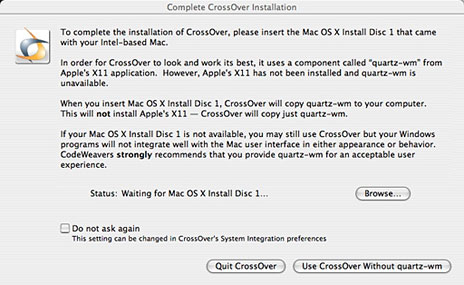
Installation was straightforward, though near the end of installation it requested my OS X Install Disc 1 in order to add the quartz-wm component of Apple's X11. (Presumably if you already have X11 installed this will not be necessary).
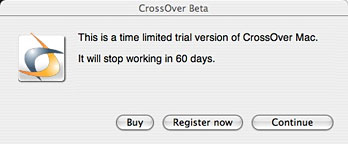
When installation is finished, users are notified that they're using a 60-day time limited version and given an opportunity to purchase or register the full version. This notice pops up again each time the trial version is started up.
Since CrossOver isn't much use without Windows applications installed, users are next given an option to install Windows software or to use any Windows programs that might have been already installed.
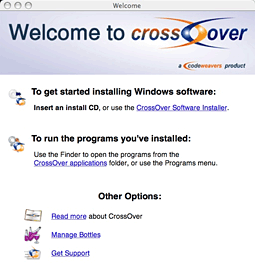
You could either insert a CD with a Windows setup program or use CrossOver's built-in installer. Choosing the later opens a dialogue box listing software with which CrossOver is preset to deal. (There's also a button to Install Unsupported Software...)
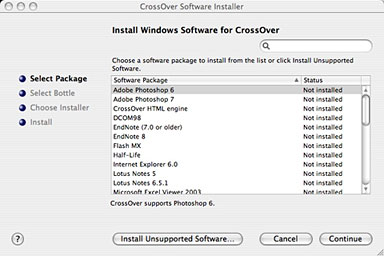
For most of the software on the list (older version of Adobe Photoshop or Microsoft Office, for instance), you'll need to have a copy of the program's CD handy; I chose Internet Explorer 6.0 - in that case, CrossOver's Installer wizard offers to go online and download a copy of IE 6.0 and then automatically steps through the installation.
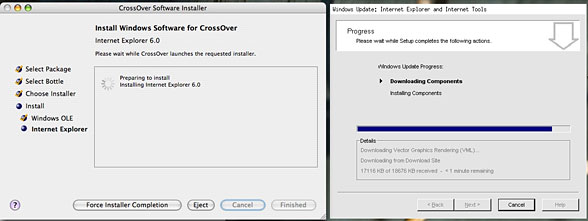
It offers to install either a Windows 98 or Windows 2000 "bottle", WINE-speak for a set of support libraries needed by the software. Internet Explorer 6 can run under both Win98 and Win2000 - its default for that program is to create a less resource-demanding Win98 bottle. The bottle gives you a bogus desktop and start menu for all the applications that can run that way.
The Windows My Documents folder is by default mapped to your Mac's Documents folder - a nice touch. Windows Start Menu items create a parallel alias in the ~/Applications/CrossOver folder (a subfolder of your Home folder - not the mail Applications folder). Because no Windows XP bottle is available, software (such as Internet Explorer 7) that requires XP or the new Vista will not work under CrossOver.
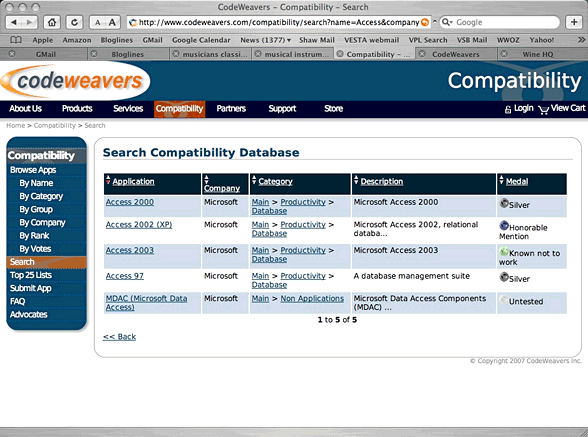
CodeWeavers claims "CodeWeavers' goal is to make Unix (including Linux and Mac OS X) a fully Windows-compatible operating system. All Windows applications should be able to be run on Unix: cleanly, harmoniously, within the native environment, and without using an emulator. To that end, we maintain this Compatibility Center."
The company claims 2,669 applications in its database, though I could only find mention of 453. Of these, a mere 9 being ranked "gold" by CodeWeavers for compatibility. 41 rank "silver", suggesting they probably will work; the rest receive ratings of "bronze", "honorable mention" "known to work", or - the bulk of the database - "untested". The untested majority, however, are entered into the database after a user has tried them and is prepared to act as an "advocate" for the application, entering it into the database.
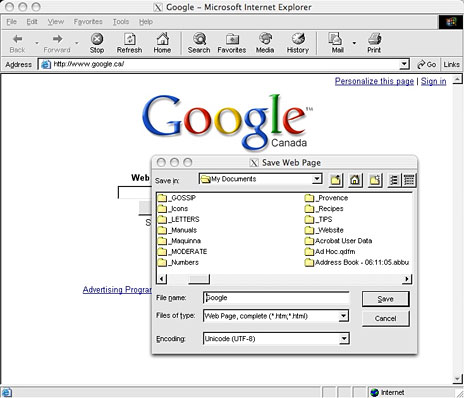
Before jumping into using CodeWeavers, it's worth checking the compatibility database for the Windows applications you might want to use. Being able to run the Windows Internet Explorer 6 could be useful to Web developers, for instance, letting them see how their designs will look in that still widely used browser. Nicely, in my installed IE 6 session, I was able to install the Flash player and get Flash animations to work. And clicking on an MP3 link on a web page loaded the music file into an already-installed copy of Microsoft's old (but usable) Windows Media Player 6.4.
Some business users may find it useful to be able to run Microsoft Access; this database is part of the Windows Microsoft Office Professional packages, with nothing similar included in the Mac versions of Office.
CodeWeavers' database gives Access 97 and 2000 silver medals, suggesting they ought to work. Access 2002 rates an honorable mention, while Access 2003 is listed as "Known not to work". (The version included in the new Office 2007 requires Windows XP or Vista, so don't even think about it!)
Some popular Windows games are listed with varying degrees of compatibility.
I tried several other applications with mixed results. On my Windows systems, I like using the freeware Irfanview graphics editor; one time I was able to get it to work, another time I wasn't. I completely struck out trying to install Silhouette, a report card application widely used in my school district. Luckily, the developers recently released native Mac OS X versions.
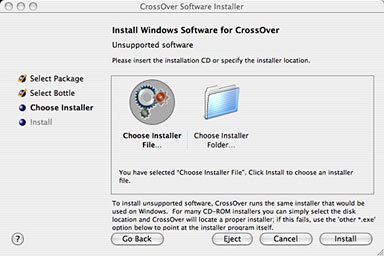
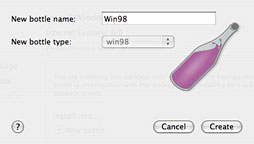
Installing an application not listed as supported requires more user input. First, users are asked to choose a "bottle" - basically to pick a Windows version that the software will think it's running under.
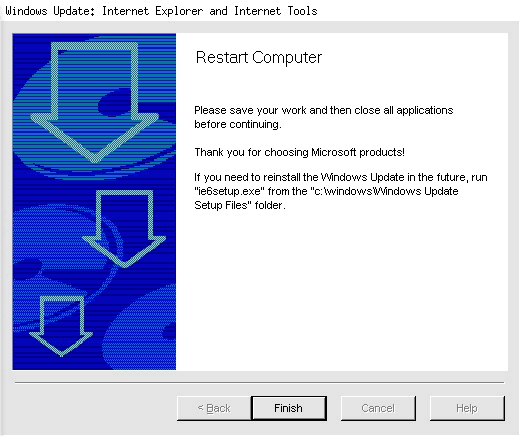
If a Windows restart is needed at the end of the installation, CrossOver can neatly simulate one.
A couple of things, though:
Often, the program installation window pops up underneath the initial CrossOver window, hiding it completely and potentially leaving the user uncertain that anything is actually happening - at least it left me puzzled!
System and screen fonts don't have quite the same appearance as on a real Windows installation; this may be an issue if you're testing how web pages or other designs will appear when run under Windows.
Overall, I have to give CodeWeavers' CrossOver Mac a mixed report. If the Windows application you need is listed as supported (IE 6, older versions of Access, and some more), it may be a worthwhile way to install and run that application without the overhead or cost of installing a full version of Windows.
But if you need to run a wider range of Windows applications,
you're probably best off with one of the virtualizers: Parallels or
VMware, and purchasing and installing a full copy of Windows.

Join us on Facebook, follow us on Twitter or Google+, or subscribe to our RSS news feed
Alan Zisman is Mac-using teacher and technology writer based in Vancouver, BC, Canada. Many of his articles are available on his website, www.zisman.ca. If you find Alan's articles helpful, please consider making a donation to his tip jar.
Today's Links
- Mac of the Day: Motorola StarMax 3000, introduced 1999.09.07. This inexpensive clone used lots of off-the-shelf parts.
- Support Low End Mac
Recent Content
About LEM Support Usage Privacy Contact
Follow Low End Mac on Twitter
Join Low End Mac on Facebook
Favorite Sites
MacSurfer
Cult of Mac
Shrine of Apple
MacInTouch
MyAppleMenu
InfoMac
The Mac Observer
Accelerate Your Mac
RetroMacCast
The Vintage Mac Museum
Deal Brothers
DealMac
Mac2Sell
Mac Driver Museum
JAG's House
System 6 Heaven
System 7 Today
the pickle's Low-End Mac FAQ
Affiliates
Amazon.com
The iTunes Store
PC Connection Express
Macgo Blu-ray Player
Parallels Desktop for Mac
eBay

