
Mac Lab Report
Safari Shows Off the Apple Difference
- 2003.01.09
I downloaded Safari on Tuesday and tried it on a 500 MHz CRT iMac running OS X 10.2.3, fully updated through Software Update. I compared it to IE and Chimera and Mozilla for OS X.
Load times are difficult to compare On our network because we reside behind at least two layers of firewall installed at the district and county ed office levels. Both cache frequently accessed pages, so typically the first load of a page is unusually slow, and subsequent loads of the same pages are much faster.
Given this caveat, my hands-on evaluation is that Safari is as fast as Apple claims. It was perceptively faster than Chimera, which has been my browser of choice for a while on this machine. It leaves Mozilla and IE in the dust, although of the four I only regard IE as notably slow these days.
Safari also loads pages smartly - displaying first the page frame and table structure, filling in the text next, and then loading background images and pictures last. Trigger-happy clickers can read while the page finishes loading - which doesn't take long.
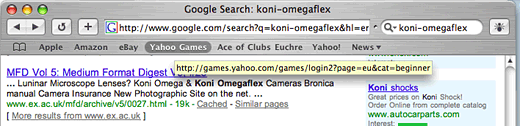
The interface is slick and clearly buys into the brushed aluminum motif for the other iApps. Toolbar favorites appear as text that turns into a rounded button on mouse over, an effect that appeared instantaneously and just looks better than the usual text with icon you get with other browsers.
The only modern interface convention missing is tabbed browsing buttons, but I am not a big fan of that mechanism anyway. You may have hundreds of bookmarks, but you probably only use a couple of dozen bookmarks regularly. The bookmark window follows the now-familiar pattern of directory on the left, and directory contents on the right, as used in iTunes. More about this in a moment.
Some might say Apple is ill-advised to introduce a browser in a market where IE is so dominant. Many people (my students included) do not even understand the concept of another browser being available. (They say things like, "Where is the Internet?" when they mean to ask "How do I start Internet Explorer?") Nevertheless I think Apple has something to contribute to the game.
The larger picture here is the reemergence of the consistent user interface in OS X. In the early days of the Macintosh, one of the major selling points over Windows was that most applications followed Apple's human interface guidelines and kept buttons in the same place in windows, kept menu items in consistent places - print was always in the File menu, for example - and tried to make it so that when you learned how to use one program, you learned how to use them all to some extent.
We see this guiding principle at work once again in the interface for Safari bookmarks, the organization of music files in iTunes, and the method of choosing options in iMovie. Instead of being menu-driven, it is instead interface-driven, with consistent layouts of files and directories, pop-down save dialogs, and so on.
Just being consistent isn't sufficient. Microsoft is consistent - consistently clunky and programmer-driven instead of user-driven. Tabbed choices that migrate all over the place each time you pick one is a sure fire way to drive a beginning user crazy, but even such simple things as making a superscript (as in 103) requires advanced skills in Microsoft products.
Making choices for users that are difficult to negate - such as the inability of Microsoft Word (2001, at least) to stop trying to reformat the outline of the book I'm attempting to write - is less than helpful. It gets in the way of the work. I have to dig and dig through obtuse help screens written by technicians to find out how to turn off this or that function, because the program defaults insist on just one way of doing things - a way which involves an insane amount of training to master.
Advanced choices aren't tucked out of the way as they are in iMovie; they're required to do the most basic tasks. I wish the same interface conventions would be applied to AppleWorks. Perhaps they are in progress; the new Keynote program gives us a tantalizing glimpse of what may lie ahead for Apple.
This is the real power of Safari and the new iApps. If you can get a sense of this true interface philosophy and integrated design, you can see what it is Apple is trying to market.
Apple's approach is a successful one on a number of levels. If you are a beginner, or if you like clean design and uncluttered interfaces, you're going to use the iApps and stick with them. If you need more features and just cannot live without them, there's always Microsoft Office or some third-party browser with tabbed windows.
If Apple keeps it simple, they won't destroy any possibility of competition from third-party developers. Apple's domain is "clean and simple." Everyone else can have "more features = better."
If Apple could just clear up the confusion in the left-hand menus in all OS X applications, I'd be hard pressed to find something to complain about. In OS 9, at least, everything in the file menu had something to do with, you know, the file. Now it seems like the File Menu is somehow . . . wrong.
It's sort of like those little colored boxes containing profiles of scientists at work in a science book. Your eyes know those things are pretty, but when you're studying, your eyes just sort of slide over them without really dealing with it. I feel the same way about the Apple and file menus in OS X. I don't like to look at them. They hurt my eyes.
This started out as a three-hour tour and ended up as a two-day Safari. I hope you enjoyed the tour.
Join us on Facebook, follow us on Twitter or Google+, or subscribe to our RSS news feed
is a longtime Mac user. He was using digital sensors on Apple II computers in the 1980's and has networked computers in his classroom since before the internet existed. In 2006 he was selected at the California Computer Using Educator's teacher of the year. His students have used NASA space probes and regularly participate in piloting new materials for NASA. He is the author of two books and numerous articles and scientific papers. He currently teaches astronomy and physics in California, where he lives with his twin sons, Jony and Ben.< And there's still a Mac G3 in his classroom which finds occasional use.
Today's Links
- Mac of the Day: PowerBook 1400, introduced 1996.10.01. Considered by many the best pre-G3 PowerBook with a small footprint and great keyboard.
- Support Low End Mac
Recent Content
About LEM Support Usage Privacy Contact
Follow Low End Mac on Twitter
Join Low End Mac on Facebook
Favorite Sites
MacSurfer
Cult of Mac
Shrine of Apple
MacInTouch
MyAppleMenu
InfoMac
The Mac Observer
Accelerate Your Mac
RetroMacCast
The Vintage Mac Museum
Deal Brothers
DealMac
Mac2Sell
Mac Driver Museum
JAG's House
System 6 Heaven
System 7 Today
the pickle's Low-End Mac FAQ
Affiliates
Amazon.com
The iTunes Store
PC Connection Express
Macgo Blu-ray Player
Parallels Desktop for Mac
eBay

