
The 'Book Page
Hands On: PowerBook 100
Dan Knight - 2001.03.21 - Tip Jar
It seems rather odd writing about the PowerBook 100 on my PowerBook G4. One is the
smallest PowerBook I've ever 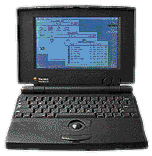 used, the
other is the thinnest PowerBook ever. Neither has an internal floppy
drive.
used, the
other is the thinnest PowerBook ever. Neither has an internal floppy
drive.
Until about a week ago, I'd never seen or touched a PowerBook 100. I'd heard it was a real sweetheart of a laptop: compact, light, and fast enough to be a good writing machine. Thanks to Kyle Hansen, I now own one.
Taking the tiny PB 100 out of the shipping box, I was blown away by the small footprint. This computer is just 11" wide and 8.5" deep. (For those keeping score, that's 2" narrower and an inch less deep than my TiBook.) It also seemed remarkably light - it turns out that it weighs about 3 ounces less than my TiBook.
Battery Problems
I put the little guy on the dining room table, plugged in the AC adapter, and hoped for the best. Alas, the battery is completely shot. Fortunately BTI makes a NiMH battery for the PB 100; unfortunately it costs $89.
Then I remembered a pair of articles Manuel Mejia Jr wrote for Mac Daniel last year: The carpenter's trade in the computer age and Field Testing the Carpenter's PB 100 Fix. Definitely something to look into.
Next I visited the PowerBook 100 FAQ to read up on batteries, recommended software, and lots more. There I discovered that it may be possible to refurbish the existing battery.
That's all stuff to investigate later. I've just signed up for the PB 100 email list. I'm sure the folks there will be able to help me decide which way to go.
The Computer
My first impression of the PowerBook 100 was quite positive. Not only it small and compact, but it has a good solid feel to it. Sony, who built the PB 100 for Apple, really paid attention to the details.
Unlike other 100-series PowerBooks, the 100 has small feet in the back that extend as you rotate them down. Too bad one of mine is broken, but it's a very neat feature.
The battery is long and slim, sliding in from the front of the laptop. Very nice.
The trackball is smaller than the rest of the 100-series uses, undoubtedly because the PB 100 is so much smaller than the other models.
The screen, a 1-bit active matrix display, is tack sharp. The hinge and latch seem well made, too. The PB 100 has knobs for brightness and contrast.
The external floppy drive is cleverly designed. A hinged piece covers the floppy slot during transport, then flips down to raise the front of the drive when it's in use. The only problem I see with the floppy drive is the huge plug that requires at least 3" of clearance behind the computer. Too bad that wasn't quite a bit smaller.
The PB 100 has all the usual PowerBook ports from 1991: ADB, serial, SCSI, and power. There's a knockout for a modem, as well as an audio out port for a speaker or headphones. And another touch that distinguishes the 100 from other early PowerBooks: the port cover has a latch to keep it closed.
The Keyboard
The only place the PowerBook 100 is lacking is the keyboard. It's about 1/2" narrower than the one on my TiBook, so it takes a bit of getting used to the tighter spacing. With that adjustment, though, it's a very good keyboard for typing.
The keys have a much longer action than recent PowerBooks, and they also feel cheaper in some way, more like a toy keyboard. But they work just fine for typing.
The big adjustment is the keyboard layout - a few keys had to be relocated. So the command key isn't immediately to the left of the space bar. Instead, the escape key sits there. The control and option keys are also one space to the left of where they are on my TiBook.
To the right of the space bar is the enter key, followed by four full-sized arrow keys. That's the old Mac Plus and compact ADB keyboard layout, and it's not a bad choice at all.
Other than that, the keyboard matches the traditional Macintosh layout. Pulling up MacWrite and typing was very comfortable.
Conclusion
I've often commented that for most users most of the time, a 300 MHz G3 is plenty of power. With Apple offering nothing that slow, pretty much everyone will be happy with the computer's speed.
Back in my Mac Plus days, I found 8 MHz performance barely acceptable under System 6.0.x - and downright sluggish with System 7. Having Brainstorm install a 16 MHz 68000 upgrade changed all that, making the Plus a very pleasant System 7 computer. At 16 MHz, a Mac can comfortably keep up with my typing, not lagging behind as was common at 8 MHz.
I've used SE/30s and Portables, both 16 MHz models that bear this out. With MacWrite, ClarisWorks (v1-3), and MS Word 5.1a, these were all very comfortable writing machines.
The same definitely holds for the PB 100. For the basic task of writing or taking notes, the size, weight, and speed are wonderful. It makes you wish Apple had teamed up with Sony on other projects.
Now I just need to solve that battery problem....
Recent Content on Low End Mac
- World Book Encyclopedia 2012 DVD, Tommy Thomas, Reviews, 2013.03.05. "You may be asking yourself, in an age of Wikipedia and instant information, is World Book still relevant?"
- Vintage Computer Festival SouthEast, April 20-21, 2013, Simon Royal, Mac Spectrum, 2013.02.25. Old Apple gear and old PCs.
Latest Deals on Low End Mac
About LEM Support Usage Privacy Contact
Follow Low End Mac on Twitter
Join Low End Mac on Facebook
Favorite Sites
MacSurfer
Cult of Mac
Shrine of Apple
MacInTouch
MyAppleMenu
InfoMac
The Mac Observer
Accelerate Your Mac
RetroMacCast
The Vintage Mac Museum
Deal Brothers
DealMac
Mac2Sell
Mac Driver Museum
JAG's House
System 6 Heaven
System 7 Today
the pickle's Low-End Mac FAQ
Affiliates
Amazon.com
The iTunes Store
PC Connection Express
Macgo Blu-ray Player
Parallels Desktop for Mac
eBay

