
2000 – Based on some recent email that I have gotten, there seems to be a number of PowerBook 100 owners trying to find a way to make them portable again. The PowerBook (PB) 100 was one of Apple’s first successful notebook computers, along with the 140 and 170. In 1991, it took the computer world by storm and developed a worldwide fan club.
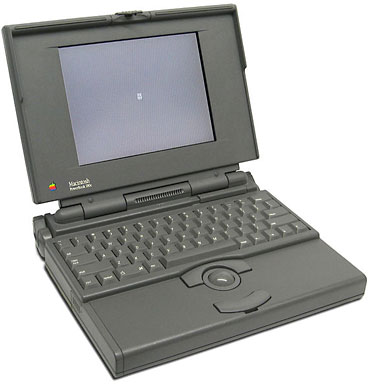 The key to the this computer’s success was its small 100 x 13 x 155 mm lead acid battery. It made the computer small enough that it could be placed in a backpack. Almost ten years later, that battery is now the PB 100’s greatest liability. The battery has a short shelf life and operating lifespan. Ordering replacements has been getting progressively more difficult and expensive as the years have passed.
I secured my PowerBook 100 with accessories through eBay. I got the computer with the special cable to connect the PowerBook to a desktop Mac, a mint condition power supply, one (dead) external floppy, and one (dead) battery pack. While waiting for delivery of the entire package, I went ahead and visited The Apple PowerBook 100 FAQ Page.
Publisher’s note: The PB 100 uses a completely different battery than the PowerBook 100 Series does. If you’re buying a battery, don’t get the wrong one. Searching for “PowerBook 100” (including quote marks) or M1506 may help, as that model number is unique to the PB 100.
The FAQ had a number of references to substitute batteries. I was distressed to hear that a number of them were lead acid type cells that would need to be rebuilt in order to be used. Most contemporary rechargeable cells use either NiCad or NiMH cells that can be stored for a long period of time without being charged. This cannot be done with lead acid type cells. The cells have to be continually charged, otherwise a chemical reaction occurs that usually renders the cells unusable. (It’s just like a lead acid car battery in that respect.)
One passage that I read noted how some PB 100 users have used 7.2 volt NiCad R/C model car battery packs to run the computer. I had a few of these packs on hand, so I decided to adapt them as PB 100 power sources.
There are two ways to get power to the 100. The first is through the plug on the back of the computer. This was not an option, since I did not possess such a connector.
The other way to get power to the 100 is through the contacts that are inside the battery compartment. This was the way to go. I went to my father, a retired machinist and carpenter, and showed him my dead PB 100 battery pack. I asked him to create an exact wood model of the pack using scrap lumber that was lying around in the garage.
After some searching, we located a board that was about the same thickness as the battery pack. My father then cut and shaped the wooden facsimile. As it turned out, the facsimile was about 2 mm too thin for use. This was corrected by gluing four Popsicle sticks lengthwise along the top of the facsimile.
I then present my father with the R/C car battery connector that would normally be used on a battery charger. He then did some carving. Along the top of the wood facsimile between two of the four popsicle sticks, he carved two grooves that would hold wires. In the area of the wood where the PB 100 battery contacts touched, he cut a pair of notches. Dad then took a 10 mm section of copper piping, cut it along its diameter, and fabricated electrical contacts which would be attached to one end of the wires. On the other end, the R/C car battery connector was attached. He used the PB 100 battery pack as a reference to make sure that he had the polarity correct. After taping over excess copper contact material that was on the facsimile, he painted the wood with acrylic paint.
The time to test the carpenter’s feat of engineering was at hand. I brought in the PB 100 and moved the battery switch to the “connect” position (the PB 100 owners know this switch very well). I then plugged a charged 7.2 volt R/C battery pack into the plug on the wooden facsimile. I pushed the wooden “plug” into the battery compartment and turned the PB 100 on. Presto! A smiling Mac appeared, and I used the computer for more than an hour before the 7.2 volt battery pack was drained.
My Dad always told me that he was a bit old to learn how to use a computer. Whether he thinks he is too old to learn how to use a computer or not is still up on the air but he sure knows how to work with wood and basic wiring. With that knowledge, he entered the computer age by doing a computer repair that has baffled many a PB 100 owner. Talk about going back to basics!
Keywords: #powerbook100 #replacementbattery
Short link: http://goo.gl/4dqJOZ
