
The 'Book Page
The Ultimate iBook Review, Part 3
- 2001.08.14
In part 2 of this review, we discussed the screen, the keyboard, the iBook's multimedia capabilities, and its autonomy. Those are typical characteristics of a portable.
But what about performance? We know that people who buy a low-price consumer portable are not necessarily looking for the ultimate speed demon, but it is nice to know how the iBook stacks up in terms of power.
Performance
We found the iBook to be fast enough for day-to-day use, but we needed to test it formally in order to have more than just a feel for how it performs. As we did not find any standard benchmarks that satisfied us, we decided to do our own hands-on tests. We put the iBook up against our other machine, a dual processor Power Mac G4 (2 x 450 MHz, manufactured in 2000). Important note: we conducted all tests with the iBook plugged into its power adapter. Users who run the iBook from the battery with optimized energy saving settings may notice slower performance.
 We used Photoshop for our first test. We scanned a sunset
panorama (see the picture to the right) at 600 DPI, which resulted in a
24.3 MB file, 3602 pixels in width and 2352 pixels in height. We ran
two filters separately, not one after another, and we calculated the
time that both machines took to get things done, timing from the moment
we hit OK to the moment when the filter was applied. To make sure that
the test was fair, we allocated the same amount of memory to Photoshop
on both machines and ran the filters while nothing else was
running.
We used Photoshop for our first test. We scanned a sunset
panorama (see the picture to the right) at 600 DPI, which resulted in a
24.3 MB file, 3602 pixels in width and 2352 pixels in height. We ran
two filters separately, not one after another, and we calculated the
time that both machines took to get things done, timing from the moment
we hit OK to the moment when the filter was applied. To make sure that
the test was fair, we allocated the same amount of memory to Photoshop
on both machines and ran the filters while nothing else was
running.
Our first filter was Dry Brush, a slightly demanding action. The G4 executed it in 27 seconds. The iBook, to our surprise (because it is a single processor machine) held its own by completing the test in 31 seconds! The second filter was Watercolor. The G4 applied it in 37 seconds. The iBook applied it within 44 seconds. Not only did the iBook hold its own against the G4 in the filtering department, it did rather well when opening files, resizing images, and all the everyday commands. When computers do not handle the little things correctly, it can be frustrating, but the iBook handled them well.
Although we were happy with the iBook's Photoshop performance, we did not find the tests conclusive. We ran tests with iTunes, where processing power has a lot to do with encoding speed.
We saw quite a difference between both machines, which leads us to think that the G4's power definitely showed up and put it in front of the iBook. When encoding songs, the iBook managed a sustained encoding speed of 3x, and toward the end of a CD - encoding speed goes up gradually as you reach the end of the disc - it went up to 3.5x. On the other hand, the G4 roared with sustained 7x to 13x, reaching 14x at times.

The iBook did not get past 3.5x when encoding music.
This iTunes benchmark was slaughter, but we believe that stacking up two G4 chips against one G3 chip in a processor intensive test is a little unfair. We believe that the results can be used as a guide to understand how one G3 performs in comparison to two G4s. However, we found 3x to 3.5x to be painfully slow for day-to-day use when encoding a good chunk of our personal CD collection. We own about 80 CDs, and it goes without saying that the iBook spent many hours encoding music when we were away from the machine.
For general use, we found the iBook rather fast, but as we observed above, it does have its shortcomings. This has to be expected from a machine that's designed with price and maximal portability in mind.
Networking
Since AirPort is the big thing for networking with the iBook, we did all our networking with the wireless system. As we explained in the first part of this review, we installed an AirPort card in the iBook and another in the G4, using the latter as a software base station. We made sure to keep encryption turned on, just in case....
Setting up AirPort was easy, as we described in Part 1. Networking with AirPort was even better. One has to understand how neat and useful it is to roam around the house with no wires, exchanging files with the other computer and surfing the Web from a kitchen table, a counter top, a bed, a couch, etc. It is no revolution, but quite an evolution. The iBook's signal was always strong, and it remained decent around our property. It did very well when we were outside, too.
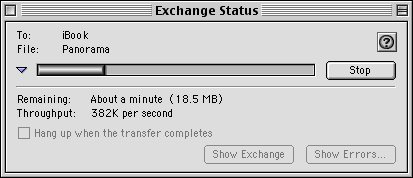
File transfers went from 350k to 400k per second.
When we exchanged files (we used Timbuktu software for many networking tasks) we did not get the best throughput speeds, but AirPort is not the ultimate fast lane for file exchange. Most of the time the transfer speeds went from 350 to 400 kilobytes per second. The FireWire target disk mode would have been faster, but, to us, this was the tradeoff of doing things wirelessly. We found the physical freedom more important than raw speed for day-to-day file transfers.
Our wireless Internet experience was nice, too. As far as we could see, there were no major problems with doing email and surfing with AirPort. Or course, downloading data from the Net was slightly slower, but we expected that. We also used Timbuktu to control our G4 from the iBook (or vice versa) through AirPort with AppleTalk connection. We were very satisfied with the connection's responsiveness, even when the other computer had a desktop picture, which normally slows things down in Control mode.
We are very impressed with the iBook's AirPort capabilities. Unlike the Titanium PowerBook, the iBook responds very well to the wireless signal.
CD drive
We were pleased with the 24x CD-ROM drive's performance, but quite disappointed that it featured a CD tray instead of a slot-loading drive.
Pricing
This basic model sells for US$1,299 ($1,249 for educators and students). Is it a fair price? Yes. We believe that the iBook offers enough bang for your buck, since its mission is to provide a good portable for a rather low price. You can get much more power for much more money or a stripped-down PC laptop for less, but we believe that this model is the right compromise between price and specifications. In our opinion, despite the default 64 MB RAM, the iBook is a great value.
Conclusion
|
|
|
|
|
|
|
|
We find the iBook to be an excellent purchase for students and users who need an affordable computer on the road. It has its shortcomings, but it can serve users who do not go for raw power or as an excellent extension of someone's desktop setup. This iBook is not a revolution, but it is definitely a positive evolution. It is much better than the first generation released by Apple, and its screen's brightness stands out as its neatest feature.
The Ultimate iBook Review
- Part 01. Initial impressions, setup, and some troubleshooting.
- Part 02. Screen, keyboard, battery life, and multimedia.
- Part 03. Performance, networking, general comments, pricing and rating.
is a French Canadian living in Montreal. He discovered the Mac in 1994 while studying journalism, the profession he loves and practices. He also studied history and communications. He writes iBasicsfor Low End Mac, On the Flip Side for The Mac Observer, and cofounded MacSoldiers
Recent Content on Low End Mac
- World Book Encyclopedia 2012 DVD, Tommy Thomas, Reviews, 2013.03.05. "You may be asking yourself, in an age of Wikipedia and instant information, is World Book still relevant?"
- Vintage Computer Festival SouthEast, April 20-21, 2013, Simon Royal, Mac Spectrum, 2013.02.25. Old Apple gear and old PCs.

