
The 'Book Page
The Ultimate iBook Review, Part 1
- 2001.08.02
In a most conservative fashion, away from the big lights of Macworld Expo keynotes, Steve Jobs introduced the new iBook on May 1. The latest Apple has been put under much scrutiny, especially with Apple's moves to successfully recapture the education market. The dual USB iBook sells like hot cakes in the consumer and education markets.
That said, how does it perform in real life situations? We have been using the basic entry-level model for several weeks, and now is the time to report on it. This is the first piece of a three-part iBook evaluation.
Specifications
- Suggested price: US$1,299 ($1,249 educational)
- System: Mac OS 9.1 and X
- Processor: 500 MHz G3
- Bus: 66 MHz
- RAM: 64 MB on base model, 128 MB on others
- Level 2 cache: 256 KB on-chip cache
- Video: ATI Rage Mobility 128 with 2x AGP
- VRAM: 8 MB
- Display: 12.1" 24-bit SVGA (maximum of 1024 x 768)
- Video out: VGA and composite video
- Hard disk drive: 10 GB IDE
- Media drive: CD-ROM
- Ports: two USB, one FireWire, one 10/100Base-T ethernet and 56k modem
- Microphone: built in
- Size: 11.2 x 9.1 x 1.35"
- Weight: 4.9 pounds
Design and 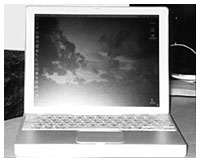 Casing
The first hands-on feeling made us think that the casing is tiny, at least if we compare the new iBook to most models of its class. We find this to be a good compromise between portability and screen space. The form factor pleases us. We appreciate the gender-neutral and yet modern-looking white exterior. The slight touch of gray inside made us think that this iBook shares DNA with the Titanium PowerBook. We definitely liked the inside because its appearance connects with the born-again trend of silver-looking electronics.
We found the simple "no curves" concept nice. The first iBook's curves added
useless size and weight to a computer 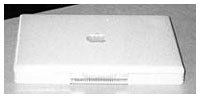 that
could have been made smaller. The new slim case addressed this
complaint. The current iBook is small enough for us to carry in a
backpack. This has to be a plus for all students.
that
could have been made smaller. The new slim case addressed this
complaint. The current iBook is small enough for us to carry in a
backpack. This has to be a plus for all students.
Setup
To our surprise, no system software was installed on the hard drive when we took the iBook out of the box. We had to boot the computer from a restore CD and start installing the system software. We had to insert and take out four different discs, and the installation process took a painful 30 minutes. It did not give us options regarding what to install, and it installed Mac OS X along with Mac OS 9.1 by default. After a restart, the iBook was ready to go, but we found this optionless process inconvenient.
After restarting, a special "first run" assistant took us through a basic customization setup that handled general settings.
The iBook comes with a few bundled software titles, from a couple of games to fax software, without forgetting QuickTime, iTunes, and free Internet software. In our opinion, the most interesting title of all is AppleWorks. It is a nice little productivity suite if you cannot afford Microsoft Office, and we enjoyed rediscovering it, having used ClarisWorks a few years ago.
Expansion
After installing our system software, we wanted to add resources to our new portable. We bought a 128 MB RAM chip and installed it. We removed the keyboard from its normal position and had to remove a couple of screws sow e could locate the RAM slots. We seated the chip, closed everything properly, and started the computer. The iBook recognized the RAM without problems. The 192 MB of RAM would prove to be useful. The preinstalled 64 MB is a ridiculous amount for users who want to do more than run one or two applications at a time.
AirPort
How could one use an iBook without AirPort wireless connectivity? We wanted to experience digital lifestyle without wires, so we bought two AirPort cards. We inserted the first one in the iBook by following the instructions present in the documentation. The second one found its home in our Power Mac G4, which, in the circumstances, serves as a software base station. To create the wireless network, we simply launched the AirPort assistant on both machines and followed the steps. Once done, the wireless connection established itself and we could surf the Internet wirelessly from the iBook.
We experienced connection problems. We thought that the iBook software's language (Canadian French) might have been an obstacle. When we saw that the iBook's version of AirPort was not the latest, we ran a software update from Apple's servers. After a quick update and a restart, the connectivity problems disappeared.
Documentation
The usual mandatory material (warranty, AppleCare, license, stickers, etc.) makes up for most of the documentation. Apart from that, there are three key documents:
- A "before you start" document with information about switching from Mac OS 9.1 to Mac OS X, configuration, and notes about some of the software titles that ship with the computer.
- An iBook manual gives a quick physical description of the iBook, discusses the basics of the Mac OS, the Internet, multimedia, and how to install an AirPort card. Along with the above information, it provides troubleshooting tips.
- A Mac OS X manual that gives a quick (but too short) overview of Apple's new generation of operating system.
The documents inside the box are fine for a seasoned veteran or a user who can learn quickly on his own. On the other hand, we wonder what a novice gets out of the very basic documentation offered, and we think that a more comprehensive manual would have been handy.
The Ultimate iBook Review
- Part 01. Initial impressions, setup, and some troubleshooting.
- Part 02. Screen, keyboard, battery life, and multimedia.
- Part 03. Performance, networking, general comments, pricing and rating.
is a French Canadian living in Montreal. He discovered the Mac in 1994 while studying journalism, the profession he loves and practices. He also studied history and communications. He writes iBasicsfor Low End Mac, On the Flip Side for The Mac Observer, and cofounded MacSoldiers
Recent Content on Low End Mac
- World Book Encyclopedia 2012 DVD, Tommy Thomas, Reviews, 2013.03.05. "You may be asking yourself, in an age of Wikipedia and instant information, is World Book still relevant?"
- Vintage Computer Festival SouthEast, April 20-21, 2013, Simon Royal, Mac Spectrum, 2013.02.25. Old Apple gear and old PCs.

