
The Mobile Mac
Tablet Computing Can Improve Productivity
- 2006.10.05 - Tip Jar
A criminal lawyer I know is a great fan of pen-based computers and bought a Tablet PC the day they hit the market.
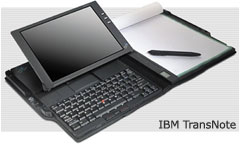
This is a guy who owned an ancient IBM ThinkPad with a touchscreen, bought almost every variety of Newton, and used an aging IBM TransNote far longer than its technology would normally permit - all because he considers a pen to be the input method of choice for portable computers.
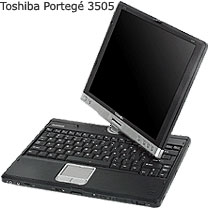
His first Tablet PC was Toshiba's Portegé 3505, an ultra-portable Pentium IIIM model with a 12" touchscreen and no built-in optical drive. Last week, he replaced the nearly 3-year-old Portegé with a new Portegé M400, which is the direct descendant of his first one.
I've never been all that interested in pen-based computing, but the one time when a tablet would come in handy for me is when waiting in line. I often spend a lot of time waiting in front of various federal buildings, intake windows for various courts, and occasionally even at my local Starbucks. How I would love to eliminate some of my email backlog during that otherwise useless time, or perhaps read an article or even proof read a motion or brief.
With a conventional laptop, that's just too dangerous to try, but with a Tablet PC, it's a piece of cake.
Try It, Maybe You'll Like It
My friend buying a new tablet meant that his old one was in need of a new home. Since he's been pushing the concept on me for a few years, he made me an offer. If I prepped his old Portegé for sale by zeroing the drive and then reinstalling the factory default software, he'd let me use the machine for a week or two to see if I liked it before listing it on eBay. On eBay, machines like his sell for between US$500-650 depending on condition and specifications, and he offered to sell me his Portegé for $500 (it's very highly optioned and in near-new condition) if I wanted it.
 I'd been playing with it for a
week and was still undecided. I finally got to use it while waiting
in line this morning, and sure enough, I read (well, skimmed and
deleted) over 100 emails and replied to about 30 - all in the 30
minutes that I was standing in front of the intake window. It was
easy to do, comfortable, and despite my never having used a
touchscreen computer (other than various PDAs), it was totally
intuitive.
I'd been playing with it for a
week and was still undecided. I finally got to use it while waiting
in line this morning, and sure enough, I read (well, skimmed and
deleted) over 100 emails and replied to about 30 - all in the 30
minutes that I was standing in front of the intake window. It was
easy to do, comfortable, and despite my never having used a
touchscreen computer (other than various PDAs), it was totally
intuitive.
Let me take a step back and describe this machine, and then I'll get into why it's a great thing for those who need it - and a waste of money for those who don't.
The Portegé 3505 was one of the first generation of Tablet PCs that came out in 2003. It has since been superseded twice, but it was so much closer to the ideal than its initial field of poorly designed competitors that almost all "convertible" Tablet PCs have come to resemble it.
Simply put, all sorts of strange designs emerged in 2003, including add-on keyboards, screens that pivoted on arms, and screens that were physically built into the bottom of the computer without any hinge (or keyboard) at all. Nowadays there remain a few of the keyboardless models (called "slates"), but most of the market has moved to convertibles, which switch between tablet and conventional laptop mode by rotating the display on a center rotating hinge that works like a conventional laptop hinge to allow a clamshell form-factor and allows the screen to twist so that it would face away from the user on a conventional laptop. With the screen reversed, you close the display (the screen is now facing up instead of down as on a regular laptop), and it locks into place, duplicating the function of a slate.
It's much simpler than it sounds, and it's by far the most popular format for tablets today. The Portegé also came with a 12" 1024 x 768 display (like the 12" iBook) which, except for some new 14" models which I find too large and heavy to use while standing in line, has become the most popular size for tablets as well.
In fact, the only areas where the Portegé shows its age is in the spec sheet and a button for display orientation. The laptop has a Pentium IIIM at 1.33 GHz and a 133 MHz system bus. These are ancient standards in the PC world, but surprisingly current in the level of performance. My current PC is a 1.6 GHz Centrino with a 533 MHz system bus, but basic computing tasks feel almost the same.
As for screen orientation, modern tablets use a system much like Apple's hard drive motion detector to detect how you are holding the tablet and automatically switch the image on the screen. Hold a current model vertically, and the display goes to portrait mode. Prefer to hold your tablet upside-down? The image will flip vertically, all in less than a second.
On the older units you press a button to rotate the display orientation in 90 degree intervals. It's slower and less intuitive, but still a simple and elegant solution.
One area where this machine remains state-of-the-art in Tablet terms is its industrial design. The new M400 includes a built-in optical drive in a computer that weighs the same but is thicker. Still, the old Portegé is about the same size as a 12" iBook when used as a conventional laptop (it's also a full pound lighter than an iBook at 3.9 lb.) and feels much like an over-thick legal pad when used in tablet mode.
It's totally comfortable to use either way and has no compromises compared to a conventional laptop or slate-style tablet except for perhaps a pound of weight and a half-inch of thickness. Otherwise its just like any 12" slate in tablet mode and just like any 12" laptop in laptop mode.
Oh yeah, its got modern USB 2.0 ports instead of the USB 1.1 standard found on all the other first-generation Tablet PCs.
Why Should I Care?
So now that you know what a Tablet PC is generally and the first-generation Portegé 3505 specifically, why should you care?
Well, perhaps you shouldn't. I ignored the technology completely for three years, but now that I've used one, I'm seriously thinking about buying in. Like most things, it's a very personal decision based on how you actually use technology and what you want it to do for you.
Personally, I prefer a keyboard to a pen for generating text. My handwriting is horribly messy - so bad that I can barely read it, not to mention that I'm a far faster typist than I am when writing longhand.
For writing legal briefs, term papers, or the great American novel, a tablet PC makes no real sense. Where it works well is for smaller tasks: I can write a letter, for example, and rather than print, sign, and then scan, I can just sign it directly in many applications, including Word. Checking boxes and writing simple biographic information into a PDF form is also far more intuitive on a tablet than with a keyboard and mouse.
I already mentioned working while standing up.
What I've learned is that touchscreen portables have a definite place, and it's not only for salesmen and doctors making notations as they walk, which is what I thought before trying it for myself. A machine like a modern convertible tablet lets you have the best of both worlds in a single machine.
Not Ready to Switch
Am I going to switch to a tablet? That's the big question, and one that at present I must answer "not yet". I won't switch, but I will supplement. I currently use a Lenovo (IBM) X41 laptop, and Lenovo has a tablet version that would use some of my accessories including the extended battery.
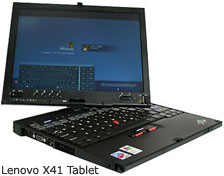 An X41
tablet would do everything my X41 laptop does, including its
stellar 9-hour battery life, but at a cost in size and weight. A
tablet PC is smaller than an iBook or 12" PowerBook, but it's much
larger than the smallest and lightest ultraportables. I'm spoiled
by carrying only 2.7 lb. in my bag, and I won't give that up.
Someday we'll have a 3 lb. convertible tablet, and that's when I'll
make the move.
An X41
tablet would do everything my X41 laptop does, including its
stellar 9-hour battery life, but at a cost in size and weight. A
tablet PC is smaller than an iBook or 12" PowerBook, but it's much
larger than the smallest and lightest ultraportables. I'm spoiled
by carrying only 2.7 lb. in my bag, and I won't give that up.
Someday we'll have a 3 lb. convertible tablet, and that's when I'll
make the move.
There is another downside to the tablet computer, and that's speed. Tablets do everything regular computers do, but they aren't quite as responsive. I think it's the handwriting recognition, which is amazingly accurate in the new 2005 version - and also very resource heavy.
Looking at Lenovo X41s, the non-tablet model takes about 2 minutes to boot into Windows with the standard software load (which can be shortened greatly), whereas the tablet model with the same specs requires a minute and a half longer to do the same thing.
Ultraportables are already bottom-feeders when it comes to performance, so I hesitate to give up too much. The X41 tablet is the only current tablet that could serve as my only laptop on account of its eraser head mouse and superior keyboard, but it's very slow (1.8" iPod-style) hard drive is already overwhelmed before adding the tablet goodies to the load. Again, other than the X41 tablet, other models use modern, fast SATA hard drives. While slow with its small iPod-like drive, an X41 tablet would be downright speedy with a fast 7200 RPM drive. Lenovo's upcoming X60 tablet should do the trick.
For Now, the Portegé
That brings me back to the old Portegé. I'll be writing a check for it next week. I'm intrigued enough to want to play with it more, but I just can't see spending the money for a cutting-edge tablet at this time.
I may make a cutting edge tablet my next primary computer - perhaps Apple will offer one as a replacement for the 12" PowerBooks I loved so much. A convertible Mac Tablet at or under 4 lb. would be a dream come true. Absent an Apple tablet, Lenovo is due to release a tablet version of their X60s, which would solve all of the X41's performance issues with a large and fast hard drive while giving me a long-running tablet with an eraser head mouse.
Strangely, in using the Portegé I've not once wished for more performance, as the Portegé has a large, fast drive. The Portegé's one Achilles' heal (and the only reason I'd never adopt it as my primary computer) is its very low-end graphics card. If you've read my previous article about cheap older laptop PCs as glorified network terminals, you know about the poor video card performance of the Toshiba Portegé 4000 laptops I bought for temp employees to use.
The Portegé 3505 has a slightly newer version of the same card, and it performs just as poorly here as it does in the older laptops. DVD movies are fine (must use a PC card or USB drive), but even older games grind the graphics to a halt. In simple terms, the poor video performance means that only games from around the year 2000 will play with any degree of smoothness, making the Portegé 3505 a work-only proposition.
That's not a bad thing for the role I will use it in, but it doesn't satisfy my desire for gaming while traveling that my primary computer must handle. A newer tablet from either Lenovo or Toshiba would, however.
What About an Apple Tablet?
So what would an Apple tablet be like, and should they build it?
Apple would likely base any tablet computer on the same architecture as the next generation MacBook. That means Core 2 Duo processors, integrated Intel graphics, and a fast SATA hard drive. Hopefully they'd go back to a standard aspect ratio screen, which works better for a table than a wide screen that will have a lot of wasted space at the top and bottom of each page in tablet mode.
12" screen size would be ideal, and while I doubt Apple would leave the optical drive off (they'd use a dual layer SuperDrive), I'd prefer that they did. Actually, my prediction is that Apple wouldn't go the convertible route and would instead offer a slate model.
Either way, I'd buy it. 
Andrew J Fishkin, Esq, is a laptop using attorney in Los Angeles, CA.
Today's Links
- Mac of the Day: PowerBook 500 Series, introduced 1994.05.16. 'Blackbird' includes a 25 to 33 MHz 68040 along with smart batteries and grayscale or color displays.
- Support Low End Mac
Recent Content
About LEM Support Usage Privacy Contact
Follow Low End Mac on Twitter
Join Low End Mac on Facebook
Favorite Sites
MacSurfer
Cult of Mac
Shrine of Apple
MacInTouch
MyAppleMenu
InfoMac
The Mac Observer
Accelerate Your Mac
RetroMacCast
The Vintage Mac Museum
Deal Brothers
DealMac
Mac2Sell
Mac Driver Museum
JAG's House
System 6 Heaven
System 7 Today
the pickle's Low-End Mac FAQ
Affiliates
Amazon.com
The iTunes Store
PC Connection Express
Macgo Blu-ray Player
Parallels Desktop for Mac
eBay

