
The Mobile Mac
Using Low-Cost Laptops as 'Not So Thin' Clients in the Mac Office
- 2006.07.11 -Tip Jar
I remember that about 12 years ago all of the PC magazines were fullof articles about thin clients, computers that booted from a networkserver and lacked their own local storage. These machines were due "anytime now" and were to be both cheap and fast, a great combination.
Every few years talk of thin clients returned. Five years ago, asDSL and other broadband Internet access came to most homes, there wastalk about Internet-based thin-client-like computers where theoperating system (Windows) was local but all of your applications anddocuments were online, with faster-than-hard drive speed courtesy ofbroadband and efficient coding.
Even Apple got on the thin client bandwagon when OS X wasdisplayed to an eager public network booting a bunch of iMacs athigh speed.
Thin clients for the masses have clearly not come to be. Most of usdon't keep a high-powered server in our closet, and broadband, whilemuch faster than dialup, is still much slower than even the slowest ofsemi-modern hard drives. Remote applications are still in theirinfancy, and they're unlikely to replace local applications any timesoon.
The one exception is the Web browser, which has grown into an emailclient, video player, and many other things - depending on what's onthe other end. The browser is where the thin client concept, in aweakened form, is alive, well, and, in my case, taking over theoffice.
Legal Software
I run a small law firm, and, as a previous series of articlespointed out, I had some difficultly in selecting practice managementsoftware for my Macs. There are plenty of software packages madeespecially for the legal market in Windows, with titles like AmicusAttorney that handles docketing, billing, and conflict management.
There are similar programs for the Mac, such as Law Desk, but thereare far fewer choices. These are general-purpose programs aimed at thetypical civil or criminal lawyer in a large firm setting, but Ipractice immigration law, which has very practice-specificrequirements, including hundreds of unique forms and electronic filingon certain types of applications.
Immigration law's form and filing requirements can be handled twoways. The old way is with PDF forms or a database-driven forms program(I used Immigration Pro, based on FileMaker 7) and government agencywebsites for electronic filing. The new (not that new) way is withintegrated tools that do everything from one application, or, in thenewest versions, website.
I chose a program called LawLogix (there are competing productsINSZoom and Immigration Tracker that do largely the same thing) thatincludes the usual synchronized calendars, contact management, andbilling modules, but also conflict database, tools for monitoring casestatus within the government maze, and, most importantly, adatabase-driven forms component that is always up-to-date. Addmessaging to that and a client page where applicants can fill in simplequestionnaires from their homes (which are often overseas), downloadand upload PDF forms (which they can sign), and never have to fill outcomplicated government forms.
It saves time and effort; more importantly, it really takes theburden of computer technology off of the law office. I can access aclient's file from an Internet café in Beijing and add a newpetition, file an addendum, or check the status of his/her applicationwithout ever going near my Los Angeles office.
One more thing - being Web-based, its 100% platform neutral.
Not So Thin Clients
This brings me back to the smart terminal or "not-so-thin" client.My office has some pretty nice Mac hardware. My office manager has oneof the last 20" G5iMacs (iSight model) with a gigabyte of RAM that is fast andbeautiful. My associate has thehigh-range G4 mini with the stealth 1.5 GHz upgrade, also with agigabyte of RAM and a very nice Samsung 19" LCD connected throughDVI.
I use the 13.3"black MacBook maxed out with two gigabytes of RAM (see Can Apple's Consumer MacBook Really Replace Two PowerBooksand a ThinkPad?). At home, my ancient Sawtooth Power Mac, upgradedwith a 1 GHz processor and Quartz-Extreme capable Nvidia graphicscard, gives up very little to the newer hardware at the office.
What I do not have, however, is space to set up a bunch of extradesktop computers for the temporary paralegal help I often hire. I'vegot a cheap Compaq PC in my associate's office that I frequently putone to work on, and I'd usually put another to work on my 12" PowerBook in the conferenceroom, but I was never comfortable putting a temporary employee (whom Ireally don't know) to work on one of my regular computers, which,except for the Compaq, are all rather expensive.
I also don't like crowding my associate with another body in heroffice.
Cheap Laptops
The solution was the "not-so-thin" client.
My conference table is huge, with six chairs and no crowding. Whenwe get busy, we get very busy, and I've actually had six tempsin at one time. With six people at the table, each with a laptop,everyone still has plenty of room for a few documents and a mouse. Fourpeople make it almost like each having their own desk.
What I needed was a fleet of very cheap laptops capable of running aversion of MS Word, Adobe Reader (required for the LawLogix software),and a modern secure Web browser.
Even with ten computers connected, my DSL connection is fast enoughfor LawLogix, which mostly transfers text and is designed with minimalscreen graphics. This is brilliant, as in many places dialup is theonly access, and, except for downloading large PDF forms, everything isvery snappy even at 33.6 kbps - and 56k positively screams.
Clearly the laptop specifications were not too important, with themain requirements being low price, reliable hardware, the ability torun a modern OS, and a small footprint.
Low price means that each machine will cost no more than $300including internal wireless and enough memory for the operating system,Word, a browser, and Adobe Reader. And finally, they must be quiet inuse.
Internal wireless is essential, because I really don't want to worryabout wireless PC cards walking away, and I just can't stand thingsprotruding from a laptop.
2001 Dual-USB iBooks(500-600 MHz) were my first thought, but these tend to fetch about $400when configured with an AirPort card, and I'm a bit afraid of the logicboard issues.
A Windows Solution
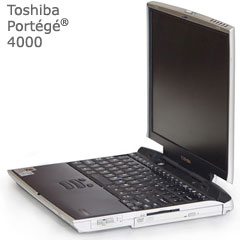 I turned my attention to the Windowsworld and found what I consider the perfect not-so-thin clients. Ibought three ToshibaPortégé 4000s, which varied in price between $200 and $300each. I'll buy three more once I get this batch configured and know what parts(memory, hard drives, WiFi cards) I have either left over or that needto be replaced.
These machines have a 750 MHz Pentium III processor, accept up to1 GB of RAM, and have a slot for an internal wireless card, whichmost of them came with. They have the same 12.1" screen size as theiBook (adequate), similarly small footprints, are very quiet even whenthe fans come on, and, most importantly, have outstandingkeyboards.
Two of the machines have 256 MB of RAM, while the third has 512 MB.Since I configured these with Windows 2000 instead of XP (they all havedual 2000/XP certificates on the bottom), 256 MB is actually quite alot.
One machine had a bad wireless card, so I bought a new Atheros 5000"G" card on eBay, which is the same chipset Apple uses for its AirPort Extremeand is very sensitive and fast. Finally, all machines had 30 GB harddrives, though I replaced a noisy one with an 80 GB 5400 RPM TravelStarthat came from my last PowerBook.
Microsoft Office 2000 and Internet Explorer 6 (Firefox takes toolong to launch) both perform very well, as they should being the sameage as the hardware.
The best of these machines is actually an extremely nice laptop evenby modern standards and will do regular duty as my associate's travelmachine, in addition to use by temps when the other five are in use.The magic of Norton Ghost makes them all extremely reliable, which I'll explainin a bit.
Back to the Portégé 4000s and Windows 2000. Two ofthese machines (and the next three I buy) are as minimally configuredas can be. Yes, they have wireless Internet access. Yes, they areclean, quiet, and can run at least 30 minutes on their 4-5-year-oldbatteries.
What they don't have is anything at all that isnot required for the work we do.
What they don't have is anything at all that is not required for thework we do. Most of the extras that Microsoft includes with Windowswere removed. Those I couldn't find or don't know much about are justinaccessible, as I removed their icons from the Start menu. All that'sleft is Internet Explorer, the WiFi client, FireFox (in case of IEtroubles), Adobe Reader, and Word.
While I have full versions of Office 2000, I installed only Wordonto these, as nothing else is required by temps.
The best of these machines is much higher spec. I ordered aslot-loading DVD-RW (Pioneer DVR-K05) to replace the dead CD-ROM on oneof the machines, and it went into this one. I included WinDVD-7 and abrand-new battery so my associate can enjoy in-flight movies. The fullinstall of Microsoft Office 2000 and Windows 2000 keeps it fast andmakes it almost as versatile as a modern machine.
Finally, with a fast 80 GB hard drive and 512 MB of RAM, she cankeep multiple applications open at once and has room to store herpersonal files and her MP3 collection. This one is not asemi-thin client, but it has an image on its second partition to makeit one very quickly.
The Ghost in the Machine
When I say that each machine has a 30 GB (or 80 GB) drive, that is alittle deceptive. All of the hard drives are set up with twopartitions, the primary at about 2/3 of the drive capacity and thesecondary at 1/3. The 80 GB drive is partitioned evenly. The secondarypartition on each computer stores an image created in Norton Ghost, andafter the temps leave (usually after 3-4 days), I just boot eachcomputer using an old Windows 98 CD and use the DOS version of Ghost(also on the secondary partition) to restore the image file, cleaningup any damage the temps may have done by viewing websites or playingonline games when nobody was looking.
I don't bother with antivirus, anti-spyware orsoftware firewall software....
I don't bother with antivirus, anti-spyware, or a software firewallsoftware because at the end of two or three days, all of the machineswill be wiped back to a pristine minimal install with nothing in thebrowser cache.
The high-spec machine has two Ghost images: the full load for myassociate, which I can easily recreate if she installs many files ormakes significant changes, and the minimal temp-hire image for when Iput a temp in front of this particular laptop. At the end of the tempassignment, I just restore the full load disk image, and once again myassociate has an excellent travel machine with four-hour real-worldruntime (and 2:45 on the best of the old batteries), internal802.11a/b/g wireless, and a weight of only 4.5 lb.
Not bad for a machine made back in 2001.
A Low-end Solution
What is most important about these is that the machine itself, andeven the software on it, is almost unimportant. I could get away withWindows 95 or 98 on these, based on my disk-image strategy, but Iprefer the added security of Windows 2000, since client data - thoughwell protected in LawLogix - is in use.
With the the minimal software loads, these machines are extremelyfast, and since they are not doing anything remotely taxing, they areextremely stable. In short, while only the LawLogix program is remote(thus these are not true thin clients), the programs that are local runvery quickly and, in LawLogix (where most of the work is done) theseare every bit as fast and stable as the newest PC or Mac would be.
For me, this is proof that sometimes the best tool for the job isn'tnecessarily the newest.
Mixing Macs and Windows PCs
To tie it into the Mac-orientation of Low End Mac and my regularcolumn, I'll add that it's because of the outstanding Windows supportbuilt-into OS X that I can even think about using Windows machinesin my Mac office.
Each of these computers has a share folder on its hard drive that Ican access from any of our Macs to both deposit (write) or copy (read)files. This makes it very easy to give each temp a checklist created inWord 2004 Mac (which opens perfectly in Word 2000 for Windows) of whathe or she needs to do for the day, all of the supporting PDF and Worddocuments required, and an easy way for me to retrieve completed workto my Mac. Of course, much of the completed work stays in LawLogix withno copying or pasting required.
Finally, the front office iMac, which functions as our file serverand is connected to the scanner, also has the share folders of eachWindows machine on its desktop. My office manager can scan documentsdirectly to any of the computers on the network, Mac or PC, with littleor no trouble.
It couldn't be easier. 
Andrew J Fishkin, Esq, is a laptop using attorney in Los Angeles, CA.
Today's Links
- Mac of the Day: Power Mac 6100, introduced 1994.03.14. The entry-level first generation Power Mac had a 60 MHz PowerPC.
- Support Low End Mac
Recent Content
About LEM Support Usage Privacy Contact
Follow Low End Mac on Twitter
Join Low End Mac on Facebook
Favorite Sites
MacSurfer
Cult of Mac
Shrine of Apple
MacInTouch
MyAppleMenu
InfoMac
The Mac Observer
Accelerate Your Mac
RetroMacCast
The Vintage Mac Museum
Deal Brothers
DealMac
Mac2Sell
Mac Driver Museum
JAG's House
System 6 Heaven
System 7 Today
the pickle's Low-End Mac FAQ
Affiliates
Amazon.com
The iTunes Store
PC Connection Express
Macgo Blu-ray Player
Parallels Desktop for Mac
eBay

