
LA Computer Company: Specials on AppleCare, iMac's, Apple Batteries and Apple A/C Adapters. Also Great prices on Used Apple Computers. Call 1-800-941-7654 Click Here.
OWC: NewerTech NuPower Batteries for iBook and PowerBooks Designed+Built in USA to run longer, LAST LONGER TOO! Free Battery Recycling Return Label; Quality High-Capacity from $99.95
I have been a Wintel user ever since I started using
computers.
I good hooked on Macs when my homeroom teacher gave me a
PowerBook 165 that had been given
to somebody else to replace my really, really, really old Wintel
laptop. It came with WordPerfect 3.5 for Macintosh and a few other
applications - and System 7.5.1 (which I upgraded to System 7.5.3
later on). I got my hands of a copy of Microsoft Word 5.1a for
Macintosh, too. I love this computer, because I had the ability to
share files between my Wintel desktop and the Macintosh laptop.
But the real problem was printing. To print I had to copy the
document to a floppy disk and take it over to one of the PCs that
had a printer and then load the document in Microsoft Word for
Windows and finally print the document from there. After several
months of watching me printing and working with my documents this
way, my homeroom teacher brought in the desktop Macintosh that he
had been using for many years in his previous jobs.
I was really grateful for this, because now I could print more
directly (meaning no conversion of the documents were needed) and
not have to get out my laptop just to get my work done. But the
weird thing is that I am planning on getting a brand new
laptop.
The only thing is that this new unit has to be a Wintel machine
for compatibility reasons, and going back to the Microsoft Windows
is not going to be as pleasant as converting to the Macintosh was.
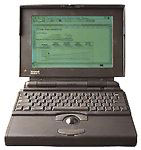
I am going to miss having direct access to
some of the great applications that are on the Macintosh, such as
MacDraw Pro and WordPerfect, but since I am keeping the PowerBook
165, this should not be a problem. But I am happy with what I am
doing, and getting this laptop when I really needed it was a
lifesaver.
I have some advice for new computer users out there (I mean
people who have never touched a computer before in their lives). If
you are just looking for a good and reliable computer for word
processing and graphics, a Macintosh computer might be the computer
you are looking for. And if you end up getting a new Macintosh
computer, make sure that you buy a USB (Universal Serial Bus)
floppy disk drive for compatibility with older computers that offer
or only have floppy disk drives.

Share the story of your first Mac experience by emailing with "My First Mac" as your subject.
Recent My First Mac articles
Mac LC III Still a Most Useful Machine, 07.30.
A love affair that will last as long as they make Macs began with a used LC III in 1997, and it's still being used today.
Hooked on Macs, new and old, 07.15.
Starting with an old Quadra in 2000, Royal left behind Windows and began acquiring his own stable of Macs.
Mac of the Day: PowerBook 170, Oct. 1991 - At 25 MHz, the PB 170 was at the top of the original PowerBook line.
List of the Day: The iPhone List Low End Mac's forum for discussing and supporting Apple's iPhone.
August 30 in LEM history: 99: The truth about USB speed - 00: Could Eazel kill the Mac? - Mac OS 8.1 on a IIci and LC III - 01: Beyond MHz and GHz - Getting a handle on email - Thanks for the IBM PC, Dad - Apple's anniversaries - 02: Mac OS X v10.2 - iBook video out - 04: Things that freak out my students - 06: Nvu and SeaMonkey can't replace Home Page - 07: DVD-RAM support
Recent Content on Low End Mac
Looking for a Content Management System That's as Easy as Mac, Dan Knight, Mac Musings, 08.29.
Low End Mac needs to move to a content management system, but the few we've tried just don't cut it for people used to the simple elegance of the Mac.
Best Power Mac G4 Deals, Low End Mac Deals, 08.29.
Used 450 MHz AGP, $75; 500, $99; 800 QS, $199; 1.25 GHz MDD, $375; 450 MHz dual, $179; 867 dual, $300; 1 GHz dual, $395; 1.42 dual, $575.
Best iBook G3 Deals, Low End Mac Deals, 08.29.
Used 300 MHz clamshell, $150; 500 CD, $150; 800, $200; 600 CD-RW, $240; 900 Combo, $300; 14" 600, $360; 900, $400.
Best iPod nano Deals, Low End Mac Deals, 08.29.
Used 2 GB iPod nano, $89; refurb 3G 4 GB, $99; new, $140; refurb 8 GB, $149; new, $179.
10 Mac Browsers Compared, Simon Royal, Mac Spectrum, 08.28.
A look at Internet Explorer, Radon, Opera, Safari, Shiira, iCab, Firefox, Netscape Navigator, Flock, and Camino running in Leopard.
Clone and Boot: Another Advantage of the Mac OS, Kev Kitchens, Kitchens Sync, 08.28.
Unlike Windows, Apple makes it possible to clone a bootable drive (Classic Mac OS or OS X) and use it with another supported Mac.
Best MacBook Deals, Low End Mac Deals, 08.28.
Used 1.83 GHz, $799; 2.0 black, $875; refurb 2.1 GHz, $899; 2.4, $1,099; black, $1,299; new 2.1, $1,019 after rebate; 22, $1,094; 2.4, $1,219 a/r; black, $1,394 a/r.
Best iMac G5 Deals, Low End Mac Deals, 08.28.
Used 17" 1.6 GHz Combo, $499; 1.8 SuperDrive, $530; 2.0, $600; 1.9 iSight, $625; 20" 1.8 GHz, $580; 2.0, $650; 2.1 iSight, $700.
Best classic Mac OS Deals, Low End Mac Deals, 08.28.
System 6, $10; 7.1, $12; 7.5.1, $4; Mac OS 7.6, $13; 8.0, $13; 8.1, $48; 8.5, $25; 8.6, $20; 9.0, $20; 9.2.2, $20; more.
CrossOver Strikes Out, Frank Fox, Stop the Noiz, 08.27.
Running Windows apps on a Mac without paying for Windows is great in theory, but actually getting Windows software working is another story.
MacDrought: 4 Months with No New Macs, Dan Knight, Mac Musings, 08.27.
The most recent Mac update was over four months ago, and the Mac mini has been unchanged for over a year.
Best Intel iMac Deals, Low End Mac Deals, 08.27.
Used 17" 1.83 GHz, $625; 20", $599; 2.16, $749; 24", $950; refurb 20" 2.4, $999; 2.66, $1,299; 24" 2.4, $1,299; 2.8, $1,549; new 3.06, $2,094 after rebate; more.
Best 15" PowerBook G4 Deals, Low End Mac Deals, 08.27.
Used 1.25 GHz Combo, $600; SuperDrive, $650; 1.33 Combo, $640; 1.5, $680; SD, $725; 1.67, $730; hi-res, $800.
Best Time Capsule and AirPort Deals, Low End Mac Deals, 08.27.
500 GB Time Capsule, $294; 1 TB, $468; AirPort Extreme Card, $39; 802.11n Base Station, $166; 802.11g AirPort Express, $60; 802.11n, $98.
All of our advertising is handled by BackBeat Media. For
price quotes and advertising information, please contact
at BackBeat Media
(646-546-5194). This number is for advertising only.
Problems viewing this page with Internet Explorer
5.5 or 6? It works fine in other browsers, including IE 7. We
recommend Firefox
for those using Windows, as it is standards based and more
secure than IE 6 (and earlier). More LEM visitors use Firefox
than any other browser.
