
Classic Macs in the Intel Age
Can Linux Replace OS X on Older Macs?
- 2008.06.30 - Tip Jar
In my previous column, 'Snow Leopard' and the Death of PowerPC Support, I had a small look at what Linux has to offer owners of old Macs that won't be supported by new applications and Mac OS versions - and now it's turned into a column.
I will give you a look at 1) if Linux can replace Mac OS X, 2) if it's good enough for everyday use, and 3) compatibility and stability.
I will use two everyday "Snow Leopard unsupported" Macs: a 1 GHz Titanium PowerBook G4 and a classic low-end Mac, the iBook G3 (Clamshell).
I'm a huge fan of Ubuntu and Kubuntu, having used these distros successfully on a number of Celeron PCs a year ago, so those are what I'm going to look into.
Ubuntu 'Hardy Heron' on the PowerBook
This PowerBook G4 has a 1 GHz G4 processor, 512 MB of RAM, and a 40 GB hard drive. I will use Ubuntu 8.04 "Hardy Heron". (Ubuntu 6.10 LTS "Edgy Eft" was the last version to officially support PowerPC, but luckily it is still community supported.)
Booting from the CD takes you to the Yaboot bootloader. Just press Enter, and the system will load. It might take a while, so this is a good time to get some coffee.
When it's finally booted, you are greeted with a clean, nice desktop containing nothing but an installer icon and an Examples folder.
So far so good. Hardy Heron looks really nice. I've never used it before, and I must say the GUI is a huge improvement from "Feisty Fawn" (Ubuntu 7.x).
Opening the installer lets you answer a few questions, like "Where are you located?", "Which time zone are you in?", and "What keyboard layout do you prefer?". Then we're at the part where you erase your hard drive.
I took a deep breath and quickly pressed Yes, removing everything on my hard drive.
The system will now install. This is another good time to get some coffee - 15 to 30 minutes later, your system should be installed.
Now for the review. Ubuntu 8.04 is freakin' awesome. It has a great GUI, is very speedy, and comes with great software like Firefox and Abiword. The experience is totally different from what I went through with Xubuntu on my Digital Audio Power Mac.
And compatibility? Well, there are not a lot of games for Ubuntu, but that's okay. I do my gaming on a Vista laptop and my eMac. DivX files are easily viewed with VLC Media Player, and writing is done in Abiword. You browse the web in Firefox, and you check your email in Thunderbird.
I love Ubuntu 8.04. I will not reinstall Mac OS X on this PowerBook, leaving it with Ubuntu. I have an old Pentium III laptop somewhere with Windows 2000 installed, I think that laptop would be a lot sweeter with Ubuntu as well.
Conclusion: Ubuntu 8.04 is a worthy replacement for Mac OS X. It has everything you need preinstalled, just like OS X, and it "just works", similar to OS X.
Rating: 
Kubuntu 5.04 'Hoary Hedgehog' on the iBook
This iBook is equipped with a 466 MHz PowerPC G3 processor and 192 MB of RAM. Due to the low specifications, I figured Kubuntu, Ubuntu based on the KDE environment rather than Ubuntu's standard Gnome environment, would be great.
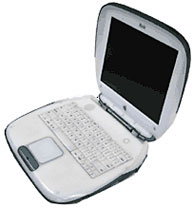 It boots and installs just
like Ubuntu, so I don't think we need to dig deep into this part. Let's
move on to the operating system itself.
It boots and installs just
like Ubuntu, so I don't think we need to dig deep into this part. Let's
move on to the operating system itself.
Even with just 192 MB of RAM, Kubuntu runs great on the iBook. Those of you who like the Windows GUI will most certainly enjoy Kubuntu. It uses KDE, which has a start menu and desktop similar to that of Windows.
You browse the Web in Konqueror, which is a great browser (Apple's Safari browser is based on it), and you can use Kmail to check your email.
Kubuntu 5.04 is a great choice for G3 systems with low memory and for those who are new to Linux. It is very easy to use, and the KDE environment is kinda lightweight, so it's definitely no Vista Ultimate-style hog.
Conclusion: Kubuntu is a great choice for low-end Macs and it also has a very user-friendly interface. However, it lacks the style and class of Ubuntu's Gnome.
Rating: 
Well, I hope this column helps you somewhat into the world of PPC Linux. It is a good choice, and distros like Ubuntu 8.04 are a fine example of how free operating systems can be really good. I'm still not a huge fan of Xubuntu; the window manager/GUI (Xfce) feels very pale and ugly and it's quite slow on a DP 533. However it remains a good choice for old Wintels and perhaps some G5s that are low on RAM.
It won't replace Mac OS X overall; but on the PowerBook, it's just
too great to pass up. 
Further Reading
Join us on Facebook, follow us on Twitter or Google+, or subscribe to our RSS news feed
If you find Carl's articles helpful, please consider making a donation to his tip jar.
Today's Links
- Mac of the Day: Power Mac G5 (Early 2005), (2005.04.27. At 2.7 GHz, the fastest G5 CPU Apple ever used, also 16x SuperDrive and it shipped with OS X 10.4 Tiger.)
- Support Low End Mac
Recent Content
About LEM Support Usage Privacy Contact
Follow Low End Mac on Twitter
Join Low End Mac on Facebook
Favorite Sites
MacSurfer
Cult of Mac
Shrine of Apple
MacInTouch
MyAppleMenu
InfoMac
The Mac Observer
Accelerate Your Mac
RetroMacCast
The Vintage Mac Museum
Deal Brothers
DealMac
Mac2Sell
Mac Driver Museum
JAG's House
System 6 Heaven
System 7 Today
the pickle's Low-End Mac FAQ
Affiliates
Amazon.com
The iTunes Store
PC Connection Express
Macgo Blu-ray Player
Parallels Desktop for Mac
eBay

