
Mac User Showcase
Max Miller, Solo Musician
- 2009.08.21 - Tip Jar
Remember Apple's old catch phrase, Think Different? It's definitely my favorite slogan of all time. When I think of Mac users, I think different. We're all different, and yet we use Macs to do what we do best.
I recently had the pleasure of interviewing a group of people who use Macs for their extraordinary work. I picked their brains about what their workflow is like, what their favorite applications are, and what their dream machines are.
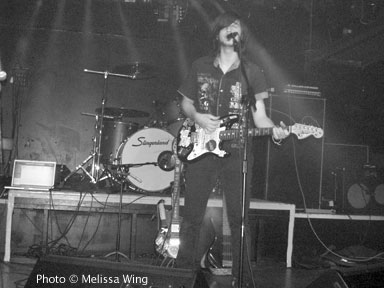
Max Miller with his MacBook Pro (on the left).
Phil Herlihy: Who are you, and what do you do?
Max Miller: My name is Max Miller, and I'm a solo alternative musician from New York.
Phil: How'd you get started as a musician?
Max: In 3rd grade, I started playing double bass in the orchestra, and about a year later everything changed. I was riding in the car with my parents when I heard the loud screams of Kurt Cobain over the radio. I had never heard anything like this before and instantly wanted to know more. I picked up electric bass from there. In the 7th grade, I met the singer of Powerman 5000, Spider One, and got his autograph. I realized how happy the signature made me, and that I wanted to be able to make people happy like that.
Phil: What made you start using a Mac?
Max: I went to this movie camp that had all Macs. I saw how it was easier to use and liked it a lot better than my PC.
Phil: Which was your first Mac?
Max: My first Mac was a "Digital Audio" G4 tower. Originally, it had OS 9. Eventually, I upgraded it to OS X. At first, it was odd to use OS X, because I didn't know much about Macs, having used a PC most of my life.
Phil: How was the transition from your PC to your new Mac?
Max: It was quick. I already had a basic idea of how to use it from the camp and quickly made it a point to learn the hotkeys and shortcuts. It was just much easier than PC. Everything was easy.
Phil: When did you get your first Mac?
Max: That was in 2004.
Phil: Did you have a favorite application?
Max: It was iPiano, which was a very poorly made version of "Musical Typing" in GarageBand. There was no real way to keep time or to quantize the beats. But I liked it because it had a huge variety of instruments and sounds to play with.
Phil: What Mac do you use now?
Max: 15" MacBook Pro from 2006.
Phil: Do you have any other Apple products?
Max: I have an iPhone 3G.
Phil: Do you prefer Macs to PCs?
Max: Absolutely.
Phil: Why?
Max: The user interface is much more user friendly. It crashes less frequently, and it can run Windows anyway.
Phil: How have Macs helped you in your music?
Max: Well, I recorded my entire first album completely using iPiano for beats and GarageBand for all layers of vocals and instruments. And I released that album to the iTunes Music Store, which was a good way to spread the word about it. Since then, I've started to use other applications like iDrum, ProTools, Ableton Live! as well as using BootCamp for PC-only programs like Fruity Loops.
In the live setting, I'll use either my MacBook Pro or my iPhone to play background beats and bass lines through the sound system to bring a full band sound to my solo stage act.
I use an app on my iPhone called GuitarToolkit, which I use before every show and recording, as a tuner. And I recently started using another app called FourTrack, which acts as a fully-functioning four track recorder for the iPhone.
Phil: Do you have a favorite feature of OS X?
Max: My favorite feature of OS X is Spotlight, because I write a lot of lyrics on my computer, and sometimes they tend to get lost over time. One day if I remember just one lyric, I can Spotlight the entire song and pick it up again.
Phil: Is there one thing you'd change about your Mac, if you could?
Max: Nothing really comes to mind. I've had it for three years, and it works just as well as I need it to. And it has always been able to do what I needed it to do.
Phil: How do you go about creating music on your Mac?
Max: Well, usually if I have a guitar riff in mind, I'll open up iDrum and create a simple beat. Then I import that into ProTools and then start adding the rest of layers of the song. Usually it'll start with the bass line and then move up to the guitar track before finally laying down the vocals.
After the basic parts are down, I'll start making random layers and recording whatever comes to mind. I then save the stuff that I like and delete the stuff that I don't.
Phil: Where can we check out your music, Max?
Max: You can go to MaxMillerMakesMusic.com to learn more about me and download my new album for free! You can also follow me on Twitter.
Phil: Thanks for your time, Max.

Join us on Facebook, follow us on Twitter or Google+, or subscribe to our RSS news feed
Today's Links
- Mac of the Day: Power Mac G5 (Early 2005), (2005.04.27. At 2.7 GHz, the fastest G5 CPU Apple ever used, also 16x SuperDrive and it shipped with OS X 10.4 Tiger.)
- Support Low End Mac
Recent Content
About LEM Support Usage Privacy Contact
Follow Low End Mac on Twitter
Join Low End Mac on Facebook
Favorite Sites
MacSurfer
Cult of Mac
Shrine of Apple
MacInTouch
MyAppleMenu
InfoMac
The Mac Observer
Accelerate Your Mac
RetroMacCast
The Vintage Mac Museum
Deal Brothers
DealMac
Mac2Sell
Mac Driver Museum
JAG's House
System 6 Heaven
System 7 Today
the pickle's Low-End Mac FAQ
Affiliates
Amazon.com
The iTunes Store
PC Connection Express
Macgo Blu-ray Player
Parallels Desktop for Mac
eBay

