
Stop the Noiz
Introduction to Hard Drives
Frank Fox - 2009.04.16 - Tip Jar
Every computer needs to remember things, even Macs. Places to store information, data, and applications are everywhere on computers. Information can be stored on hard drives, in memory chips, in caches, and in buffers.
Hard drives, flash drives, and optical drives are used for bulk storage. They are like a bookshelf full of books. There is plenty of information, but it can take a while to look up what book you need, find it on the shelf, locate the page you need, and then read the information.
The basic tradeoff with hard drives and optical drives is that the more data they hold, the longer it can take to find the information you need.
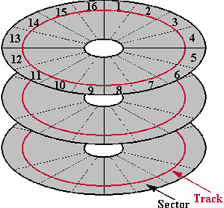 The way to fix the slowdown from larger hard drives
is to reduce the time it takes to find the information. Unlike a
bookcase, which is vertical, hard drives are round, so the information
is written in circles on disks. Instead of running faster up and down a
ladder to find a book, a hard drive can be spun faster to get to the
data more quickly.
The way to fix the slowdown from larger hard drives
is to reduce the time it takes to find the information. Unlike a
bookcase, which is vertical, hard drives are round, so the information
is written in circles on disks. Instead of running faster up and down a
ladder to find a book, a hard drive can be spun faster to get to the
data more quickly.
RPM and Latency
Most notebook hard drives today spin at 5400 rpm, while a desktop drive typically spins at 7200 rpm.
The technical term for talking about how long it takes to find something is latency. For faster drives, the latency is smaller (for a 7200 rpm drive, the average latency might be 4.2 ms, and for a 10,000 rpm drive, perhaps only 3.0 ms).
Netbooks and iPods have the slowest hard drives, regular notebooks are bit faster, desktops still faster, and servers often have the fastest drives of all. Faster drives require more battery power, which can also make them noisier and hotter. There are tradeoffs in speeding up the hard drive.
Seek Time
In addition to speed, there's the issue of seek time, the time it takes to move the read/write head to the correct data track. Shorter is better.
A few other factors can affect how fast a hard drive provides the information you need, but spindle speed/latency and seek time are the major components. Picking a drive with high spindle speeds and low seek time will put you on the right track to finding a fast drive.
Buffers and Caches
The hard drive is mechanical and slow compared to an all electronic solution. Hard drive manufactures know this and are putting RAM in the hard drive to cache data.
The idea is that when a computer sends a request, the drive reads the whole "page" and stores it in the cache just in case a second request comes looking for more information from that same page. A really big cache can hold not just one or several pages, but a whole book. This works great until the request for a different page comes though and the search starts all over.
Most of this is also true for CDs and DVDs. They are spinning disks, and the information has to be searched from around the surface. The optical disc (either CD or DVD) spins far slower than a hard drive, so reading the information takes longer. An optical drive's speed is usually listed as a multiple of base speed - 4x, 8x, etc. That's why we don't use the install disc to run the computer, except during install. It would be just too slow.
Serial ATA
Today most hard drives talk to the computer using a SATA interface. The maximum speed that they can move data is based on the type of interface your computer uses. The original SATA specification was 150 MB/sec, now it is mostly 300 MB/sec, and the new speed just coming out is 600 MB/sec. But even though the maximum speed is that high, it doesn't mean that your hard drive can deliver the information that fast.
Here's a link a PDF with information on several models of Seagate Barracuda drives. Looking at the list, we see that although each of these is a 300 MB/sec drive, the sustained rate is much less - 125 MB/sec. And if you have to seek all over your drive for bits of information, your transfer rate will slow even more.
Solid State Drives
The hard drive replacement may be solid-state drives (SSD). These are like jumbo sized flash drives, generally with 64 GB or more RAM. Since these are electronic, not mechanical, some can read information at the maximum transfer rate of SATA. However, writing information is slower. When Ars Technica tested the MacBook Air with a SSD versus a hard drive, the SSD was better, but not by as much as you might expect.
A company called Fusion-IO recently announced that its SSD would come on a PCI Express card for a major leap in performance.
- Sustained read bandwidth: 1500 MB/sec (32k packet size)
- Sustained write bandwidth: 1400 MB/sec (32k packet size)
- Read IOPS: 186,000 (4k packet size)
- Write IOPS: 167,000 (4k packet size)
- Latency < 50 µsec
That is five times faster than today's typical SATA 300 configuration. These cards will not be cheap at around $30 per GB, but for people who make their living moving lots of data, it may be worth the cost. In time and with more competition, these prices will drop, and SSD may eventually become more common on computers.
Hard drives still have the lead over SSD in capacity - up to 1.5 TB and growing. They also come in a range of sizes. Everything from 1.8" drives for iPods and some netbooks to 2.5" drives for laptops and 3.5" drives for desktop computers. A few bigger and smaller sizes exist, but these are the most common ones.
Be Sure to Backup
One important thing about any hard drive: It will all fail at some time. Make plans to deal with this. You should back up any important data. You should have a recovery disk (CD, DVD, external hard drive) so you can start your computer when there is a failure.
Trust no single solution to be fail-proof. If you have data that is particularly precious, like photographs, plan for recovery even if your computer and hard drive burn in a fire with backup copies at another location or on the Internet. Once the data becomes damaged, recovery solutions can be very expensive, so be smart and plan ahead.
The final word on hard drives is to buy them as big and as fast as
you can - but don't forget about reliability. That's why I pay a little
extra for a better brand (my preference is Seagate) and use a RAID
setup for protecting my most important data.

Further Reading on Backup
Join us on Facebook, follow us on Twitter or Google+, or subscribe to our RSS news feed
Today's Links
- Mac of the Day: PowerBook 500 Series, introduced 1994.05.16. 'Blackbird' includes a 25 to 33 MHz 68040 along with smart batteries and grayscale or color displays.
- Support Low End Mac
Recent Content
About LEM Support Usage Privacy Contact
Follow Low End Mac on Twitter
Join Low End Mac on Facebook
Favorite Sites
MacSurfer
Cult of Mac
Shrine of Apple
MacInTouch
MyAppleMenu
InfoMac
The Mac Observer
Accelerate Your Mac
RetroMacCast
The Vintage Mac Museum
Deal Brothers
DealMac
Mac2Sell
Mac Driver Museum
JAG's House
System 6 Heaven
System 7 Today
the pickle's Low-End Mac FAQ
Affiliates
Amazon.com
The iTunes Store
PC Connection Express
Macgo Blu-ray Player
Parallels Desktop for Mac
eBay

