
Zis Mac
Alan Zisman on the Mac
QuickTime X in Snow Leopard Imports, Trims, and Publishes Video Quickly and Easily
- 2009.11.04 - Tip Jar
Follow Alan Zisman on Twitter.
"Snow Leopard" (Mac OS X 10.6) has been, to a large extent, marketed by Apple with a lowering of expectations - instead of banners proclaiming "hundreds of new features", it's promoted more as a a clean-up/speed-up of OS X 10.5 "Leopard", offering better performance while taking up less hard drive space - but only for owners of Intel Macs.
Along with the modest expectations, Snow Leopard comes at a modest price - US$29 for a single-user upgrade edition, compared to US$129 for most other OS X versions.
But along with tightening the code and removing PowerPC code, Apple has quietly upgraded some Snow Leopard features. In Preview in Snow Leopard Supports Scanners and Screen Shots, I looked at few handy new capabilities of Snow Leopard's Preview app.
Snow Leopard's version of Apple's long-time QuickTime player has also evolved. Now named QuickTime X, it gets a new icon and a new look. Apple calls it "a major leap forward" that will give users "enhanced playback, greater efficiency, and higher quality". Being built on various core OS X technologies, Apple suggests the new version will launch up to 2.4 times faster than its Leopard predecessor.
QuickTime X also gained several features that Apple previously kept out of the free QuickTime viewer, reserving them for its $29 QuickTime Pro upgrade version (coincidentally, the same price as the single user Snow Leopard upgrade). You can now make an audio, video, or screen recording using your Mac's built-in hardware right from the QuickTime File menu using the iSight camera built-into many Mac models, for instance.
More useful to me is the new ability to trim movies.
I play in a couple of bands, and I've posted video clips of performances onto YouTube. I may video a set of 8 to 10 songs using a Creative Vado (see Creative's Vado Pocket Camcorders Now Work with Macs), Flip Mino, or Kodak Zi8 pocket camcorder. Recording the video is pretty straightforward.
Up until QuickTime X, though, the next steps have been time consuming.
Using iMovie, for instance, the first step is to import the hour or so of video into the program. iMovie then analyses the file, breaking it up into seemingly hundreds of individual scenes - and this takes quite a while.
Then I have to locate the beginning and end of a song, selecting it out from the larger file. After I've done that, I might add titles, fade in and out, and the beginning and end - a fairly straightforward and quick process.
But then, to create a video clip of just that single song, iMovie needs to render the video. On my MacBook, it may take half-an-hour or so to render a 5 minute video clip, giving me a file I can (finally) upload to YouTube.
While I don't need to be sitting at the keyboard for much of the time, it has taken the better part of a day to get an hour's performance imported, edited, rendered, and uploaded. (I can be rendering a second song while the first song is being uploaded).
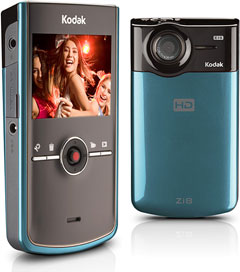 Enter QuickTime X. On Halloween, I filmed Mojo Zydeco, a band with whom I play
accordion, using a Zi8
pocket camcorder on loan to me from Kodak. (The Zi8 is the first
pocket camcorder to record in 1080p hi-def and is, in general, quite a
nice - and affordable - little gadget.) It saves video files in
QuickTime MOV format.
Enter QuickTime X. On Halloween, I filmed Mojo Zydeco, a band with whom I play
accordion, using a Zi8
pocket camcorder on loan to me from Kodak. (The Zi8 is the first
pocket camcorder to record in 1080p hi-def and is, in general, quite a
nice - and affordable - little gadget.) It saves video files in
QuickTime MOV format.
QuickTime X Is Fast
Connecting the Zi8 to my Mac by its built-in USB connector, its SD memory card (not included in the package) appears as an external drive; double-clicking the saved video clip opens it up in QuickTime X. Unlike the tedious process of importing into iMovie, the 2 GB video clip opens almost instantly in QuickTime X. It's also a much quicker process to quickly scroll through to find the beginning and end of a song; I noted the times on a piece of scrap paper.
New to QuickTime X: the Trim command in the Edit menu. Choosing it adds a bar across the lower part of the window with a little red line showing where in the clip you were playing. As you drag from the left or right ends to trim the clip, you get an indication of your timing, letting you find the proper points to start and stop the clip.

A high-def video clip in QuickTime X (reduced to half actual size).
Again, quick and reasonably straightforward.
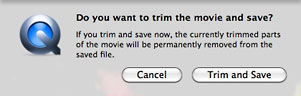 Once you've
trimmed your clip, it's time to save. You'll get a dire-looking
warning: "If you trim and save now, the currently trimmed parts of the
movie will be permanently removed from the saved file".
Once you've
trimmed your clip, it's time to save. You'll get a dire-looking
warning: "If you trim and save now, the currently trimmed parts of the
movie will be permanently removed from the saved file".
Not as big a deal as it may sound. Just give your trimmed file a new file name - that way, the original file remains intact.
Unlike iMovie, which needs a time-consuming process to render your file before saving it, saving the song in QuickTime X just takes a few seconds. No rendering required.
Close the saved file, reopen the original file, and go on to the next song.
Using QuickTime X, I was able to create my set of ten individual video clips from the performance in about the same time it would have taken iMovie to render just one of the clips. Wow!
Doesn't Replace iMovie
I could have done more with iMovie - using QuickTime X, I was unable to add titles to the clips, adding the song name and the band name in my best MTV style, for instance. But for the time I saved, it was worth it.
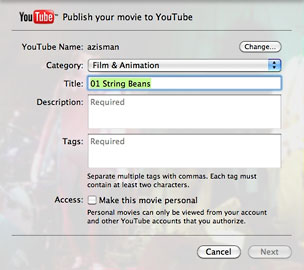 QuickTime X also gains a Share menu, letting you send the
newly-trimmed video clip directly to iTunes, your MobileMe Gallery
(assuming you've got a MobileMe account - I don't), or to YouTube.
Enter your YouTube user name and password, and you can enter the
relevent data and send the clip directly from QuickTime X.
QuickTime X also gains a Share menu, letting you send the
newly-trimmed video clip directly to iTunes, your MobileMe Gallery
(assuming you've got a MobileMe account - I don't), or to YouTube.
Enter your YouTube user name and password, and you can enter the
relevent data and send the clip directly from QuickTime X.
I didn't do it that way - that would let me send one clip at a time, and despite QuickTime X saving me a lot of time creating the clips, the time to upload them remains the same. Instead, I used YouTube's online bulk upload feature, which lets me queue up to ten clips, uploading them one after the other. I let it run overnight, and in the morning it was done.
(You want to see the clips? Go to YouTube and search for "Zydeco Crescent Beach". How's that for blatant self-promotion? I'm the guy in the "Desert Prince" costume - it was Halloween, after all).
For this sort of quick-and-dirty video project, QuickTime X's trim feature is a huge time saver.
Only in Snow Leopard. 
Join us on Facebook, follow us on Twitter or Google+, or subscribe to our RSS news feed
Alan Zisman is Mac-using teacher and technology writer based in Vancouver, BC, Canada. Many of his articles are available on his website, www.zisman.ca. If you find Alan's articles helpful, please consider making a donation to his tip jar.
Today's Links
- Mac of the Day: PowerBook 500 Series, introduced 1994.05.16. 'Blackbird' includes a 25 to 33 MHz 68040 along with smart batteries and grayscale or color displays.
- Support Low End Mac
Recent Content
About LEM Support Usage Privacy Contact
Follow Low End Mac on Twitter
Join Low End Mac on Facebook
Favorite Sites
MacSurfer
Cult of Mac
Shrine of Apple
MacInTouch
MyAppleMenu
InfoMac
The Mac Observer
Accelerate Your Mac
RetroMacCast
The Vintage Mac Museum
Deal Brothers
DealMac
Mac2Sell
Mac Driver Museum
JAG's House
System 6 Heaven
System 7 Today
the pickle's Low-End Mac FAQ
Affiliates
Amazon.com
The iTunes Store
PC Connection Express
Macgo Blu-ray Player
Parallels Desktop for Mac
eBay

