
Zis Mac
Alan Zisman on the Mac
New MacBook Trackpad Takes Some Getting Used To
- 2008.12.22 - Tip Jar
Follow Alan Zisman on Twitter.
Apple released new MacBook and MacBook Pro notebook models in October 2008. The new models follow up on the earlier MacBook Air with solid, carved aluminum bodies and get in line with the iMac styling, with a glossy black rectangle surrounding the display.
As with past product introductions, Apple cleverly manages to make its own older models look old-hat - even though Low End Mac has done a good job of pointing out the "value equation" comparing on sale end-of-production older models to the new models (and a 13" white plastic MacBook remains on sale as the low-end model).
Less Options
While most users seem to be pleased with the looks of the new models, there have been complaints; some users prefer matte displays to the highly reflective glossy screens that are now the only option. And while retaining a FireWire 800 port on the higher-priced MacBook Pro models, Apple dropped FireWire entirely from the new-style MacBooks - something that it had earlier done on the MacBook Air.
Queried about this, Steve Jobs replied that pretty much all current-model consumer-level camcorders now use USB connectors, making FireWire unnecessary on a notebook aimed at the consumer market. That's true, but it ignores that fact that many nonprofessional Mac owners have invested in recent model, FireWire-equipped camcorders, hard drives, and the like - and may be more reluctant to upgrade to the new MacBook line if it makes all their peripheral hardware unusable.
 The New Trackpad
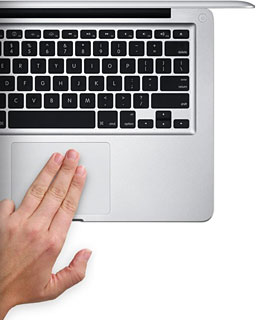
The new notebook models - both MacBook and MacBook Pro - also feature a new style trackpad, which lacks the traditional separate button. On Apple's website describing the new MacBook, they note: "amazing new trackpad doubles as a button - just press down anywhere and consider it clicked. No separate button means there's 39 percent more room for your fingers to move on the silky glass surface."
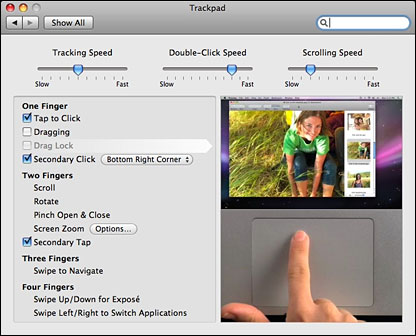
Moreover, unlike previous Apple trackpads (but like Apple's so-called Mighty Mouse), it can be configured for right-clicking - just open System Preferences and go to either the Keyboard/Mouse preference or, starting with Mac OS X 10.5.6, the new Trackpad preference, and enable "Secondary Click". When you do that, the lower right-hand corner of the trackpad acts as a right-mouse button.
 Very cool.
The glass surfaced trackpad feels smooth and responsive, and the ultra-large surface makes it nice for the various multitouch features that are now available, though supported on only a few Mac applications. (Note: these multitouch features are also implemented on older Mac laptop models, though to varying degrees; they're not limited to the new Fall 2008 releases. I've gotten into the habit of using two fingers to scroll even on my old 12" PowerBook G4, for instance).
But having treated myself to a new, aluminum MacBook, I'm finding that it's taking me a while to get used to the new trackpad. It's requiring me to break old habits - and is making it harder to move between my new MacBook and other Mac and PC laptops.
Track Different
Web pages, for instance, magically get larger or smaller text when using the new trackpad. Contextual menus pop up unexpectedly, and other seemingly random mousing around is taking place.
Here's what I think is going on. When I'm typing (like right now while writing this article), my natural hand position has my thumbs over the space bar, while my other fingers move around the keyboard. After years and years of computing, this is a very natural hand position.
When I need to use the mouse, it's simple to just move my right hand down to the trackpad while keeping the same basic hand position. My thumb wants to rest on the trackpad button for clicking, while my index finger moves around the trackpad, in much the way it easily moves around the keyboard.
But on the new MacBook, resting my thumb on the clickable area of the trackpad as if it was a physical trackpad button causes problems. The system correctly reads that I've got two fingers resting on the trackpad . . . so if I move the pointer with my index finger, it assumes that I'm making a pinching motion.
The good news is that most software currently ignores this multitouch gesture. But Safari interprets it as a command to zoom in or out, depending on which direction my index finger is moving. Text and images enlarge or shrink.
Similarly, the optional two-fingered Secondary Tap too often misreads my finger motions. Hence the undesired contextual menus.
I'm trying to learn to keep my thumb in the air when I'm mousing around the trackpad, only lowering it when I actually need to click. But that's less comfortable than letting my thumb rest on a physical trackpad button.
Problems with Boot Camp
That's not the end of the story. I've installed Windows XP and Ubuntu Linux onto the MacBook using Boot Camp. Neither of them are entirely happy with the new trackpad. Neither recognize right-clicks in that area of the trackpad, for instance, and even standard left-clicks seem a bit iffy. An Apple Knowledge Base article confirms these sorts of problems, noting that users may find the cursor fails to select the intended item, shakes slightly, or "unexpectedly release" when dragging. Another article notes that right-click support may be missing even when enabled.
Apple has released a "Multi-Track Update for Windows" to deal with both of these problem areas, though installing it didn't seem to make any difference that I could notice on my system. I suppose I should just plug in a mouse when booting my MacBook into Windows or Ubuntu. (I also installed the new Parallels Desktop 4.0. The good news is that when I start up these same Windows and Ubuntu installations as virtual sessions, the secondary click features work just fine.)
What Apple refers to as "the amazing new trackpad" is stylish and
cool . . . but it's not without problems - both for Boot Camp
users and even when working within OS X. I'm sure I'm not the only
user of a new MacBook or MacBook Pro who's having to relearn old habits
in order to make it work smoothly.

Join us on Facebook, follow us on Twitter or Google+, or subscribe to our RSS news feed
Alan Zisman is Mac-using teacher and technology writer based in Vancouver, BC, Canada. Many of his articles are available on his website, www.zisman.ca. If you find Alan's articles helpful, please consider making a donation to his tip jar.
Today's Links
- Mac of the Day: PowerBook 500 Series, introduced 1994.05.16. 'Blackbird' includes a 25 to 33 MHz 68040 along with smart batteries and grayscale or color displays.
- Support Low End Mac
Recent Content
About LEM Support Usage Privacy Contact
Follow Low End Mac on Twitter
Join Low End Mac on Facebook
Favorite Sites
MacSurfer
Cult of Mac
Shrine of Apple
MacInTouch
MyAppleMenu
InfoMac
The Mac Observer
Accelerate Your Mac
RetroMacCast
The Vintage Mac Museum
Deal Brothers
DealMac
Mac2Sell
Mac Driver Museum
JAG's House
System 6 Heaven
System 7 Today
the pickle's Low-End Mac FAQ
Affiliates
Amazon.com
The iTunes Store
PC Connection Express
Macgo Blu-ray Player
Parallels Desktop for Mac
eBay

