
Quicklinks: · Power Macs · 'Books · Early Macs · Week's Best Deals · Best Buys · OS Downloads

X-Basics

Using Jaguar's Finder for FTP

- 2003.02.11

Low End Mac Reader Specials

Memory To Go Special: MacPro 8 Core Memory 4GB kit $192 / 2GB kit $109. MacBook Pro / MacMini / iMac Intel Core2 DUO 2GB $44 1GB $23--Free shipping available.

Download Typestyler, still the Ultimate Styling Tool for Internet, Print and Video Graphics. Works great in Classic with a Native OS X Version on the way. Free Tryout: www.typestyler.com

LA Computer Company: LA Computer Company: Specials on AppleCare, Apple Displays, MacBooks, iMac's, MacBook Pros, Laptop and iPod accessories and more. Apple A/C Adapters for laptops starting at $25.00 Call 1-800-941-7654 or Click Here.

OtherWorld Computing: Better than new Batteries for iPods NewerTech NuPower, up to 20+ Hours! Complete with Tools from $19.99. Online videos. Professional installation available.

Mac users can finally play Party Poker for Mac. Not only that, they can also learn how to play PokerStars for Mac.

Laptop Hardware Provided by TechRestore - Overnight Mac & iPod Repairs.

Compare products like desktop computers, laptops, and LCD TVs side by side! All the information and reviews to make the best purchasing decision for a new cell phone GPS products or MP3 players. The Ciao network makes searching products easy for you.

Memory For New Intel Core2 DUO MacBooks, MacBook Pro, MacMini & iMacs" 4GB Kit $80, 3GB Kit $60, 2GB Kit $40, 1GB $20. Click to Maximize your Macs...

FTP is an old Unix service that has a long history of being used to transfer files. In fact, email messages were originally text files transferred via FTP.

Jaguar's Go/Connect to Server menu makes traditional FTP software (programs like Fetch) unnecessary for many people. Here's how to do it.
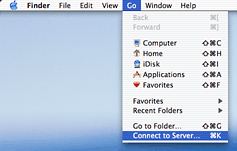
Connect to Server

In the Finder/Go/Connect to Server dialogue, if you type

ftp://domain_name

you'll be connected to an anonymous ftp server (if available). This might be just what you need. You'll be asked for authentication with user-name and password if that domain doesn't offer an anonymous ftp service.

My web host, however, maintains an optional anonymous ftp service-- so if I type ftp://zisman.ca, I go there, rather than to my (password-protected) folders, which is where I want to go.
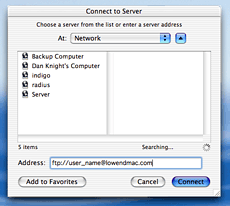
Connect to Server

If instead, you type

ftp://user_name@domain_name

you'll get a log-in prompt, with the user name already filled in, waiting for you to enter the password.

And if you type:

ftp://user_name:password@domain_name

you'll go right in with no log-in needed (assuming you typed everything correctly!). Of course, doing that, anyone looking over your shoulder can read your password.

Thanks to Jesse Feiler, author of Osborne Books' Mac OS X Jaguar: The Complete Reference, for help in working this out.

Unix fans will notice that there's nothing mysterious about this; it's all standard Unix FTP syntax.

Once connected, a network drive icon will appear on the desktop; opening it allows you to copy files to your Mac from the remote FTP host. However, it will not let you upload files to the remote server; for that you will still need software. Of course, performance will be much more sluggish than working on a local system or on a local area network.

Some may prefer to use the Terminal's command line FTP service. That works fine, you just need to know a little bit more about what you're doing! LEM

Recent X-Basics Columns

Recent Content on Low End Mac

<go to the X-Basics index>

Channels
 Power Macs
 iMac Channel
 iBook/PowerBook
 MacInSchool
Computer Profiles
 iMac
 Power Mac
 PowerBook/iBook
 Performas
 Mac Clones
 Older Macs
 LisaNeXT
Editorial Archive
Mac Daniel's Advice
Email Lists
LEMchat (uses AIM)
Online Tech Journal
Consumer
 advice, reviews
 guides, deals
Software
Apple History
Best of the Web
 Best of the Mac Web surveys
Miscellaneous Links
 Best Used Mac Buys
 Used Mac Dealers
 Video Cards
 Mac OS X
 Mac Linux
 Macspeak
 RAM Upgrades
About Low End Mac
Site Contacts

Open Link

Support LEM

Affiliates

The Apple Store
.mac
iTunes Store
Club Mac
MacMall
MacResQ
ExperCom
eBay
Amazon.com
PayPal
PCMall
PC Zone
Crucial Memory

Our advertising is handled by BackBeat Media. For detailed price quotes and advertising information, please contactat BackBeat Media (646-546-5194). This number is for advertising only.

Entire Low End Mac website copyright ©1997-2008 by Cobweb Publishing, Inc., unless otherwise noted. All rights reserved. Advice presented in good faith, but what works for one may not work for all. Please report errors to .
  LINKS: We allow and encourage links to any public page as long as the linked page does not appear within a frame that prevents bookmarking it.
  Access our RSS news feed at http://lowendmac.com/feed.xml.
  Email may be published at our discretion; email addresses will not be published without permission, and we will encrypt them in hopes of avoiding spammers. If you prefer your message not be published, mark it "not for publication." Letters may be edited for length, context, and to match house style.
  PRIVACY: We don't collect personal information unless you explicitly provide it. For more details, see our Terms of Use.
  Low End Mac is an independent publication and has not been authorized, sponsored, or otherwise approved by Apple Inc. Apple, the Apple logo, Macintosh, iBook, iMac, eMac, iPod, PowerBook, MacBook, Mac Pro, Apple TV, and AirPort are registered trademarks of Apple Inc. Additional company and product names may be trademarks or registered trademarks and are hereby acknowledged.

