

Mac OS X Freeware I Wouldn't Want To Be Without, and Free Tech Support for OS X
Beverly Woods - 2005.05.11 - Tip Jar
Wow. A big thank you to all the very helpful, inventive, and knowledgeable readers who wrote in after my last Acoustic Mac column. Perhaps it's no surprise that the most popular category in OS X freeware is utilities. The hands-down reader favorite in nominated freeware was (drum roll please) Carbon Copy Cloner.
One big change between OS X and previous Mac operating systems is that in OS X you cannot simply drag a System Folder onto another drive to create a bootable backup. Carbon Copy Cloner makes it possible to clone your hard drive to another drive and end up with a functional copy. Mike Bombich deserves many thanks (and donations, if you're so inclined) for this and other software he has written.
At this date, CCC is not yet compatible with Tiger.
Speaking of backup, there is also SilverKeeper, a very useful backup utility, provided as freeware by LaCie.
AppleJack
Now I would like to mention a less well known utility that I think is right up there in the "must have" category. It is called AppleJack, and it is often the first thing I install on any computer I am working with that runs OS X.
OS X reminds me of that little girl with the curl in the nursery rhyme. When it's good, it's very good indeed, and when it's bad, it's horrid.
The functions in Disk Utility will take care of many problems, but what if your system is not working well enough for you to open and run Disk Utility or other utility programs? Further, Disk Utility will tell you "To repair or verify the startup disk, boot from the Mac OS X Install CD and select Disk Utility from the Installer menu."
To most effectively deal with serious trouble in OS X, you need a place to work from outside of the startup disk. I have a FireWire backup drive and discovered early on that in case of problems I could boot my Pismo from that and fix just about anything that way.
But not every Mac will boot from a FireWire drive. I have OS X 10.3 installed on several beige G3s with the help of another wonderful piece of freeware, XPostFacto. They won't boot from a FireWire drive.
Your OS X install disks can serve this function, but what if they are not handy at your moment of crisis? As a PowerBook user, I don't always want to have my FireWire drive or my install disks with me everywhere I go.
Enter AppleJack. Once you have installed it (very easy with the latest version, which has a more standard installer than earlier versions) all you have to remember is that in times of trouble, you can reboot in Single User mode. You get there by holding down the Command and S keys at startup.
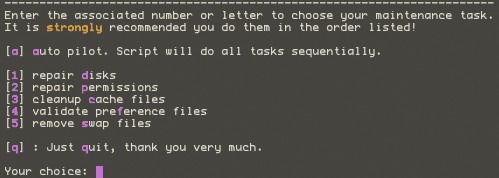
Single User mode is one of those places that looks a little scary if you haven't been there before, consisting of a black screen with all information presented in lines of white text and all interaction done via command line. Nothing to fear with AppleJack - it will prompt you to enter the relevant commands, which are short and sweet. To use AppleJack, type 'applejack' and hit the return key.
AppleJack can do a number of things, and one command will make it do all of them if you like. All commands are listed immediately, so you don't have to remember them either. Here's what AppleJack can do:
- repair disks
- repair permissions
- cleanup cache files
- validate preferences files
- remove swap files
It's important to note that you should use AppleJack only as directed. For more in depth coverage of AppleJack and what it does, see Troubleshooting Tools: AppleJack by Dan Frakes at MacFixIt. If you are interested in user reports on AppleJack, see User Reports on AppleJack at Accelerate Your Mac.
AppleJack 1.4 has just been released, a version that works with Tiger.
Free OS X Tech Support
Finally, I want to mention a tech support service that LEM readers may be interested in. I really like the model of open source, and MacOSX.com applies this model to Mac tech support. Anyone can post a question relating to Mac OS X, including problems with third party hardware and software (there are also some questions about OS 9 occasionally).
Tech support questions are answered by volunteers. As the site points out, you need not be an expert to volunteer; there are questions of all sorts, and even you, gentle reader, may know the answers to some of them. Other volunteer techs may comment on some of your answers, so as a tech support volunteer you may learn more in the process of providing help to others.
I am a big fan of LEM email lists and often give and receive technical advice there, but sometimes a question goes unanswered on an email list - maybe no one there knows the answer or has time to write an answer. The help ticket system at MacOSX.com enables your request to stay visible until it is resolved.
There are plenty of questions right now; the biggest need at the moment is for more tech support volunteers. I encourage anyone who feels able to do so to register as a volunteer.
There is no charge for the service, but if you find it useful, donations are encouraged. The same applies to the software mentioned above: if you find it useful, please donate to the authors to make the next round of improvements possible.
We've only scratched the surface of useful OS X utilities here,
so stay tuned for the next installment! 
About LEM Support Usage Privacy Contact
Follow Low End Mac on Twitter
Join Low End Mac on Facebook
Favorite Sites
MacSurfer
Cult of Mac
Shrine of Apple
MacInTouch
MyAppleMenu
InfoMac
The Mac Observer
Accelerate Your Mac
RetroMacCast
The Vintage Mac Museum
Deal Brothers
DealMac
Mac2Sell
Mac Driver Museum
JAG's House
System 6 Heaven
System 7 Today
the pickle's Low-End Mac FAQ
Affiliates
Amazon.com
The iTunes Store
PC Connection Express
Macgo Blu-ray Player
Parallels Desktop for Mac
eBay

