
Mac USB & FireWire
Logitech Cordless Elite Duo
Wireless USB Mouse and Keyboard
Dan Knight - 2002.10.10
The latest thing in laptops is using them as desktops. Devices such as the Lapvantage Dome and forthcoming Oyster Laptop Dock let you move your 'Book off the desk to position the screen at a more comfortable, more ergonomically correct height.
But they also ruin the idea of typing on your 'Book's keyboard or using its trackpad. (With the Oyster, you'd also lose access to the DVD, CD-RW, or Combo drive in a TiBook.) Using a laptop stand requires an additional investment in a mouse and keyboard.
Looking at recent reviews on other sites, the Logitech Cordless Elite Duo sounded very inviting. Road Warrior Charles W. Moore compares the combo to a Mercedes or BMW, so the last time I was at CompUSA, I had to check it out.
I was pleasantly surprised to see how many Logitech keyboards come with Apple markings: the splat and open apple on the command key, the alt/option label on what is also the Windows key. The number of USB and wireless keyboards was impressive. I just had to see how they felt.
Logitech seems to make keyboards in three qualities: cheap, okay, and very nice. The least expensive keyboards have a mushy feel to them, while the mid-priced model is of average quality. The top-end keyboard, though - that had great keyboard action.
Looking at the price of a USB keyboard, a wireless keyboard, and the combination that was on sale (US$80 after rebates), I elected to go with the Cordless Elite Duo. No more USB cables snaking from my TiBook to my mouse. No more USB cable tangling things when I want to put a keyboard in my lap.
Setup
In addition to the mouse and keyboard, the box contains a receiver, four AA batteries, and a wrist rest. The keyboard and mouse each use two AA batteries for power, and they should last for months upon months before needing replacement. The receiver draws its power from the USB port. (Those using PCs or Motorola StarMax computers will be happy to note that the receiver also has PS/2 mouse and keyboard connectors.)
Of course, before I could use this, I had to clear my cluttered desk, put the TiBook on a stand, and then plug in the receiver. I had to read the Read Me to discover the procedure for synching the mouse and keyboard to the receiver. It's not difficult; it just has to be done in the right order. Push the connect button on the receiver and then push the red connect buttons on the bottom of the mouse and keyboard.
- As for the stand, my TiBook is at a nearly perfect height sitting on a Fellowes monitor stand (6.5") with my Podium CoolPad on top of that. The screen is just beyond my fingertips, and reading at this range is very comfortable. My external CD burner sits on a shelf beneath the TiBook. Exactly what works for your desk, your height, and your eyes is something only you can determine.
Software
Presto, it works. No drivers necessary - or so it seemed at first. Then I tried to use the command key. I quickly discovered that this is first and foremost a PC keyboard. As with all PC keyboards, cmd is mapped to the Windows key and alt/option to the Alt key. That's just the opposite of what Mac users are used to - and the opposite of the way the keys are marked.
The keycaps are only correctly marked when you use Logitech's Mac drivers (their Control Center software), and those drivers only work in Mac OS X. That was a rude surprise, because I spend most of my time working in Mac OS 9.2.2 - not in OS X and not in Classic Mode.
If this is the only keyboard you're using with your Mac (and it probably won't be if you're using it with a 'Book, which also has a built in keyboard), ResExcellence explains how to use ResEdit to hack the Mac OS to make the keys work as they should.
Logitech strongly recommends Mac OS 9.0 and later for those using their MouseWare driver, which is strictly a mouse driver. MouseWare only supports two things: the mouse and the scroll wheel on the keyboard (see below).
The mouse drivers work beautifully in OS 9 and X. I can program the right and left mouse buttons, the speed of the scroll wheel, the behavior of the scroll wheel button, and the thumb button. (Lefties note that this is definitely a right handed mouse.)
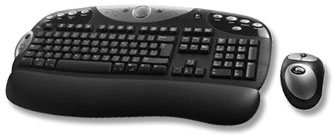
As you look at the photo, notice how many extra buttons and controls the keyboard has. I haven't yet figured out what they all do, but here's the quick tour starting to the left of the caps lock key and going clockwise:
- Go button with icon of a runner
- Silver button with arrow pointing left. I may program this as a back button for my browsers.
- A scroll wheel right on the keyboard. Nice. Very nice.
- The black User button with a crescent moon icon on it. In the Windows world, this is the sleep and wakeup button. On the Mac, it works like the power key.
- F-Lock
- Messenger/SMS, which launches Fire when I'm using OS X.
- Webcam
- In the silver media section: rewind and fast forward, a Media button with a picture of a remote control, a volume knob (haven't tried it yet), a Mute button, a pause/play button, and a stop button. I'm guessing these would work very nicely with iTunes and the QuickTime Player.
- iTouch
- Search, which I will probably link to Sherlock when not in a browser and Google when in a browser.
- My Home
- Shopping
- Favorites
The F1 through F12 keys are marked with Windows standards: New, Reply, Forward, Send, Undo, Redo, Print, Save, My Com, My Doc, My Pic, and My Music. The Mac recognizes them as standard function keys, and I have the first four mapped to the traditional Mac undo, cut, copy, and paste using QuicKeys in OS 9.
Except for the User/power button, none of the extra keys do anything in Mac OS 9, nor are they accessible using a program such as QuicKeys.
I've emailed Logitech to express my disappointment that they don't have keyboard drivers for the classic Mac OS. That means I can't use any of the extra keys and controls, which isn't a big deal, but also that the cmd and opt keys are in the wrong place. As I get used to that in OS 9, I have to undo that relearning when running OS X, and that includes classic mode.
It would be nice if they could add remapping of the cmd and opt keys to the next revision of MouseWare.
U Means Universal
Rant time.
The U in USB stands for universal. For the most part, it is, but it seems that this time around it was Apple that decided to "embrace and extend" an industry standard. That's usually Microsoft's role.
When Apple embraced USB with the iMac, they added a standard Mac feature, the power button on the keyboard. Problem is, the USB specification says no power should go over the bus when the computer is turned off. That's part of the reason Apple's newer keyboards lack the useful power key.
Apple had the opportunity to map the cmd and opt keys to match the rest of the world. They should have done that. Then there'd be no need for drivers to allow USB keyboards from any manufacturer to work as intended on the Mac.
End of rant.
Using the Keyboard
After 20 months on the TiBook, I thought it had a pretty decent keyboard. Not a lot of distance in the keys, but not bad for a laptop. Now that I'm using a real keyboard with a full keystroke and good key action, I realize what a compromise the keyboards on iBooks and PowerBooks are. It makes me wish the TiBook were a bit thicker so Apple could provide a longer keystroke, better tactile feedback, and a more rigid support under the keyboard.
The Logitech Elite is one of the best keyboards I've ever typed on. My typing speed and accuracy are improving. I have no experience with BMW or Mercedes automobiles, but this keyboard is definitely first rate.
But it's not perfect. Besides the cmd/opt problems that could be solved with a driver, there's one more thing that's really frustrating. There is absolutely no indication when the "lock" keys are active. Caps Lock. Num Lock. Scroll Lock. They don't stay depressed, so there's no tactile or visual indication on the keyboard indicating which mode they're in, and there's no LED on the keys themselves. (There are LEDs on the wireless receiver, but the keyboard is where they belong, although that would reduce battery life.)
That seems like a peculiar oversight in an otherwise excellent product. (That said, the Windows PCs at work seem to suffer from the same kind of oversight. Maybe it's a Windows standard not to provide status feedback on these keys. I know it used to be standard for DOS keyboards to have indicator lights, but I stopped being a DOS geek well over a decade ago.)
Using the Mouse
This is about the largest mouse I've ever worked with. It's comfortable and fits the hand well, but it's so large I keep running it off my mousepad. I've played with mouse tracking, which helps somewhat.
The right and left mouse buttons have silky smooth action, and the scroll wheel moves effortlessly. The scroll wheel button demands a bit too much pressure, making it easy to scroll while trying to press the button. The thumb button is new to me. I like the idea, and after thinking it over for several days, I finally decided to use it as a back button in my browser.
I wish the mouse were smaller and lighter, and Logitech could have made it smaller while still using AA batteries. Better yet, they could have made it much smaller and lighter by switching to AAA batteries.
That said, this mouse fits the hand very nicely, moves very smoothly, and exudes the same feeling of quality as the keyboard. The more I use it, the less I care about the size.
Conclusion
If you're using Mac OS X and want a keyboard for your 'Book - or if you want to replace the Apple keyboard and/or mouse on your iMac or Power Mac - I don't think you can do any better than the Logitech Cordless Elite Duo. For someone who spends a lot of time at the keyboard, this one is a treat.
I have barely begun to tap the potential of all the extra keys and other controls on the keyboard. I really like the scroll wheel next to the tab key.
If you're still using OS 9 (not classic mode, but actually booting into OS 9), the transposed cmd and opt keys are something you can get used to, but it sure would be nice to have drivers from Logitech fix that one issue in the classic Mac OS.
This is a first class product with first class support in Mac OS X. If Logitech had as much regard for the 80-90% of Mac users who are still using the classic Mac OS, it would be perfect - and Logitech would greatly increase their sales to Mac users.
Update, April 2009: This was the first of three Logitech cordless keyboard/mouse combos I've owned (the original Cordless Duo and a later equivalent that uses NiMH batteries in the mouse and has a charger in the receiver). After all these years, the MX700 mouse I use daily is getting flaky, mostly having problems registering clicks correctly, and the label on the S key is partially worn away. The keyboard still works wonderfully, none the worse for age, but I may have to look into replacing the mouse.
Manufacturers and distributors: Interested in having your product reviewed? Please read our review policy.
About LEM Support Usage Privacy Contact
Follow Low End Mac on Twitter
Join Low End Mac on Facebook
Favorite Sites
MacSurfer
Cult of Mac
Shrine of Apple
MacInTouch
MyAppleMenu
InfoMac
The Mac Observer
Accelerate Your Mac
RetroMacCast
The Vintage Mac Museum
Deal Brothers
DealMac
Mac2Sell
Mac Driver Museum
JAG's House
System 6 Heaven
System 7 Today
the pickle's Low-End Mac FAQ
Affiliates
Amazon.com
The iTunes Store
PC Connection Express
Macgo Blu-ray Player
Parallels Desktop for Mac
eBay

