

Eric Schwarz's iBook
Eric Schwarz - July 2002
Back in March, I decided to retire my PowerBook 540c (see below) from main use and buy an iBook. Upon ordering, I received the education discount and decided to get a build-to-order model.
What made me choose the iBook over the TiBook wasn't really the price. I was more concerned about the problems associated with the TiBook - the flaking paint, the fragile construction, the lousy AirPort reception, and the failing FireWire port. I decided that for my use, a G4 wasn't necessary, so I saved some cash and bought the iBook.
Buying directly from Apple was a good idea, since shipping was free, and I got some money off because of the education discount. My order number shows up under Apple System Profiler as well. I'm not sure if this is the case on other iBooks.
The specs are:
- 600 MHz G3 processor
- 384 MB RAM
- 20 GB hard drive
- CD-RW/DVD Combo drive
I also bought:
- an AV cable (to allow output to a TV/VCR)
- an extra VGA cable (so I can leave it attached to a PC monitor)
- a Zip 100 drive
- Epson C60 printer
- Logitech Optical mouse
- Belkin USB hub
Of course, no hardware from the 540c worked with the iBook, except for the network and phone cords. I was able to transfer my files from Eudora and AppleWorks, even though the 540c has OS 8.1 and the iBook had OS X.
Configuring my iBook, I rarely use OS 9 now that OS X is getting better and better. The only thing I need OS 9 for is to connect to my TI-86 graphing calculator.
Software
I'm not going to get into all the apps and utilities that I use, but I found newer versions and comparable other programs for all the old apps I used: OmniWeb, Apple's Mail.app, BBEdit, AppleWorks 6, Adium (rather than AIM), iTunes (rather than GrayAMP), and Palm Desktop.
Other Hardware
AirPort? I'm looking into getting a card and putting it in so I'll be able to access stuff wirelessly, but I'm in no hurry.
The iBook gets somewhat warm, and I wish there were flip-down feet like on the 540c, but instead I made something to raise the back of it up a little (I took 3 rubber feet and stuck them to the little plastic piece that fits on the bottom of an Apple 13" RGB screen.
My printer is an Epson Stylus C60, and, as everyone knows, inkjet ink can be quite costly, so I found ink4art.com - the ink is a lot cheaper and works well.
Conclusion
My 540c isn't gone, but I use my iBook a lot. Not only is it more durable, faster, and runs more efficiently, but it's also not quite as much of a pain to get software and peripherals for. OS X has been working out quite well for me.
Am I regretting that I didn't spring for a G4? Nope.
Below is the article about Eric's upgraded PowerBook 540c we first published in December 2001.
Eric Schwarz's 540c
(This is somewhat of a spoof (but the truth) based on Dan Knight's TiBook article).
Okay, have your laugh. A PowerBook 540c is my main computer. Sure, I have other Macs, but for some reason I use my PowerBook the most.
What made me choose the 540c over a 180c (since I previously had a 180), was the beautiful 640 x 480 active matrix color screen (as opposed to the 640 x 400) - most of the apps and games that I used required at least 640 x 480.
I bought it used from the Low End Mac
Swap List in November 2000. I bought it from a guy who had
previously 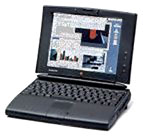 used it for Web work at a communications
company. It needed some work when I got it. First of all, the battery
was crap, so I replaced that. My PowerBook also needed a new PRAM
battery.
used it for Web work at a communications
company. It needed some work when I got it. First of all, the battery
was crap, so I replaced that. My PowerBook also needed a new PRAM
battery.
Since my PowerBook 180 had died in July, I had been using a Performa 475. It was a decent Mac, and I once found a good price on the PowerBook 540c, I was able to basically have the power of my Performa wherever I went.
I bought my PowerBook 540c with a PowerBook 170. The 170 went to my mom for email. My PowerBook 540c came with: 33 MHz stock '040 processor, 12 MB RAM, 320 MB hard drive, 19.2k Global Village modem (internal).
All the adapters I had from the 180 worked on the 540c, so I was able to use external video and SCSI. I also hooked it up to my 10Base2 (coax) network.
Sadly, that December, my 540c was dropped and needed some work. The piece of plastic that holds the latch down when the computer is closed was broken. Also, the little piece of plastic under the screen had 2 of the 3 tabs broken off. A little glue and duct tape fixed things for the time being.
In January, I replaced the latch plastics and the PRAM battery with a replacement from eBay. My 540c was pretty much back to normal. I decided my 540c needed a name. Calling the hard drive "Eric's 540c" was getting lame fast. I chose BlackBird, since the code names of the 540c were SR-71 and Blackbird.
Configuring BlackBird
I loaded OS 8.1 on my PowerBook when I got it and used RAM Doubler. Performance was decent for the programs I used. I made an emergency floppy disk in case things went wrong.
In May, I picked up a PowerPC 603e/100 card. This gave the computer 4 MB more RAM (the card has 8 MB as opposed to the '040's 4 MB). I also bought a 16 MB RAM module, giving my PowerBook 24 MB total RAM (I had to remove the original 8 MB module already in there). This opened up new possibilities in terms of software.
Software
I'm not going to get into all the apps and utilities that I use, but I did copy all the old apps I used: MS Internet Explorer 3, MS Internet Mail & News 3, BBEdit 3, Word 5, Excel 3, FileMaker Pro 2, HyperCard, and ResEdit.
After the PowerPC card, I moved to Internet Explorer 4.5, AppleWorks 5 (to replace the old Word/Excel/FileMaker combo), and added GrayAMP to play MP3s.
I also use TechTool and TechTool Pro, as well as StuffIt, and a bunch of other little utilities.
Other Hardware
AirPort? Ha! I have enough ethernet transceivers to allow me to connect wherever I need to. I also have a laptop wrist rest/platform that I got from Cyberguys.com for 99¢.
Heat is not an issue on my 540c. It gets a little warm, but the back feet flip down to provide ventilation.
I keep the 19.2k modem as my main modem (it's fine for uploading the many Web pages I work on, and getting/sending email - plus our phone lines suck out here, so it's not much slower that the maximum connection). In the serial port, I have an Apple ImageWriter LQ. I know, it's not a laser or inkjet, but it's quality is almost as good as an inkjet (if not a cheap laser). When I'm at school I can print over the network onto their HP LaserJet or Apple LaserWriter printers.
I picked up a second AC adapter, as well as a car adapter. I also bought one of those wind up phone cords. Finally, I got a much needed accessory, a small laptop case from Office Depot.
Another "accessory" I have is a Power Mac 7200/90 (my current desktop Mac), which has a 28.8 modem (the max connection for our phone lines is 26,400 bps). Using ethernet, I share the Internet connection between that and my 540c over the 28.8 modem.
Conclusion
We all know that the 540c is a rather dated computer in today's world. Hopefully, I'll be getting an iBook soon (it's the only valid replacement I see in terms of size), but my 540c isn't useless yet.
I've had about four different desktop Macs since I've gotten my 540c. One day I might install OS 8.6 or 9 (with the hack that's floating around the Web).
Sure, it can't run OS X, nor does it have USB, nor does it have
any kind of internal optical drive, but it gets things I need done with
a minimum of crashes, errors, and problems. That's why I've stuck with
this old computer this long. 
About LEM Support Usage Privacy Contact
Follow Low End Mac on Twitter
Join Low End Mac on Facebook
Favorite Sites
MacSurfer
Cult of Mac
Shrine of Apple
MacInTouch
MyAppleMenu
InfoMac
The Mac Observer
Accelerate Your Mac
RetroMacCast
The Vintage Mac Museum
Deal Brothers
DealMac
Mac2Sell
Mac Driver Museum
JAG's House
System 6 Heaven
System 7 Today
the pickle's Low-End Mac FAQ
Affiliates
Amazon.com
The iTunes Store
PC Connection Express
Macgo Blu-ray Player
Parallels Desktop for Mac
eBay

