
Embracing Obsolescence
Customizing Mac OS 9
- 2006.08.01
Last time I left things with an ebullient overview of how I learned to stopped worrying and love the PowerBook 1400 (a bit of word play may be corny, but it sure is fun).
However, I didn't give too many details about how I set about customizing and integrating the PowerBook 1400c into my workflow. The simple goal was to give the PowerBook a bit of flair, a desire to let it shine through with its own personality.
I couldn't help but notice that my PowerBook came with a photo of lovely dog placed nicely under the clear cover. The desktop picture was a predominantly purple and red scene (below). The imagery depicts a man and his dog in a row boat traveling on their way towards a mysterious rocky outcropping whence sits a lonely castle. A glorious setting sun basks the scene with its brilliantly lush fading light.
The picture comes from MacDesktops.com and is attributed to Rob Thompson (derived from a work from Georges Remi, a.k.a. Hergé). Liking the desktop picture enough to build an entire graphical interface around it, I browsed over to the ResExcellence website to peruse their archives of classic Mac OS themes.
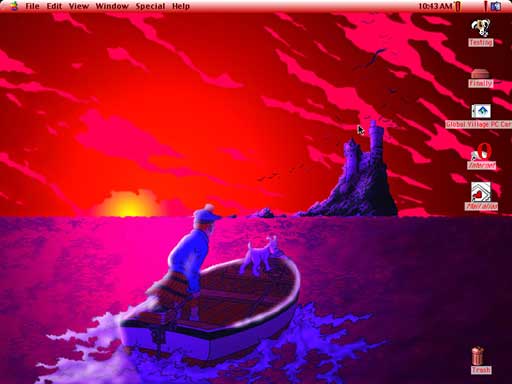
Tintin and Snowy on the PB 1400 Desktop - click for full-sized
image

Themes and Appearances
One of the nice things about Mac OS 8.5-9.2.2 was the easy way to apply new themes. Simply unstuff the desired Appearance (downloaded from ResExcellence or another website) and drag and drop it into the System Folder. If the System Folder doesn't offer automatic placement, manually drag and drop the appearance package into the Theme Files folder found with the Appearance folder.
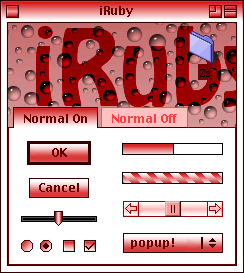 The iRuby
theme designed by Michael Rabe suggests doubling the RAM
allocation of the Appearance Control Panel for better stability.
Desiring a similar look from my preferred browser, iCab, I downloaded an alternate icon set from the
iCab website. I choose the Son Rosas icons for its pink hue to
match the vivid desktop picture and the iRuby theme. Installing the
icons is easy - simply drag the Son Rosas_icons file into the iCab
application folder.
The iRuby
theme designed by Michael Rabe suggests doubling the RAM
allocation of the Appearance Control Panel for better stability.
Desiring a similar look from my preferred browser, iCab, I downloaded an alternate icon set from the
iCab website. I choose the Son Rosas icons for its pink hue to
match the vivid desktop picture and the iRuby theme. Installing the
icons is easy - simply drag the Son Rosas_icons file into the iCab
application folder.
New Icons
I figured a dog icon would suitably compliment the dog theme given by the PowerBook lid and desktop picture. I installed CyberDog on my spare Mac OS partition, and then used "Get Info" to copy the CyberDog icon and again to paste it over my boot drive icon.
Lacking the creativity or good sense to search for an icon for my second partition, I simply colored it red by selecting a Label setting from the File menu. The Trash icon was likewise colored with the Label command.
I kept the "Browse the Internet" alias and "Mail" alias on the desktop. I renamed Browse the Internet to "Internet" and pasted the Opera 5 icon ( Opera 6 is the oldest version currently available for download) over the stock icon. An added bonus with using the Opera icon was how nicely it blended into the background with the red O.
While I prefer iCab 3.0, I find Opera feels less heavy and remains a fun little browser. Ultimately, I may stick with iCab 2.9.9 - or more likely WannaBe - for light browsing needs.
I pasted the Sweetmail icon over the stock Mail alias icon. Again, Sweetmail suited the theme nicely because its icon has red elements.
Customizing the OS
My basic graphical theme now set, I proceeded with configuring my interface additions. The first order of business was to install my favorite application/window switching duo, ApplWindows and LiteSwitch.
Since I had Mac OS 9.1 installed, I went ahead and and configured the function keys to launch my favorite applications. When I get settled down a bit, I can streamline \ application launching by setting the Location Manager to launch those applications most commonly used in my work flow.
Applications
The only utilities I added to my basic OS 9.1 install were TomeViewer for extracting files from installers, Blackwatch for a screen saver, and the Excalibur spell checker. Nisus Compact ably handles all my basic text editing duties and writing management (I love the network aware File Clerk Catalog).
True to my indecisive ways, Internet duty is performed by several applications: iCab 3.0, iCab 2.99, Opera 5.0, and WannaBe PPC combine to give me a flexible view of the World Wide Web, and Sweetmail is always my standby for email. I may end up adding applications for reading newsgroups, chatting on IRC, and accessing FTP servers. Feel free to email any suggestions for those last three.
Looking Ahead
All in all, I'm very happy with the PowerBook 1400c. So happy, in fact, that I'm fully set on swapping my Power Mac 7600 for some smaller bits and pieces of computer gear. I no longer need a desktop or tower PowerPC Mac, as the PowerBook 1400c is able to perform my most often used tasks (excepting heavy Web browsing) nearly as well as the much faster G3-upgraded Power Mac.
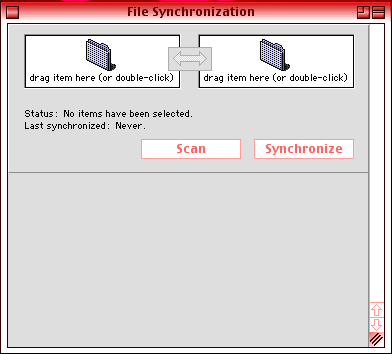
Maybe I'm simply happy enough to have something I can cart around the house or out to the café without too much trouble. That GV ethernet/56k modem PC card makes all the difference, as I can now quickly interface with my other computers for transferring files back and forth. The File Synchronization control panel makes synching work between computers quite easy.
My basic plan is to use either my Celeron box (now running Xubuntu 6.06) and my G3 iMac for my main Web-related work and more demanding multimedia tasks . The PowerBook 1400c can make itself at home by providing me with a gorgeous active matrix display and solidly built keyboard to perform my email and writing tasks. If I can fit more of my less demanding Web tasks into the picture, hurray for me.
As things are today, I think small, quiet computing is continuously underrated. Power is great, and expandability is better, but there's something soothing about running a small, efficient device.
Learning the limits of any given system is one of the keys to enjoyable computing. The PowerBook 1400c's one glaring limitation is its relatively low RAM ceiling. RAM Doubler (discontinues) may be worth a try, and I think I have a lead on acquiring a copy. More PowerBook 1400c adventures to come in future articles.
Links
About LEM Support Usage Privacy Contact
Follow Low End Mac on Twitter
Join Low End Mac on Facebook
Favorite Sites
MacSurfer
Cult of Mac
Shrine of Apple
MacInTouch
MyAppleMenu
InfoMac
The Mac Observer
Accelerate Your Mac
RetroMacCast
The Vintage Mac Museum
Deal Brothers
DealMac
Mac2Sell
Mac Driver Museum
JAG's House
System 6 Heaven
System 7 Today
the pickle's Low-End Mac FAQ
Affiliates
Amazon.com
The iTunes Store
PC Connection Express
Macgo Blu-ray Player
Parallels Desktop for Mac
eBay

