
Embracing Obsolescence
Enhancing the WannaBe Browser with Sherlock and Mozilla Plugins
- 2006.01.16
I'm back with more tips for browsing the Web on the classic Mac OS. This session focuses on getting the most out of WannaBe.
I use WannaBe as the primary browser on my 68k Macs, since they are more limited in regards to RAM and processor speed.
However, this little text browser has proven equally adept in handling PowerPC duties. In fact, to truly optimize WannaBe, you'll need to have access to a computer capable of running a Mozilla-based browser. Since you are Low End Mac readers, a PowerPC Mac running Mac OS 8.6-9.x will do just fine.
WannaBe's primary duty is to dump text into a browser window. There is not a great deal of interaction with websites, other than clicking on links and reading text. (You can download files as well, provided a login is not required to gain access.)
There is a very easy way to add functionality to WannaBe - Sherlock 2 plugins.
What Are Sherlock 2 Plugins?
Sherlock 2 plugins were Apple's way of providing Mac OS 9 and 10.2 users a way to do Internet searches without having to open a browser. If you remember, the Sherlock application allowed users to select different channels for performing these searches.
Each channel had one or more plugins, and additional ones could be added to expand functionality. Shopping, movie times, weather, etc. were all accounted for, and Sherlock 2 was a neat little application.
Unfortunately, Apple moved development in a different direction, and much of Sherlock 2 and Sherlock 3 (although I believe 3 used a different format for its plugins) functionality is delivered via Tiger's (OS X 10.4) Widgets. Since I have yet to upgrade to Tiger, I'm not sure Tiger even includes Sherlock anymore.
Who and What Is Mycroft?
Never fear, open source is here. Since Mozilla based browsers use essentially the same format as Sherlock 2, the Mozilla community has built thousands of Sherlock 2 compatible plugins. The Mozilla plug-in project is named Mycroft after Sherlock Holmes brother.
From the few plugins I've tried, the Mycroft versions work fine with WannaBe. You might have to run the plugins through the Change Creator To WannaBe AppleScript in order to make WannaBe automatically recognize them.
Unfortunately, there's a catch. While you can occasionally find other Mycroft plugins by performing a Google search, the Mycroft website is the biggest repository. This wouldn't be so bad, except JavaScript needs to be enabled in order to download the plugins from the Mycroft website. WannaBe doesn't have JavaScript support, so you'll have to move to another browser to complete the download. Strike two, the JavaScript link is present to check for Mozilla browsers. No Mozilla browser, no download.
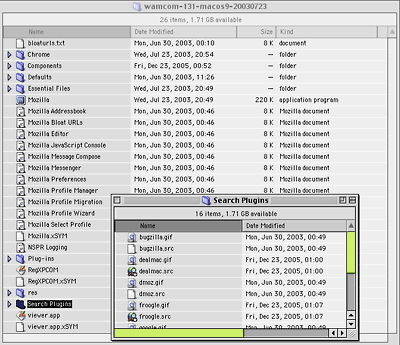
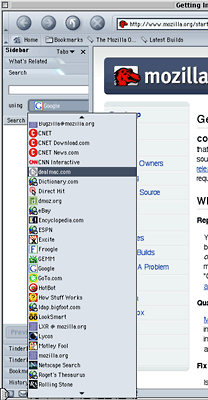
Luckily, if you have access to a newer Mac with a Mozilla browser, you can transfer the files to your older Mac after download. For my test, I tried WaMCom on a PowerPC Mac running OS 9. When you click a download link on the Mycroft website, the plug-in will install itself into WaMCom. (Download WaMCom here.)
 Bringing us back to the
previous JavaScript issue. The JavaScript is there to protect you from
trying to install the plugins in an incompatible browser, which is good
for the average user. Of course, for those more discerning users, a
direct download link would be appreciated. (Maybe there is an optional
download link I missed. If so, please email me to berate me for being
negligent. I would deserve it.)
Bringing us back to the
previous JavaScript issue. The JavaScript is there to protect you from
trying to install the plugins in an incompatible browser, which is good
for the average user. Of course, for those more discerning users, a
direct download link would be appreciated. (Maybe there is an optional
download link I missed. If so, please email me to berate me for being
negligent. I would deserve it.)
Back to the plugins. You can find the actual plug-in by navigating into the following folders WaMCom > Search Plugins. Please note, you do not need the accompanying image file for use in WannaBe. Now you can transfer all the .src files you may've downloaded.
How to Use a Plug-in?
The creator of WannaBe was kind enough to add a starter set of plugins. After downloading the plugins, you might be wondering what these little files do. First, notice that when each plug-in is opened, a small window appears. The window consists of a label at the top to tell you what plug-in you've opened, a text box in the middle, and a submit button at the bottom. Also, notice you can open more than one plug-in at once - or the same plug-in multiple times.
When you perform a search, the results are displayed in a normal WannaBe window. If no window is currently open, a new window will appear. If a window is already present, WannaBe will use the topmost window. Additionally, if the topmost window is currently rendering a web page or search query, an additional window will open with the new information.
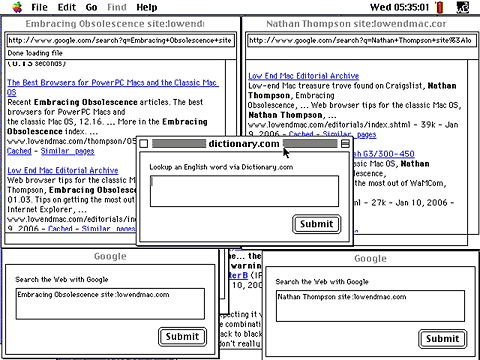
Now we have the basics of WannaBe covered, I'll bet some of you are wondering what's the best way to quickly pull up a plug-in when you need to perform a search. One way is to keep the most used plug-in open at all times. If screen real estate or RAM are a limitation, you could use one of these three handy techniques:
- Make an alias of your plug-in folder and place the alias into your Apple Menu.
- If you are using Mac OS 8 or higher, try a popup window of your plug-in folder on your desktop. Try sorting the plugins as buttons for one click access.
- If your system is too old or RAM limited, you could simply leave the plug-in folder on your desktop. Try sorting the plugins as buttons for one click access.
Where Else Can I Find Plugins?
Both Mac OS 9 and 10.2 came with Sherlock plugins. Not all are still functional, but the Amazon and eBay ones work fine. Some websites still have Sherlock 2 plugins listed. A Google search may uncover more, but MegaMacs has one you can try.
Finally, you can always write your own plugins. One way to get started is to open a plug-in with a text editor to see how the file is constructed. With a little guesswork and a liberal amount of trial and error, it shouldn't be too hard. Apple still has specifications listed if you prefer a more structured learning environment. The Mycroft website is another good source with excellent documentation.
Closing Thoughts
Overall, WannaBe may be limited by design, but the addition of many useful plugins opens up more options for browsing the Web. True, you still cannot log into websites without depending on other browsers, but for slower dialup connections or older Macs, WannaBe is a great application.
- WannaBe
- Change Creator To WannaBe
- Mycroft
- Mycroft documentation
- Apple Sherlock 2 documentation
- MegaMacs.com (Sherlock 2 Plug-in near bottom on left side)
- WaMCom
About LEM Support Usage Privacy Contact
Follow Low End Mac on Twitter
Join Low End Mac on Facebook
Favorite Sites
MacSurfer
Cult of Mac
Shrine of Apple
MacInTouch
MyAppleMenu
InfoMac
The Mac Observer
Accelerate Your Mac
RetroMacCast
The Vintage Mac Museum
Deal Brothers
DealMac
Mac2Sell
Mac Driver Museum
JAG's House
System 6 Heaven
System 7 Today
the pickle's Low-End Mac FAQ
Affiliates
Amazon.com
The iTunes Store
PC Connection Express
Macgo Blu-ray Player
Parallels Desktop for Mac
eBay

