
Embracing Obsolescence
The Best Browsers for PowerPC Macs and the Classic Mac OS
- 2005.12.16
In my previous article, we looked at 68k Mac browser and email options. Now we'll look at options for PowerPC (PPC) Macs running the classic Mac OS.
Email is less an issue with PPC Macs; certainly there are more options available than for the 68k platform. However, like the older Macs, the classic Mac OS/PPC platform is not overflowing with options for viewing the Web.
Still, we should be thankful there are any available options, since Mac OS 9 was officially declared dead over two years ago. There are, in fact, two very solid choices - iCab 3.0 beta and WaMCom - to go along with a host of less ideal, although still somewhat functional, browsers.
Unless otherwise noted, expect that you'll need Mac OS 8.6 to 9.2.2 in order to run the following applications.
iCab 3.0 beta
Take all the good things I said about iCab 2.9.8 and subtract most of the negatives. iCab 3.0, hereafter referred to simply as iCab, truly improves upon the very promising base present in older versions. All of the neat little customizable treats remain in place, and a few are even easier to implement.
iCab continues to refine the power user tools that were previously hidden and/or too complex for the average user by bringing them to the foreground. Now the casual user can more easily discover what sets iCab apart from other browsers.
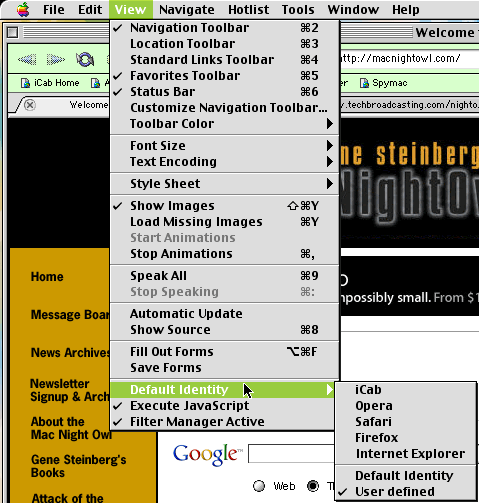
Although I didn't touch upon this feature in my earlier article, the ability to change how your browser identifies itself to websites remains present in the updated iCab. Why is this feature useful? Some designers insist on restricting access to their sites to specific browsers, even when there's no technical reason to do so. As long as the offending website doesn't actually need a technology present in a specific browser, iCab makes it easy to trick the site into granting you the privilege of viewing its content.
In iCab 2.9.8, activating this feature required navigating to the Edit Menu, selecting Preferences, and changing two different settings - a somewhat hidden and complicated process. Now, when visiting such rudely designed websites, all you need to do is navigate to the View menu and select the Default Identity you want iCab to pretend to be.
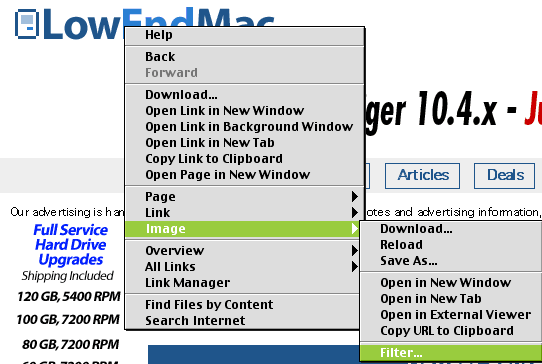
Another addition are shortcuts for adding filters with a simple right click or a drag-and-drop maneuver. Very handy indeed. Don't worry, more to come on how to use the filter manager in a future installment. For now, suffice it to say these features are an improvement over the iCab 2.9.8 way of setting up filters.
The newest version of iCab is not simply a refinement of previously available tools - many months of hard work have gone into extending the feature set.
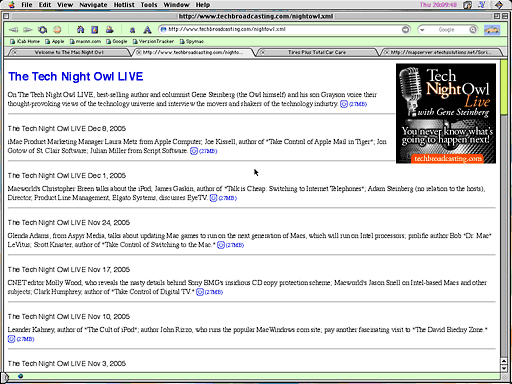
Of the many additions, my favorite is the included RSS reader. True, the reader is very bare bones, but now you have access to Podcasts and other RSS feeds. In a limited sense, anyway, but there are tricks to making this feature work more like a normal RSS reader. Again we will delve into customizing iCab in a future installment. I won't leave you hanging for too long, I promise.
There are two small complaints that slightly mar an otherwise positive browsing experience. One, the beta is not tuned for speed, and two, there are a few bugs that spring up from time to time when attempting to render a page or interact with forms.
Most bugs are ironed out between updates, but there is a definite beta pallor to iCab that colors your browsing experience a wee bit.
Also, if you want the latest build of iCab, you will need to pay the registration fee. I decided to register my version about a year ago, because I wanted to encourage the iCab developers to keep the classic Mac OS platform relevant. I also enjoy getting access to the latest builds as soon as they are released.
If you feel the same way, I'm sure the development team would love the support. By the way, this goes for any Mac software developer. There are three ways to show how much you love a particular application:
- Provide feedback
- Tell your friends
- Pay registration fees or, in the case of freeware, donate money to the cause. Every little bit helps.
End of public service announcement.
Overall, I urge all readers to give iCab 3.0 a try. You may come away impressed with what the classic Mac OS can still do for your web browsing needs.
WaMCom
I find iCab 3.0 beta to be my browser of choice with the classic Mac OS, but I realize different people have different needs from a web browser. Some users prefer the suite approach, which WaMCom (for Web and Mail Communicator) brings to the table with spades. (Download WaMCom here.)
This section will be dutifully succinct. If you're familiar with the old Netscape Communicator, Mozilla, or SeaMonkey, you'll be instantly at home with WaMCom. Indeed, you are looking at the last version of Mozilla produced for the classic Mac OS.
Email, IRC chat, WYSIWYG web editor, and web browser are all found in one convenient application.
The advantages to WaMCom:
- Tabs.
- Popup blocker.
- Contains most web related features, most users will want in one convenient package.
- Relatively stable.
- Good compatibility with web sites.
- Open source, which means any enterprising Mac user could continue development
The negatives:
- Buggy, not prone to crashes, but basic operations may randomly malfunction.
- No longer being maintained. There are known bugs and possible security holes, but no one is addressing these issues. However, because the code is open, there is always a chance a group of users could start maintaining the application again.
WannaBe
Although there are other full featured browsers, you can still get good mileage out WannaBe, a sweet, little browser. The same comments apply from the 68k version. WannaBe is great for PPC users with low RAM, slow connections (such as dialup), or who don't have access to Mac OS 8.6 or higher.
Opera 6.0.3
All the basic Opera goodies from yesteryear are still here. Tabs, popup blocker, and the flexible and quirky interface are all intact. Unfortunately, Opera is a little unstable and not terribly compatible with every site. (If you have OS X, I suggest giving Opera 8.5 a try. It's my primary browser for any OS X Mac I have to maintain.)
Netscape
I have not dealt with any version of Netscape past the 4.x versions, but I'm sure if you really want one, a download link shouldn't be too hard to find. Netscape is a suite and generally contains the same basic components I listed under WaMCom: email, chat, composer, and browser in one application. I have no real experience here, so I must ask for reader input.
Internet Explorer 4.5 - 5.1.7
Way too many crashes for me while running any version of Internet Explorer (IE). No tabs, no popup blocker, and slow rendering.
Okay, compatibility with websites, decent printing, and the auction manager are kind of neat. I refuse to provide a link, as I cannot in good conscious recommend Internet Explorer over iCab 3.0 or WaMCom. If you must subject yourself to IE, I'll bet Google will help you locate the information. Good luck - you'll need it.
- Editor's note: The best thing about IE is that it comes free with a lot of older versions of the Mac OS, so you have a tool for browsing the Web and downloading better browsers. If you must use IE, version 5.1.7 supports Mac OS 8.1 through 9.2.2. Like Nathan, I don't recommend IE. dk
I now implore Low End Mac readers to regale me with tales of their favorite browsers, email clients, and other web software (FTP client, chat, etc.) for 68k and PPC Macs. I've already received feedback on the first article, and I welcome any additional information you, the readers, can provide.
Please look forward to a part three followup to our Web Options for the Classic Mac OS series and other future installments of Embracing Obsolescence.
Remember, old does not equal useless. We are Mac users after all.
Further Reading
Low End Mac Reader Specials
About LEM Support Usage Privacy Contact
Follow Low End Mac on Twitter
Join Low End Mac on Facebook
Favorite Sites
MacSurfer
Cult of Mac
Shrine of Apple
MacInTouch
MyAppleMenu
InfoMac
The Mac Observer
Accelerate Your Mac
RetroMacCast
The Vintage Mac Museum
Deal Brothers
DealMac
Mac2Sell
Mac Driver Museum
JAG's House
System 6 Heaven
System 7 Today
the pickle's Low-End Mac FAQ
Affiliates
Amazon.com
The iTunes Store
PC Connection Express
Macgo Blu-ray Player
Parallels Desktop for Mac
eBay

Advertise

Advertise
