
Low End Mac's Online Tech Journal
Making a Trifold Brochure
The Power of AppleWorks and Creative Thinking
Dan Knight - 2001.06.25
Wow, that was quite a project. Last week we designed and printed a full-color brochure for Family Matchmakers, Inc., the adoption agency my wife runs. It was quite a learning experience.
The following steps should also work in previous versions of AppleWorks and ClarisWorks, but since AW6 is what came with her iBook, it's the only version we used for this project.
Rough Draft
Linda roughed out the brochure in AppleWorks 6, starting with the text, then placing it in a three-column page in landscape mode. The next step was adding photos, using some she took with our Canon PowerShot A50 and some sent in by her clients.
Being a low-end Mac kinda guy, I ran all the images through Photoshop 4, cropped them, color corrected them, and then saved them as roughly 3" wide 180 dpi images. I copied those from my TiBook to the SuperMac J700 server in the closet. From there, she copied them to her indigo iBook and placed them on the pages. Here's what it looked like at that point:


Tweaking the Design
The first thing to do was recreate the brochure using the drawing tools in AppleWorks. To simplify things and keep the files smaller, I created a separate file for the outside and inside of the brochure. Each was created as an 8.5" by 11" document.
We'd earlier purchased some Geographics trifold brochure paper to match the agency's letterhead and business cards, but found it unworkable for this brochure. However, it did include the important figures we needed to determine where the folds would go.
On the outside page, I drew a thin light gray vertical line at 3-5/8" and another at 7-5/16". On the inside page, the lines were at 3-11/16" and 7-3/8". Using these measurements, everything should print properly.
The next step was to drop text boxes in each column, then cut and paste the text from the draft brochure. From there it took a bit of finagling with font sizes and placement, but things were coming together nicely.
Once the text was in place, each image was copied from the draft brochure and placed on the new page. Resizing images while keeping them in proportion was easy - just hold down the shift key and resize to fit. Here's what that looked like (click here for a larger view, about 100K worth of images):
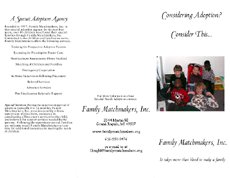

Just don't forget to remove the "fold lines" before you print.
Printing the Project
The next question was how to print it. Color is important. I could print a master on my Epson Stylus Photo 870 using high quality photo paper. We could then take that to Kinko's, Office Depot, or someone else doing color copies - but at a price of $1.50 to $3.00 per brochure.
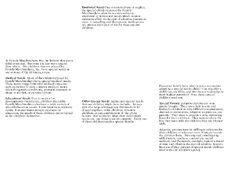
There had to be a better way, so we got creative. We decided to try mixed printing. We'd use our LaserJet 2100TN for the text, and then print the color images with the Epson. That meant duplicating each page twice (so we could leave the original intact), then removing all the photos from one version and all the text (except for the reversed out words over the photos - something I think really works nicely) from the other.

Here's what the interior page looked like, both the text and photo versions:

We did some quick tests using regular laser paper to make sure this was feasible, but knew we'd need better paper. We visited Office Depot, where they recommended Kodak Premium Inkjet Paper, a double sided finished paper designed for two-sided color printing. Home for a test, a little tweaking on placement, picking the right paper setting (Photo Quality Inkjet Paper) - and we're off and printing.
After the first 25 were done, we took them to Office Depot, where they ran them through their folding machine at 4¢ apiece.
Sidebar: A Web Graphic Trick
I've put together a full-size version of the brochure interior on a separate page using a similar trick to the way we printed. Converting the whole interior, text and photos, to a high quality JPEG (85% setting in GraphicConverter) resulted in a 149,139 byte file. Saving just the photo layer at the same setting resulted in a much smaller file: 79,828 bytes. I then saved the text as a 16-level GIF image, which was just 27,342 bytes in size.
To display the two images as one, I set the white background of the text to transparent, created a one cell table, put the JPEG in as a background image, and then placed the GIF inside the cell. In the end we have two images totaling 107,170 bytes, a saving of nearly 30% compared with the original JPEG. Not only that, but the text is much sharper than it would be in a JPEG.
The Final Cost
This process really goes through the color ink, but it results in very crisp text (the LaserJet 2100 is 1200 dpi). Linda, I, and everyone she's shown the brochure to thinks it was worth the effort.
Best of all, we did it all ourselves using the tools at hand, so we can easily edit the text or change a photo for the next batch of brochures.
The hard part is calculating our final cost for the project. I donated my time, and her agency bought all the supplies. Paper was $15 for 100 sheets and color ink is $18 per cartridge. I'm estimating 35 brochures per cartridge. At 10 pages per minute times two sides, the time to run the paper through the LaserJet is minimal, as is the cost of toner.
It takes 2:50 to print the inside of the brochure in color and about 50 seconds for the outside, for a net time per brochure of roughly 4 minutes. At 15 per hour, if we were paying someone $6/hour to babysit the job, it would add 40¢ to the cost of each copy.
Here's the cost breakdown:
| Supplies | Cost per page |
| Paper |
|
| Toner (est.) |
|
| Ink (est.) |
|
| Folding |
|
The total cost to print 100 color brochures: $74. The value of one child placed with a new family: priceless.
Join us on Facebook, follow us on Twitter or Google+, or subscribe to our RSS news feed
Today's Links
- Mac of the Day: PowerBook 500 Series, introduced 1994.05.16. 'Blackbird' includes a 25 to 33 MHz 68040 along with smart batteries and grayscale or color displays.
- Support Low End Mac
Recent Content
About LEM Support Usage Privacy Contact
Follow Low End Mac on Twitter
Join Low End Mac on Facebook
Favorite Sites
MacSurfer
Cult of Mac
Shrine of Apple
MacInTouch
MyAppleMenu
InfoMac
The Mac Observer
Accelerate Your Mac
RetroMacCast
The Vintage Mac Museum
Deal Brothers
DealMac
Mac2Sell
Mac Driver Museum
JAG's House
System 6 Heaven
System 7 Today
the pickle's Low-End Mac FAQ
Affiliates
Amazon.com
The iTunes Store
PC Connection Express
Macgo Blu-ray Player
Parallels Desktop for Mac
eBay

