
Low End Mac's Online Tech Journal
The Original Macintosh
Dan Knight - 2001.05.29
This article is adapted from a series of articles and sidebars in the February 1984 issue of Byte magazine. Although some of the details included in this article are specific to the original Mac, many also apply to other compact Macs, such as the Plus and SE/30,
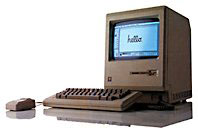 The Macintosh was
introduced on January 24, 1984, so the staff of Byte was working with late prototypes or
early production units when they wrote these articles, which include a
long interview with the Macintosh development team.
The Macintosh was
introduced on January 24, 1984, so the staff of Byte was working with late prototypes or
early production units when they wrote these articles, which include a
long interview with the Macintosh development team.
The goal of the Macintosh project was to bring the concepts and technology of the $10,000 Lisa to a much broader audience, mostly by figuring out how to adapt it to a far less costly computer. The original Macintosh was released at $2,500, a fraction of the Lisa's original cost. Steve Jobs said this fulfilled the design goal to "build a really cheap implementation of Lisa's technology...."
Bill Atkinson summed up that part of the design: "We want to most computer that you can get for the least dollars so that the most people can have it...." Maybe that's the origin of "The computer for the rest of us," although the Mac has never really sold for "the least dollars."
Memory
The biggest compromise was memory - Lisa came with 1 MB and could be expanded to 2, while the Macintosh had 128 KB of memory. (Apple hoped to expand that to 512 KB by the end of 1984; they had to wait for 256 kilobit memory chips. Once they became available, Apple released the Macintosh 512K in September 1984.) The operating system and programs had to be completely recreated for the low-RAM footprint of the Mac, since the Lisa OS alone required more RAM than the Mac had.
Making life even more difficult, just over 21 KB of that precious 128 KB of memory was used for video, leaving under 107 KB available for the operating system and applications. (That memory used for video is a big part of the reason Apple didn't produce a 64 KB Macintosh - video would have used one-third of its memory.)
Perhaps the first thing to go was multitasking; with so little RAM, the Mac couldn't be expected to run multiple programs at the same time, although Apple did provide for Desk Accessories, applets that could run at the same time as full-fledged applications.
Another clever memory-saving, speed-boosting move was switching from compiled Pascal to 68000 machine language for the operating system.
A third way of getting around the limitation of 128 KB of RAM (due to high memory prices, from what I've heard, since even the original Mac OS really cried out for 256 KB of RAM) was building 480 handcrafted, optimized toolbox routines into ROM, where the OS and all Mac applications could access them. Not only did this reduce the need for RAM, since these routines were run directly from ROM, but it also helped enforce a standard user interface, since all programmers could use these routines.
Speed & Video
Although we call this an 8 MHz computer, nit-pickers are quick to point out that the 8 MHz processor "only" ran at 7.83 MHz. (Why they get so bent out of shape over this 2% difference is beyond me.) Compared with the 5 MHz Lisa, the CPU in the Macintosh was a speed demon. And compared with the 4.77 MHz 8088 processor common in DOS machines, the Mac's 68000 was both faster and more efficient, since it accessed memory 16 bits at a time vs. the 8-bit architecture of the IBM PC.
Working to squeeze the most out of every component, ROM and RAM ran at full speed on the system bus, so there was no speed penalty using the toolbox routines in ROM. However, because RAM was triple-ported (that is, it was used by the CPU, for screen display, and for sound), the 68000 processor had access to RAM only part of the time.
Video and sound are time-critical; they had to run at fixed intervals. In simple terms, that means that when the Mac needed to draw on the screen or make a sound, the CPU was temporarily shut out from access to RAM.
According to "Macintosh System Architecture" by Burrell C. Smith, this was handled in a very clever way where the CPU and video alternated access to memory:
Each 512-pixel horizontal line consists of 32 words [16 bits or 2 bytes] of data . . . followed by 12 words of horizontal blanking. The last memory bus cycle of each horizontal line is reserved for sound DMA . . . The update rate of the sound channel is equal to the horizontal video rate, or 22,254.55 Hz.
Access to RAM is divided into synchronous time slots, with the 68000 and video circuits sharing alternate word accesses during the love portion of the horizontal video display line . . . Although access to RAM is divided three ways, the 68000's share is maximized by giving it access to unused cycles during horizontal and vertical blanking. This way, 68000 access to RAM averages to a speed of about 6 MHz.
The Mac only displayed black and white pixels - no grays - and had a relatively small screen of 512 x 342 pixels, which also helped the display run quickly. (The video was also internally clocked to 60.15 Hz, making it possible to run the Mac on 50 Hz current without messing up the display.)
Even the fact that the Mac uses square pixels, something we take for granted today, greatly simplified the display routines and helped make for faster screen displays.
Beyond 8 MHz
Because of the video architecture, moving to a 16 MHz CPU, as with the SE/30 or Brainstorm upgrade for the Mac Plus, meant that the CPU didn't share time 50:50 with the display, but instead used three cycles for every one needed by video. Because of this, 16 MHz compact Macs could run over twice as fast as 8 MHz ones.
This is also a reason that Apple never released a grayscale compact Mac - 8-bit video would require eight times as much data going to the display, which would mean 8 video accesses for every CPU access to memory on an 8 MHz Mac (4:1 on a 16 MHz Mac), which would have slowed the computer to a crawl. Color and grayscale video had to wait for dedicated video cards (on the Mac II and SE) and faster CPUs with 32-bit data paths (the IIci).
Reliability and Simplicity
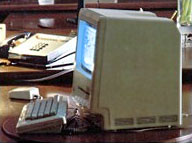
Mac prototype with Twiggy drive.
The Mac had a fraction as many chips as the Lisa and used only two circuit boards, one for analog circuitry (power) and on for digital (the motherboard). Decreasing the number of parts not only helped reduce costs, but also meant greater reliability. Reliability was also one of the reasons Apple moved from 5.25" floppies to Sony's new 3.5" floppy. (As the photo to the right shows, Apple built some Mac prototypes using the Twiggy drive from the Lisa - look at how wide the floppy slot is.)
One reason Apple was able to squeeze 400 KB onto a 3.5" floppy was Steve Wozniak's clever disk interface work done for the Apple II. By creating a high-speed version of the Woz design, Apple had "twice the margin of MFM" (the standard way of encoding data) and was able to store 400 KB on a single-sided floppy that other vendors used at 270 KB capacity.
Another clever hack was running the floppy at different speeds depending on how close the track was to the outer edge, since there was much more room to store data there. This also contributed to the higher capacity - and was a key reason other computers would have a difficult time reading Mac floppies.
The 3.5" Sony drive was customized for Apple to include 80 tracks (earlier drives had only 70 tracks) and support rotation speeds of 390-600 rpm. This allowed the Mac to store data at a constant linear density under control of the IWM (integrated Woz machine) chip. The drive had 400 possible speeds, and the IWM chose the proper speed by monitoring data read speed and attempting to maintain 489.6 Kbps.
If all that sounds complex, remember that the whole thing is controlled by the IWM, while IBM's floppy controller needed 45-50 chips to run a drive with a single rotation rate. Apple's elegant solution was simpler and more reliable - and definitely a sign of a company that thinks different.
To this day, Macs have a reputation for greater reliability than other personal computers.
Hardware
Bucking conventional wisdom, Apple adopted a single-button mouse because their usability tests found that new users were often unsure which button to use on multi-button mice. Apple has never produced a multi-button mouse.
The two serial ports were not the typical RS232C ports found on other computers, but RS422A ports, which not only supported RS232 functionality, but allowed Apple to develop LocalTalk, an inexpensive, easy, relatively fast (230.4 kbps) networking protocol that was standard on all Macs until the iMac. With an external clock, the serial port could support 1 Mbps, a feature which some companies would later use to accelerate LocalTalk.
In addition to the mouse and serial ports, the only other data port on the Mac was for a second floppy, although this would later be adapted for serial hard drives as well.
These serial ports remained in use until Apple adopted USB with the iMac in 1998.
The keyboard connected to the front of the Mac using a coiled cable that looked like it came from a telephone handset, although it was not interchangeable with telephone cables. The keyboard itself had no arrow keys (you were expected to use the mouse), no numeric keypad, and no function keys. It did have shift, option, and command keys, but no escape or delete keys.
Apple added arrow keys to the keyboard with the Mac Plus, and included function keys on the Extended Keyboard for the Mac II and SE.
The Physical Design
An early design goal was to make the system compact and portable, but early designs had a horizontal layout with the floppy drive next to the screen - just like the Osborne, Compaq, and most other portables of that era.
One day Steve Jobs "said that we didn't want portability to be the primary aspect of this, but we did want it to take minimum desk space." Putting the floppy below the display solved that and also put the monitor at a better working height.
Not only did Apple begin the Macintosh with this kind of design, but this also forms the foundation of the iMac's design.
The Operating System
One of Apple's clever hacks in adapting the Lisa OS to a one program at a time environment was retaining the Lisa's clipboard, which let the Mac user copy a piece of text or a graphic from one program, quit that application, launch another, and paste the item into the second application. We may expect that today, but with the Lisa and Mac, it was an innovative feature.
Another key issue for both the Lisa and Mac operating systems was full integration of graphics and mouse with the operating system. This is in contrast to operating systems such as the consumer version of Windows (a graphical shell running on top of DOS) and Mac OS X (Aqua running on top of Unix). While it is possible to break out of the GUI (Graphical User Interface) into a programmers mode, even that uses toolbox routines to display text; you cannot use the Mac OS without accessing graphics.
Desk accessories were Apple's solution to the occasional need to run more than one application at a time. These applets were specifically designed to run at the same time as other applications to display the time, manage a scrapbook, etc.
The Mac OS responds to peripherals on an asynchronous basis, which permits the computer to work with more than one peripheral at a time. For example, this means the user can move the mouse while accessing a floppy disk.
Peripherals
The Mac's two peripherals were the ImageWriter printer and an external floppy drive. The $595 ImageWriter could easily (albeit slowly) print in graphics mode to emulate what was on the screen. The $495 external floppy was a practical necessity, since it meant you could switch programs or save files on a work disk without ejecting the system/application disk.
It was two years before Apple produced the HD20, a hard drive for the Mac that connected via the slow floppy port. Shortly thereafter they released the Mac Plus, the first Mac with a SCSI port, which made it easy to add faster hard drives. Apple still offers SCSI as a build-to-order option for the Power Mac G4.
Trivia
McIntosh is the apple, but Macintosh is the Apple computer - and also an overcoat in the UK. The original code name, McIntosh, was misspelled, and Apple decided to stick with it.
MacWrite was developed under the name MacAuthor, and MacDraw was going to be called Mackelangelo. Thank goodness they changed them.
The Macintosh was designed for an international market; the only text on the rear panel was Apple. Everything else was marked with icons.
All the early Macs (all models prior to 1987) were fanless, just like current iMacs and the Cube.
Join us on Facebook, follow us on Twitter or Google+, or subscribe to our RSS news feed
Today's Links
- Mac of the Day: Power Mac G4 Cube, (2000.07.19. Compact, powerful, and attractive with limited expansion and a high initial price doomed the Cube.)
- Support Low End Mac
Recent Content
About LEM Support Usage Privacy Contact
Follow Low End Mac on Twitter
Join Low End Mac on Facebook
Favorite Sites
MacSurfer
Cult of Mac
Shrine of Apple
MacInTouch
MyAppleMenu
InfoMac
The Mac Observer
Accelerate Your Mac
RetroMacCast
The Vintage Mac Museum
Deal Brothers
DealMac
Mac2Sell
Mac Driver Museum
JAG's House
System 6 Heaven
System 7 Today
the pickle's Low-End Mac FAQ
Affiliates
Amazon.com
The iTunes Store
PC Connection Express
Macgo Blu-ray Player
Parallels Desktop for Mac
eBay

