
Classic Restorations
NuBus RAID Slower than Single Drives? Say It Isn't So!
- 2006.03.21
Editing multitrack digital audio is a demanding task for any computer, vintage or modern. The storage subsystem gets worked particularly hard in a way the standard megabytes-per-second benchmarks don't measure.
Imagine you're a Mac playing back 16 CD-quality audio files simultaneously: That's 44,100 two-bytes samples for each second and each track, for a total of about 1.5 MB/s. Sounds easy! Even a grungy old Quantum ProDrive from a Mac LC can muster that kind of performance; where's the challenge?
The difficulty lies in the fact that the job isn't just to read an 1.5 MB/s linearly from one file. The job is to read 1.5 MB/s spread across 16 separate files stored in separate places across the disk surface. Moreover, delivering the data in "spurts" just isn't acceptable; they must arrive in a regular and timely fashion to avoid skips in sound playback.
No hard drive that can read 16 files simultaneously and deliver the contents with perfect regularity has ever been hooked to a Macintosh. How do we get the sound data to the sound chip at just the right time then? By the magic of buffering.
Imagine a barrel filled with water with a small hole in the bottom and someone pouring buckets in from time to time. That's how the playback buffer smooths out the peaks and troughs in the data stream from the hard drive. The necessity of using a buffer is unfortunate, because it introduces a lag in the system - the time required to fill the buffer - before playback can begin.
More Power!
What's this all got to do with RAID in NuBus Macs?
The Digidesign AudioMedia II NuBus card still has impressive sound quality after all these years. With prices so low (would you believe US$10 on eBay?), I want to build a multitrack audio workstation around one.
I also don't want to wait five or more seconds for playback to begin. There are two ways achieve this: The first is to use a hard drive with an extremely fast seek time and a very small, quick filling buffer. The second is to use a very large buffer and fill it from a disk (or RAID) with an extremely high transfer speed.
Since the mid-90s, hard drive performance has increased dramatically. Seek times have come down from about 17ms to 7ms. That improvement pales in comparison to data transfer speeds: A fast disk array has improved more than 100 times, from 3.3 MB/s to 460+ MB/s! Thus, for a given load (track count), the second method is much easier than the first - getting gobs of speed is simpler than blinding quickness. It was in my quest to fill a huge play buffer in a reasonable amount of time that I turned to NuBus RAID.
Doesn't RAID Kill Bugs?
Yes it does, and it also makes your Mac faster. RAID means Redundant Array of Independent Drives, and there are many types of RAID with different features. When I talk about RAID in this article, I mean RAID level 0, which is where two or more drives share the work of reading and writing files. RAID breaks each file up into pieces (called Stripe Chunks) and distributes them evenly to all the disks in the array.
Theoretically, a RAID 0 made of five drives could have a data-transfer speed five times greater than an individual drive. Actual results are less stellar, but the improvement is still quite dramatic - usually.
In my Power Mac 8100 I have a FWB SCSI JackHammer, one of the two fastest SCSI interface cards ever made for NuBus (and a steal nowadays at maybe $20 on eBay). The other real contender, the ATTO SiliconExpress IV, would work just as well for our purposes.
I also have a couple of Ultra2Wide SCSI hard drives that are way faster than anything the JackHammer has ever seen. When I was disappointed by the speed of filling the playback buffer, I knew RAID 0 was the best way to go.
"Everybody knows" that if you have two fast disks, striping them together is "always" faster. Also, "everybody knows" that fancy third-party hard disk drivers are faster than the stock Apple drivers, and the fastest ones cost the most.
Ridin', Ropin', and RAIDin'
I benchmarked four different hard disk drivers: ATTO ExpressPro-Tools, FWB Hard Disk Toolkit 3, SoftRAID 2.2.1, and Apple's own Drive Setup. All these drivers were running on my Power Mac 8100 with drives on the FastWide bus of the FWB JackHammer under Mac OS 7.6. I formatted the drive(s) with test software and then benchmarked the volumes using ATTO ExpressPro-Tools built-in benchmarking. Only the FWB and SoftRAID drivers supported RAID, so Apple and ATTO were tested with single- disk volumes.
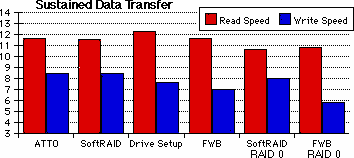 Notice anything funny about the graph? In every case, the
fancy RAID 0 configuration was slower than the same
software's standard single-drive setting! Furthermore, all the
drivers come in at about the same speed, with SoftRAID taking a
smallish lead in the Write performance.
Notice anything funny about the graph? In every case, the
fancy RAID 0 configuration was slower than the same
software's standard single-drive setting! Furthermore, all the
drivers come in at about the same speed, with SoftRAID taking a
smallish lead in the Write performance.
Analysis
How this could be is a question I lack the technical know-how to answer definitively, but I can provide a pretty good hypothesis. 20 MB/s is the theoretical maximum throughput of the JackHammer card, and real-world performance will always be lower. Thus, for any particular Mac (and each Mac's NuBus has its own quirks) there will be a maximum speed that even an infinitely fast drive can't exceed.
When the speed of an individual drive is much lower than the maximum the SCSI bus can support, RAID 0 is great for performance. A little extra overhead chopping the data up for consumption is rewarded by the drives sharing the load for a huge speed increase.
That was the situation with vintage drives connected to this card, and it's also the case for modern drives in modern computers with SATA and Ultra320 SCSI interfaces.
A vintage Mac with a modern UltraSCSI drive is a completely different situation. Each of these disks is faster by itself than the JackHammer is! When you stripe two or more of them together, the computer chops the data up into little bite-size pieces. Then each disk devours these little bits of data as fast as the SCSI bus can supply them.
In this test the JackHammer doesn't seem to be able to exceed about 13 MB/s. In the RAID configurations, the computer first manipulates the data and then sends it out to the disk array at 13 MB/s. In the single-drive configs, the computer skips that processing and just sends the data out at 13 MB/s. If an individual drive is nearly as fast as or faster than the SCSI bus, using RAID introduces a bottleneck and reduces performance.
There is one case where this won't happen, even if the drives are a lot faster than the bus. On Macintoshes with more than one SCSI bus, such as the 8100, 9150, WGS 95, or any Mac with more than one NuBus SCSI card, RAID 0 might still help. By placing one drive on each separate SCSI bus and then striping them, you'll harness the combined speed not of two drives, but of two busses.
Since used drives are more common than JackHammers, you might not need one for that 8100 after all!
Putting it All Together
If you're looking for maximum disk throughput in a vintage NuBus Mac, chances are that just buying and plugging in any fairly modern 68-pin SCSI drive is the way to go.
The other important note is that it doesn't really matter which formatting software you choose. SoftRAID is faster than the others by a small margin, but I can't really recommend it for the Macs we're looking at today. While the Quadras and PowerMacs support partitions larger than 4 GB under System Software 7.5 and higher, using SoftRAID limits you to 4 GB on these machines.
It's also hard to recommend Hard Disk Toolkit. This software's current version no longer supports vintage Macs, but it is commercial software, and finding a licensed older copy can be hard, hard, hard.
Several other drivers like LaCie Silverlining, Micronet Utility, CharisMac Anubis, and Casa Blanca Drive7 fit in this "ex-commercial" category, too. With these eliminated, we're left with only the freeware contenders.
Apple's Drive Setup utility (and the HD SC Setup that preceded it) can be patched to support nearly all SCSI hard drives. You already have a copy; it comes with the System. It works on PowerPC and 68k-based Macs, and it can even be used to specify custom mode-pages (if you can puzzle out the format in ResEdit). Patching Drive Setup to support any drive isn't as simple as turning a key, though, and those uncomfortable with ResEdit will be left feeling a little squeamish. For use on 68k Macs, it's the best bet, so take a deep breath and try ResEdit.
The downfall of ATTO's ExpressPro-Tools (registration required) is that it's PowerPC-only. It's freely available, supports all SCSI drives without patching, and has easy-to-use Mode Page optimization for Digital Video, Digital Audio, and PrePress (also good for general use, by the way).
If you are using a NuBus PowerMac, ExpressPro-Tools is the best choice by far, in my opinion. Check it out!
Until next time, may your disks spin quietly and your Mac scream
with speed. 
Further Reading
About LEM Support Usage Privacy Contact
Follow Low End Mac on Twitter
Join Low End Mac on Facebook
Favorite Sites
MacSurfer
Cult of Mac
Shrine of Apple
MacInTouch
MyAppleMenu
InfoMac
The Mac Observer
Accelerate Your Mac
RetroMacCast
The Vintage Mac Museum
Deal Brothers
DealMac
Mac2Sell
Mac Driver Museum
JAG's House
System 6 Heaven
System 7 Today
the pickle's Low-End Mac FAQ
Affiliates
Amazon.com
The iTunes Store
PC Connection Express
Macgo Blu-ray Player
Parallels Desktop for Mac
eBay

