
Classic Restorations
Turning an LC or Other Ancient Mac with a QuickCam into a Webcam
- 2006.01.25
Welcome back to Classic Restorations! After a three week absence, I'm feeling well again and ready to chat.
Today I'd like to discuss a new use for one of my favorite Macs, the Macintosh LC. We'll be outfitting the LC today to serve as a webcam host. For this purpose the Mac LC is ideal - it's small (just 3" tall), quiet, and has low power consumption. Any of its LC cousins would serve equally well for this project: the LC II, LC III, or the 400-series Performas.
Welcome to Macintosh LC
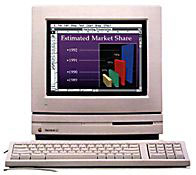 The Macintosh LC was
introduced on October 15, 1990 with a price of US$2,400. When it was
introduced, it was the cheapest color Mac ever - a title it retained
until the introduction of the LC II 17 months later. LCs were snapped
up by schools, together with a cutesy 12" 512 x 384 color monitor and
an Apple II
compatibility card.
The Macintosh LC was
introduced on October 15, 1990 with a price of US$2,400. When it was
introduced, it was the cheapest color Mac ever - a title it retained
until the introduction of the LC II 17 months later. LCs were snapped
up by schools, together with a cutesy 12" 512 x 384 color monitor and
an Apple II
compatibility card.
The most basic Mac LC contained 2 MB of RAM, 256 KB VRAM (displaying 256 colors at 512 x 384 on the 12" monitor or 16 colors at 640 x 480 on Apple's 13" display), a 16 MHz Motorola MC68020 CPU, one 1.44 MB SuperDrive floppy drive, and a 20 MB internal SCSI hard drive. Dual floppies could be special-ordered to reduce cost to the education market, and approximately 5% shipped this way.
Externally, the LC can be expanded in much the same way as any other Macintosh of its age: SCSI, ADB, serial, and sound input/output ports are all provided. (Sound input was new to the Mac in October 1990.)
Expandability
Internal expansion options include a 16-bit Processor Direct Slot (PDS), two 30-pin SIMM slots for memory upgrade (10 MB max), and the ability to upgrade to 512 KB of VRAM to display 256 colors on a 13" 640 x 480 monitor and 16-bit video on Apple's new 12" 512 x 384 display.
The 68020 CPU has no PMMU, so virtual memory is not possible except with a CPU upgrade. Since the internal hard drive is SCSI, it can be upgraded to a fairly modern hard drive with no practical size limit. Utilization of large hard drives will vary depending upon what System software is used.
Several different cards are available to expand the Mac LC's capabilities using the PDS connector. SuperMac Technology offered the Video Spigot LC video digitizer. Media Vision's Pro Audio Spectrum 16 offers CD-quality sound and a PC-style game port. Video cards were made by Envisio, Focus, Radius, RasterOps, and others.
Apple, Asante, Sonic Systems, and others produced ethernet cards to get the LC on a modern network. Apple also offered the aforementioned Apple II compatibility card.
Accelerators to increase the computing power of the LC were available from Applied Engineering, DayStar, Formac, MicroMac, and Sonnet Technology.
Though I am often loathe to recommend any Sonnet accelerators due to compatibility problems I have experienced, one Sonnet product stands out. Sonnet's Presto Plus card seems to solve the "accelerator PDS conundrum" by offering 32 MB of RAM, a 33 MHz 68040 CPU, and ethernet all on one card. Furthermore, this is the only Mac LC accelerator still available retail. While $99 seems pretty steep (about the price of a used Beige G3), it could be well worth it to a dedicated LC fanatic.
Building the Webcam LC
The small size and low power consumption of the Mac LC will make it ideal for use as a webcam host. A Mac LC and a serial Mac-compatible webcam, such as the Connectix QuickCam or Color QuickCam, will be necessary. (eBay is always a good place to start, followed by Low End Mac's Swap List.)
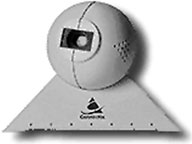 Even a
stock LC can serve this purpose; extensive upgrades will not be
required.
Even a
stock LC can serve this purpose; extensive upgrades will not be
required.
If you would like to connect your LC to the Internet via ethernet, an ethernet card is necessary. Alternately, the LC can connect to another computer on your ethernet network serving as a MacIP or PPP gateway through the serial port.
Expansive storage is not required, either. Any old hard drive will suffice. If the stock hard drive in your LC is still working, you're all set on the storage front.
At least 4 MB of RAM is required. This means adding a pair of 1, 2, or 4 MB SIMMs in addition to the LC's built-in 2 MB. The LC II and later models already come with 4 MB of RAM.
Begin with an updated installation of System 7.0.1. (see System 7: Bigger, Better, More Expandable, and a Bit Slower than System 6). At a minimum, QuickTime 2.5 (or earlier, if you prefer) and MacTCP are necessary. If your ethernet card requires drivers, don't forget to install them! If you'll be connecting by PPP, add FreePPP to your System Folder. (You can download both MacTCP and FreePPP from Low End Mac's Dropbox account.)
Many have written about getting these old Macs on the Web. Look at Internet Access for Classic Macs on Jag's House for more information.
Install the appropriate drivers for your QuickCam and find a suitable subject to photograph. Now you should be able to launch the QuickPICT application and take pictures with the QuickCam. Verify QuickCam operation before proceeding to...
Get Your Serve On
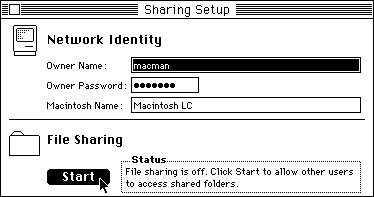
Once the QuickCam is working, let's get the Mac LC up and running as a web server. NetPresentz (free) uses File Sharing permissions to control Web access, so File Sharing must be enabled.
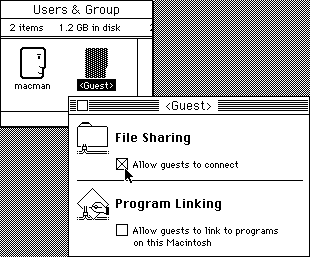 Using the Sharing Setup control panel, name your LC and
enable File Sharing. Open Users and Groups, double-click on
"Guest", and enable Guest access. Create a new folder on the LC's
hard drive and name it "Web Documents" (or some other suitable
name). Share this folder with guest-read permission by selecting
it, choosing "Sharing..." from the File menu, and setting the
appropriate options.
Using the Sharing Setup control panel, name your LC and
enable File Sharing. Open Users and Groups, double-click on
"Guest", and enable Guest access. Create a new folder on the LC's
hard drive and name it "Web Documents" (or some other suitable
name). Share this folder with guest-read permission by selecting
it, choosing "Sharing..." from the File menu, and setting the
appropriate options.
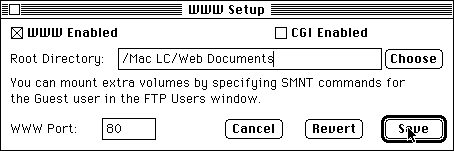
Now that your "Web Documents" folder is shared, we can put it on the Internet using NetPresentz. Launch NetPresentz setup, tick the "I Registered" checkbox in the FTP tab, and set the appropriate settings in the WWW tab. Fire up NetPresentz, and you're ready to start writing HTML.
Putting It All Together
Next, decide how often you want your webcam image to update.
Using your favorite method, author the web page you'd like the webcam image to appear on. Add this tag to the beginning, after the <head> tag and before the </head> tag:
<META HTTP-EQUIV="Refresh"
CONTENT="XXX;URL=http://your.url.here/">
Replace the XXX in the example with the number of seconds you want between updates - for example, 14. Make sure to include the webcam image itself in the web page, using code similar to this:
<IMG SRC=webcam.jpg>
Save the HTML file in your "Web Documents" folder. Unless you have some reason to choose a different name, index.html is a good name for your page.
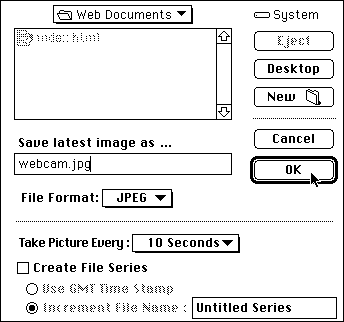
To start capturing images, launch QuickPICT. From the Settings menu, choose Capture Mode: Auto Capture. A window will pop up. Fill in appropriate options. Make sure to use JPEG format and to save the file in your "Web Documents" folder with the same name used in the HTML file (webcam.jpg in our example).
Now here's the trick - tell QuickPICT to take a new picture with about three-quarters the delay you chose for the web page. For example, if you filled in a 14-second HTML refresh, tell QuickPICT to take pictures every 10 seconds. This will greatly reduce the chance of catching the LC while it's in the process of taking a new picture. Click "Begin Capture" to start the fun.
Start picture-taking, point your browser at your LC, and enjoy the show! When you wish to stop taking pictures, simply click "End Capture" in QuickPICT. To restart, follow the above directions again.
Congratulations, you've given a great old Mac a new lease on
life and a new job! 
Further Reading
- All Spigots Q&A (about the SuperMac Video Spigot)
- Video Spigot Review, Jon Pugh, TidBITS, 1992.04.20
- The Pro Audio Spectrum Frequently Asked Questions List
- The Connectix QuickCam FAQ
- The Connectix Quickcam Technical FAQ
- QuickCam Software, Pure Mac
- QuickCam IR, modify a b&w QuickCam to work with infrared
About LEM Support Usage Privacy Contact
Follow Low End Mac on Twitter
Join Low End Mac on Facebook
Favorite Sites
MacSurfer
Cult of Mac
Shrine of Apple
MacInTouch
MyAppleMenu
InfoMac
The Mac Observer
Accelerate Your Mac
RetroMacCast
The Vintage Mac Museum
Deal Brothers
DealMac
Mac2Sell
Mac Driver Museum
JAG's House
System 6 Heaven
System 7 Today
the pickle's Low-End Mac FAQ
Affiliates
Amazon.com
The iTunes Store
PC Connection Express
Macgo Blu-ray Player
Parallels Desktop for Mac
eBay

