
Low End Mac Round Table
iOS 5 and iCloud: Should You Make the Move?
Low End Mac Staff - 2011.10.17
This week marked a couple big changes for iDevice users: iOS 5 wasreleased on Wednesday, and iCloud officially replaced MobileMe. Theevent was not without some problems: First of all, you had to installiTunes 10.5, released two days earlier, before you could download andinstall iOS 5, and then you had to get through to Apple's servers forvalidation. For a lot of us, it took several tries before iOS wasfinally up and running on our iPhones, iPads, and iPod touches.
iCloud provides 5 GB of backup space that you can access from youriDevice running iOS 5 (iPhone 3GS or newer, 3G or newer iPod touch, anyiPad), a Windows computer running Vista or newer, and any Mac runningOS X 10.7.2 Lion - leaving those of us using OS X 10.5 Leopard and 10.6Snow Leopard out in the cold.
Today our staff looks at iOS 5 and iCloud - the upgrade process, thenew features, the improvements, and anything they lost in thetransition.
Charles Moore (severalcolumns): I can't really comment with any authority on iOS 5,because I haven't downloaded it yet. The issues early adoptersencountered with failed updates and disappearing data were notencouraging.
However, I've been poring over iOS 5 new features lists and findingprecious little that I find especially enticing. Here are the featuresthat might have some useful relevance for me.
- Siri is interesting, and I'm a user of voice technology, but it'scurrently beta and is only available on the iPhone 4S.
- New camera features - Meh, and some don't support the iPad 2.
- Safari Reader will be handy, and real tabs (iPad only) is a majoradvance.
- Ditto for Improved full content mail search, and Draggableaddresses between To:, CC:, and BCC: fields are also a nice addition.
- iCloud? Right now I'm happy with DropBox, but I'll keep an openmind.
- A full thumbs-up for text macros toggled by keyboardshortcuts.
Unfortunately, that's about it from my perspective. None of my beefsabout the many shortcomings of iOS as a platform for content creatorshave been addressed - particularly multitasking. I am a consummatemultitasker and miss it grievously on the iPad. The lack of productiveefficiency in the iOS is a constant irritant. Double-pumping the Homebutton to bring up recent app icons is emphatically not multitasking.
Those who continue blithely insisting that media tablets andsmartphone are going to push personal computers to the back burner - oreven eventually off the stove altogether - are inhabiting a differentdigital universe from mine. Tech.pinions contributor Patrick Moorheadrecently posted a blog pointing out that iOS's so called "PC Free" isreally just about removing the necessity of a PC mothership for a fewprimarily administrative tasks.
Moorhead conducted an informal survey of his family and co-workersthat revealed plenty of tasks the PC is better at or completelynecessary for, such as multitask conversing on Google Chat whilesurfing Facebook, creating spreadsheets or presentations for which youreally need a mouse, and iOS doesn't support them, even simplemultitasking like downloading a file in the background while you dosomething else in the foreground, compressing big files for email,watching 1080p video, importing video into the iPad that wasn't takenon an iPhone or another iPad, storing all your pictures and your musiccollection and personal videos beyond iPad's storage capacity, cleaningup personal video that's shaky, dark, etc, face tagging, displayingdifferent content on two different displays, viewing web site that usesFlash, and printing (reliably).
And I would say that's just the tip of the proverbial iceberg. Ergo,at this point, "beyond doing the very basics, a PC or Mac is stillindispensable."
iOS 5 is a solid update for iPhone and iPod users, but for the iPad,hardly a gotta-have-it. I'll get around to downloading it after thedust settles, but my expectations are not high.
Dan Bashur (Apple, Tech, andGaming): Although I am not an iOS user and I can't make a fairassessment of iOS 5, I can truly say that iCloud excites me. At Low EndMac, we have been using Dropbox , andalthough Dropbox is quite convenient to share content across users,iCloud could add endless possibilities for enterprise users with fleetsof iOS devices collaborating on documents and other creative works. Inaddition to its productive uses, iCloud allows you to shift your iTunespurchased content to the cloud, freeing up precious space on your iOSdevice.
The only drawback I have noticed so far is that iCloud requiresOS X 10.7.2 Lion, which meansthat you won't be using AppleWorks 6 any time soon in conjunction withiCloud. This is clearly intentional, since iOS devices are not designedwith legacy apps crafted during the PowerPC era in mind, although itwould have added some extra convenience, considering that iOS devicescan still sync with PowerPC Macs as long as they are running the latestversion of iTunes and OS X 10.5.8Leopard.
Personally, I feel an amazing overall vibe for both iOS 5 andiCloud. There hasn't been a better time to buy an iOS device along witha Mac that are both capable of taking advantage of this great newtechnology.
Austin Leeds (Apple Everywhere): Forme, iOS 5 was a relative breeze. The whole upgrade process wentrelatively smoothly (I accidentally unplugged my iPad during therestore process, thinking it was done, and this stopped the restorationof my apps and whatnot, but it also gave me an early opportunity to tryWiFi syncing), and at the end of it, my iPad was runningperfectly.Ê
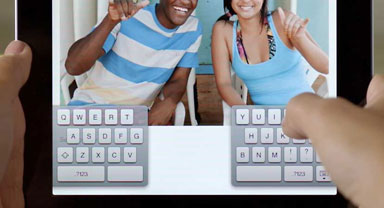
iOS 5 lets you split the iPad's keyboard for easier use.
My favorite new feature (other than the WiFi Sync) is the new splitkeyboard, which allows me to type much faster when holding the iPadwith both hands than was previously possible. I'm actually using it totype this in landscape mode! One interesting fact about the newkeyboard is that you can actually type the letters Y, H, and B from theleft side by pressing just past the letters T, G, and V, respectively.Same goes with vice-versa. It's an interesting addition that willlikely help many get accustomed to the split keyboard.
Another of my favorite features is the delta update process - it'smuch faster and more efficient on battery life than the old updateprocess. I'm also looking forward to OTA updates, to complete the wholePC-free feeling.
As far as performance and battery life goes, the 1st gen iPad is essentially unchanged, althoughwith a little time and experimentation, extending the battery lifeshould be possible.
iCloud has been great thus far, saving my novel right off the batand backing up trouble-free every night.
My verdict on iOS 5? It's delightfully solid - a littledisappointing, but much more exciting and functional.
Allison Payne (TheBudget Mac): I haven't downloaded iOS 5 yet, but I will as soon asinitial reports show no major bugs. Apart from all of the majorfeatures every review has covered, I'm particularly excited for the newmultitasking gestures on the iPad 2:swipe between open apps, swipe up to bring up the app switcher, andfour-finger pinch to go home. Although I've gotten very adept atnavigating between apps, it's my biggest pet-peeve how often the Homebutton is necessary in iOS 4. Aside from being clunky, it's also one ofthe few moving parts on the device and thus subject to wear and tear inways that the touchscreen isn't. Gestures will largely eliminate itsuse. I hope they optimize them and enable them on the original iPad andiPhone/iPod Touch.
iCloud is promising in a way that MobileMe and .Mac never have beenfor me. I would never trust private, corporate, or sensitive data to athird-party service, and part of me is still waiting for the other shoeto drop with things like iTunes Match, but Apple seems to finally havea coherent, resilient infrastructure in place (unlike the somewhatdisastrous MobileMe debut), and I'm looking forward to seeing how itplays out.Ê
Charles Moore: I stand corrected on theapp-switching by gesture support. That does indeed sound like a majorimprovement. I agree that the electromechanical Home button strikes adissonant chord on a touchscreen device - one of the touchscreen'sstronger points being its relative freedom from mechanical wear andtear.
Austin Leeds: True. In a moment of sweet irony, Irecently test drove a 1987 Buick Riviera. Almost everything in and outof it was shot - except the original CRT touchscreen display!
Dan Knight (Mac Musings): It took 5or 6 tries to get iOS 5 installed on my iPhone 3GS last week, and Ihave to say that I'm very satisfied with it thus far. I'm happy thatthe music player has been renamed Music (calling it iPod made no senseto me) and clearly differentiates it from the iTunes app. And now thatiCloud is free, I have a free email account to use with the Mail app (Itry to avoid doing email on my iPhone, so the bulk of it still goes tomy Mac). The new Trailers app works nicely, and Reminders looks verypromising (I'd been using a third-party freeware app).
iOS 5 feels more solid than version 4.x, although this may betotally subjective. I am disappointed that the camera icon does notshow up on the unlock screen on the iPhone 3GS - I was really lookingforward to it, as the Camera app has always been slow to load. I haveto say that I am very impressed with the zoom feature, something theiPhone has long needed with its fixed lens. A true zoom lens would benicer, but this is a big step forward.
My biggest disappointment with iCloud is that it requires Lion, andI am not enamored of the latest version of OS X. I use AppleWorks,Photoshop Elements 3, and a few other PowerPC-only apps that run justfine with OS X 10.6 SnowLeopard but won't run with Lion. If I have to choose between iCloudon my Mac and my PowerPC apps, I'll stick with what I know. I'm notholding my breath for Apple to add iCloud support to Snow Leopard, asApple is making this one more compelling reason to get people toupgrade to OS X 10.7.
Except for some changes in the way iOS 5 clears caches in low memorysituations (very ably explained byInstapaper's Marco Arment last week), I haven't heard of any problemswith iOS 5 that should keep you from upgrading if your hardwaresupports iOS 5.
About LEM Support Usage Privacy Contact
Follow Low End Mac on Twitter
Join Low End Mac on Facebook
Favorite Sites
MacSurfer
Cult of Mac
Shrine of Apple
MacInTouch
MyAppleMenu
InfoMac
The Mac Observer
Accelerate Your Mac
RetroMacCast
The Vintage Mac Museum
Deal Brothers
DealMac
Mac2Sell
Mac Driver Museum
JAG's House
System 6 Heaven
System 7 Today
the pickle's Low-End Mac FAQ
Affiliates
Amazon.com
The iTunes Store
PC Connection Express
Macgo Blu-ray Player
Parallels Desktop for Mac
eBay

