Mac Fallout Shelter
How to Set Up Your Own Mac Plus (or Later) Web Server
- 2005.11.29 - Tip Jar
This week I am going to talk about my Mac Plus setup. As I mentioned before, it's a web server.
I know there are many old Mac web servers on the 'Net today, and it has been mentioned here on Low End Mac before, but I still insist on writing about how mine works in the later part of the year 2005.
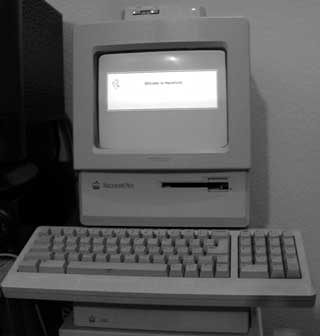 My Hardware
- Kensington System Saver Mac: This is a classic Mac cooling device that also includes a multi-plug power cord outlet built-in.
- Mac Plus: My floppy is busted after a lizard crawled up in there and died. It has 4 MB of RAM and is in good shape.
- Kensington Screen Guard: protects the screen and your vision.
- Apple SC20 hard drive: It's missing the top, but it has a piece of wood to support the Mac Plus. Mine has a 40 MB hard drive instead of the stock 20 MB.
- Asante EN/SC: The gold jewel of any classic Mac setup is getting one of these. I got mine brand new (still factory sealed) off eBay. It connects to the Mac Plus through the SCSI port and then has a extra port for the hard drive. This provides your classic Mac with a Ethernet port.
- Bay Networks 10Base-T hub: Hubs that support 10Base-T and 100Base-T can cause problems.
The Kensington System Saver Mac is a very cool, hard to find add-on for my Mac. It makes it easy to turn the Plus on and off along with two other devices.
Mac System 7.5.5 is used for stability, along with MacHTTP 2.6. Both are the latest for classic Macs and run pretty solid.
I got the Asante EN/SC driver from Asante's website. A very important thing to know is that there are different version of the EN/SC, but all will really work the same - just make sure it has a 10Base-T ethernet connector.
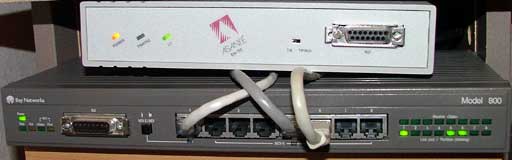
You must have a hub that supports only 10Base-T to connect the EN/SC or chances are it won't work. Newer network equipment automatically switches between 10Base-T and 100Base-T, and that causes problems with the EN/SC. I have a Bay Networks 10Base-T hub that I used together with my Mac Video Security system in the picture.
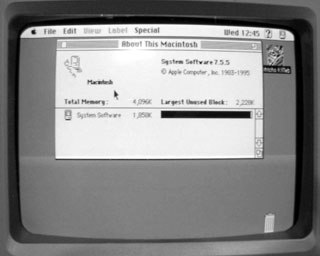 What You Need
- Mac Plus or better
- 4 MB RAM minimum
- 20 MB hard drive or larger
- ethernet port or adapter
- Mac System 7 or later
- MacHTTP
What Makes My Setup Different
Mine has the Asante EN/SC, which is a must, but the Kensington accessories also make it look cool and stay cool. Everything else is just like any other Mac Plus server out there.
Ways to Make It Better
A Mac SE or Classic would run better. A bigger hard drive is a must. A Zip drive would be really cool. Setting the disk cache to 128K will improve drive performance. Remember, this is lowest you can go on a Mac - anything above this is a lot better.
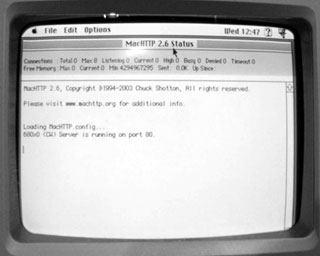 A custom
config file for MacHTTP and a domain name will help optimize your
server experience. See
MacHTTP Configuration for information on customizing your
setup.
A custom
config file for MacHTTP and a domain name will help optimize your
server experience. See
MacHTTP Configuration for information on customizing your
setup.
You can do this with almost any Mac. The important thing is that MacHTTP is free and works with System 7 and above.
You must also have a network connection - preferably an ethernet connection. You can choose to run this on a closed network or on the Internet.
You can have your very own web server for your website, and even a Mac Plus can handle a decent load, but not a whole lot.
My Mac Plus sits nicely next to the Mac Video Security System in my closet.
If you have any question, comments, concerns, or corrections,
please feel free to email me. 
- eBay
- MacHTTP, Sourceforge
- Asante EN/SE driver
- MacHTTP Configuration