Low End Mac Reader Specials
TypeStyler For Mac OS X is Now Shipping! Download The Free Fully Functional 60 Day Tryout at www.typestyler.com
OWC: We Make DIY Upgrading Easy! Maximize your Apple MacBook / MacBook Pro. Up to 8.0GB Memory, up to 1.0TB HD & More. Easy Guide + Free, Detailed Installation Videos. Click here
Don't install Parallels to play poker online! Poker Mac will show you how
to download and install a native Mac poker application such as Full
Tilt Poker Mac.
Laptop Hardware Provided by TechRestore - Overnight Mac & iPod Repairs.
Compare products like desktop computers, apple laptops, apple macs, and LCD Monitors side by side! All the information and reviews to make the best purchasing decision for new mobile phones, sat nav systems, or MP3 players. The Ciao online shopping community makes searching products easy for you.
Mac Fallout Shelter
Make Your Own Mac Video Surveillance System on the Cheap
- 2005.11.22 - Tip Jar
This week it's Mac security time. But I'm not talking about network security; I'm talking about physical security.
What good is it to have the most secure OS and best firewalls if anyone can simply come in and steal your Mac.
That's why it's good to lock all your doors and windows, but sometimes even that isn't good enough. Don't worry, the solution to this problem lies right there in front of you - your Mac.
I'm
going to teach you how to setup a home surveillance system using
your modern or older Mac.
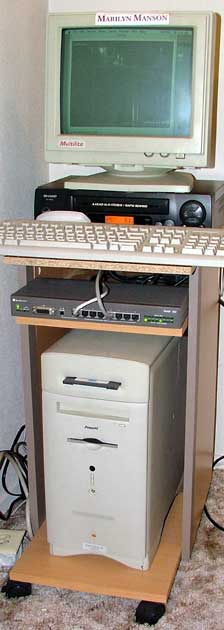
Before I start I will show you my current Mac Video Surveillance System (MVSS). From top to bottom:
- Old Multilite Black and white Monitor
- Sharp VHS VCR
- Apple keyboard and mouse
- Bay Networks 8-port hub
- Power Macintosh 6500/250
- Cheap black & white security cam from Walmart
What You Need
- Any Mac that can run Mac OS 8.5 and above
- A camera, either composite or USB
- A camera interface (composite video input or USB)
Optional:
- Network interface
- VHS VCR
- Monitor
Once you have everything you need, it's time to start.
First you need to get a copy of EvoCam. If your not running Mac OS X, you'll need to get version 3.4. EvoCam is shareware, and I recommend you pay the $25, because it's stable and the best for our application, which runs 24/7.
Go ahead and connect you camera(s). In my case, I got a cheap home surveillance cam from Walmart for $25 and connected it using my Mac's built-in A/V ports. Next start up EvoCam and adjust it to you needs.
Once you get all the bugs out, you can set motion detection spots on the image. This is for automatic recording when motion is detected.
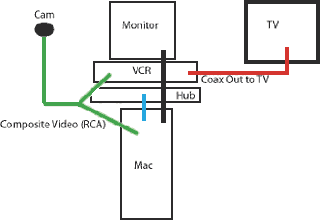
I also added the VCR to both record and transmit the image
to a closed-circuit television. How? I just put a splitter on the
composite video connection (RCA) coming in from the camera and fed
it to the VCR - and then connected a TV using the coax video out
from the VCR.
You can upload images to your website, run a web server, email pictures, and even record with a VCR so you will have your evidence when crooks break in. My system is in a closet to protect it. Like the old military saying, "Out of sight, out of mind"
This is a simple setup, but it's efficient. You can add more cameras, better machines, or a color monitor.
It will run a lot better with the latest version of EvoCam on
Mac OS X, but I like mine low-end style.
- Link: EvoCam software
- Link: EvoCam 3.4 for Mac OS 8/9
If you find Joe's articles helpful, please consider making a donation to his tip jar.
Recent Mac Fallout Shelter articles
- My Newton: Why I won't buy an iPhone or iPod touch, 09.07. The iPod touch and iPhone sound wonderful, but I love the handwriting recognition, fax support, and email abilities of my Newton MessagePad.
- Network administration tools for Mac OS X users, 06.25. Thanks to Mac OS X, today's Macs are great network citizens and excellent tools for doing network administration.
- Apple's secret battery reset utility for WallSteet and Clamshell iBooks, 07.05. If your old 'Books battery isn't taking a charge like it used to, Battery Reset 2.0 could help recover its useful life.
- Replacing Lombard with a TiBook: Which one is enough?, 04.19. Nice as the Lombard was, it has a new owner. The new 'Book should have FireWire, G4 power, and run Tiger nicely. How much TiBook is enough?
- More in the Mac Fallout Shelter index.
Links for the Day
- Mac of the Day: iMac Core Duo, Jan. 2006 - The first Intel-based iMacs ran at 1.83-2.0 GHz, came with 17" and 20" displays.
- Group of the Day: Mac Pro List is for those using a Mac Pro.
- November 23 in LEM history: 99: Should I buy a USB card? - 01: Can a low-end Mac be an only Mac? - Palm Desktop without a PDA - CyberDog saves the day - 05: How Consumer Reports could compare Macs fairly - Speakers for your Mac - Living with the hi-res 15" PowerBook - Birth of the PowerBook - Daystar 1.9 GHz iMac G4 upgrade - 1.92 GHz PowerBook upgrade
- Support Low End Mac
Recent Content on Low End Mac
- Apple's Tablet an End Run Beyond Netbooks, Frank Fox, Stop the Noiz, 11.20. Whatever Apple has planned will leverage existing technologies while going beyond what its competitors can offer.
- i5 iMac Benchmarked, Mac mini 'Shouldn't Be Overlooked', Twitter Client for Classic Mac OS, and More, Mac News Review, 11.20. Also why Apple leaves the low end to others, 10.6.2 fixes video playback problem in 27" iMac, 3D Leopard and Snow Leopard performance, and more.
- Apple #4 in Reliability, Apple Tablet a Gadget for All?, HP's i7 Notebook Outdoes Mac Rivals, and More, The 'Book Review, 11.20. Also Flash 10.1 improves video on Hackintosh netbooks, thin-and-light notebooks impress, Windows XP finally on the way out, and more.
- NASA Chemical Sensor for iPhone, Smartphone Death Match, iPhone Earrings, and More, Ian R Campbell, 11.20. Also mobile phone dangers, new apps, GPS solution for iPod touch, new iPod and iPhone cases, and more.
- Replacing the Hard Drive in a Clamshell iBook, John Hatchett, Recycled Computing, 11.19. Yes, it is one of the most difficult Apple notebooks to disassemble and reassemble, but a 10 GB hard drive just will not do.
- IBM Model F: A Great Old Keyboard with an Outdated Layout, Tommy Thomas, Welcome to Macintosh, 11.19. Although it used a different technology than the revered IBM Model M keyboard, the Model F was a great keyboard in its own right.
- Soft Touch Keyboards, Wireless Mouse Options, Loving SeaMonkey 2, and More, Charles W. Moore, Miscellaneous Ramblings, 11.18. Also the future of browsing with PowerPC Macs and the multiple mouse input bug introduced with OS X 10.5.8.
- More links in our archive.
Recent Deals
- Best eMac Deals, 11.18. Used 1 GHz Combo, $100; SuperDrive, $269; 1.25 GHz Combo, $119; SD, $319; 1.42 GHz Combo, $289; SD, $498.
- Best Mac OS X 10.6 and Mac Box Set Deals, 11.18. "Snow Leopard", single user, $25; 5 users, $45; Mac Box Set, single user, $139; 5 users, $180; Server, $414. Shipping included.
- Best Xserve Deals, 11.18. Used 1 GHz dual G4, $649; 2.3 dual G5, $795; 3.0 4-core Xeon, $1,899; refurb 2.26 4-core, $2,499; new, $2,888; refurb 8-core, $2,999; new, $3,449; more.
- Best 15" MacBook Pro Deals, 11.17. Used 1.83 GHz, $750; 2.16, $800; 2.33, $900; refurb 2.4, $1,299; 2.53, $1,449; 2.66, $1,699; 2.8, $1,899; new 2.53, $1,579; 2.66, $1,799; more.
- Best Power Mac G4 and AGP Video Card Deals, 11.17. Used 400 MHz, $50; 933 MHz, $80; 500 dual, $60; 867 dual, $90; 1 GHz dual, $150; 1.25 GHz dual, $225; 1.42 GHz, $499.
- Best Mac OS X 10.5 Deals, 11.17. "Leopard" upgrade, $80; single user license, $135; 5 users, $173; Mac Box Set, 5 users, $230; Server, 10 users, $340; unlimited, $850. Shipping included.
- Best Mac mini Deals, 11.16. Used 1.42 GHz G4 mini, $379; 1.66 GHz Core Solo, $419; 2.0 Core 2, $450; new 2.26 GHz nVidia, $580; 2.53 GHz, $769; Server, $990.
- Best iBook G4 Deals, 11.16. Used 12" 1.07 GHz Combo, $210; 1.33 GHz, $298; 14" 1.33 GHz, $398; 1.42 GHz, $479; SuperDrive, $498.
- Best iPod shuffle Deals, 11.16. Used 1 GB, $35; 4 GB, $65; refurb 1 GB, $39; 2 GB, $59; new 2 GB, $55, 4 GB, $75. New and refurb prices include shipping.
- More deals in our archive.
About LEM | Support | Usage | Privacy | Contacts
Navigation
Used Mac Dealers
Apple History
Video Cards
Email Lists
Favorite Sites
MacSurfer
MacMinute
MacInTouch
MyAppleMenu
InfoMac
Macs Only!
The Mac Observer
Accelerate Your Mac
RetroMacCast
PB Central
MacWindows
The Vintage Mac
Museum
DealMac
DealsOnTheWeb
Mac2Sell
ramseeker
Mac Driver Museum
JAG's House
System
6 Heaven
System 7 Today
the pickle's Low-End
Mac FAQ
Abandonware
Petition
Mac vs. PC Info
Affiliates
The Apple
Store
Mac
Connection
B&H
MacMall
TechRestore
ExperCom
Crucial
Memory
batteries.com
Advertise
MacMinute
MacInTouch
MyAppleMenu
InfoMac
Macs Only!
The Mac Observer
Accelerate Your Mac
RetroMacCast
PB Central
MacWindows
The Vintage Mac
Museum
DealMac
DealsOnTheWeb
Mac2Sell
ramseeker
Mac Driver Museum
JAG's House
System 6 Heaven
System 7 Today
the pickle's Low-End
Mac FAQ
Abandonware
Petition
Mac vs. PC Info
Mac Connection
B&H
MacMall
TechRestore
ExperCom
Crucial Memory
batteries.com
