
The Practical Mac
iRock!, a Gadget We Can't Live Without
- 2003.04.03 -
Rating: 
We live in a gadget world. We are mesmerized by robotic lawn mowers and vacuum cleaners whose hype is greater than their bite. However, once in a while we find a gadget that makes us wonder, "How did we ever live without this?" The iRock! 300W falls into this category.
The iRock! 300W is manufactured by First International Digital, Inc. of Chicago, a Motorola spin-off company. The premise is simple: The iRock! 300W plugs into the headphone or line-out jack of your iPod (or other portable music device) and transmits its signal to your car or home stereo.
The 300W can transmit on the FM frequencies of 88.1, 88.3, 88.5, or 88.7, so you are sure to find a station free of standard radio transmissions. Depending on conditions, the 300W has a range of 10-30'. In our tests, we were able to get a crystal-clear signal in both of the vehicles we used for evaluation. One vehicle had the radio antenna in the windshield, and the other outside by the trunk. Indoors, the unit had no trouble transmitting a clear signal up to about 25'.
The 6" flexible antenna doubles as the jack for your portable audio
device. In a clever piece of design 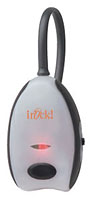 work worthy of
Apple, the combination antenna/jack plugs into a rubber receptacle on
the back of the 300W when not in use so as to protect the jack from
damage.
work worthy of
Apple, the combination antenna/jack plugs into a rubber receptacle on
the back of the 300W when not in use so as to protect the jack from
damage.
The 300W operates on two AAA batteries (not included). iRock! claims a typical battery life of 20 hours. In our test, we got just over the 20 hour mark. The unit has a simple push button on/off switch and a small LED on the front to let you know when it is on.
We envision many uses for the 300W. It allows you to use a portable cassette or CD player in a car that doesn't have one.
We still have nightmares about the hoops we had to jump through to listen to CDs before we got a car with a built-in CD player. We placed a portable CD player in the passenger seat and strung out two portable speakers - hopefully in such a position so as not to interfere with driving or fall to the floor when we turned a corner - and hoped for the best.
|
With this column, Low End Mac is instituting a uniform ratings system for product reviews. Reviewed products will receive from zero to four LEMs. The scale goes something like this:
Products might receive ratings with "1/2" increments from time to time. In keeping with the focus or this website, when rating products which are for use directly with or on a Mac, a factor in our evaluation will be how well it works with lower-end Macs and the Classic Mac OS. |
We once purchased an adapter that allowed us to use the portable CD player with the car stereo. One end plugged into the portable CD player and the other end had an adapter in the shape of a cassette tape which popped into the car stereo to transmit the signal via the car's cassette player. While it was a nifty idea, the cords involved in setting everything up were reminiscent of a spider web. And the thing broke after about two weeks.
Our current vehicle has a built-in CD player but no cassette. We have to go through the same sort of gyrations to use a cassette player or iPod. The iRock! 300W allows you to kiss all those cords good-bye. The only real complaint, and this is minor, is that there is no "automatic off" feature. If you get out of your car and don't notice the LED on the front, you are apt to leave the device on and run down the batteries. An automatic shutoff after four hours or so (or even an adjustable time) would be a welcome feature.
The 300W also allows you to use your portable music device with your home stereo when other connection methods are not available or convenient. At US$29.95, this is a "must-have" for any music enthusiast. (Please note that the iRock! 300W is not currently available outside of the U.S. and Canada.)
Rating: 3-1/2 
Join us on Facebook, follow us on Twitter or Google+, or subscribe to our RSS news feed
Steve Watkins is the Vice President for Information Technology for a mid-sized bank, an attorney, and an Army Reserve JAG on extended active duty. He has been a Mac user for about 12 years. He has owned some PCs along the way - but always came back to the Mac. If you find his articles helpful, please consider making a donation to his tip jar.
Today's Links
- Mac of the Day: PowerBook 1400, introduced 1996.10.01. Considered by many the best pre-G3 PowerBook with a small footprint and great keyboard.
- Support Low End Mac
Recent Content
About LEM Support Usage Privacy Contact
Follow Low End Mac on Twitter
Join Low End Mac on Facebook
Favorite Sites
MacSurfer
Cult of Mac
Shrine of Apple
MacInTouch
MyAppleMenu
InfoMac
The Mac Observer
Accelerate Your Mac
RetroMacCast
The Vintage Mac Museum
Deal Brothers
DealMac
Mac2Sell
Mac Driver Museum
JAG's House
System 6 Heaven
System 7 Today
the pickle's Low-End Mac FAQ
Affiliates
Amazon.com
The iTunes Store
PC Connection Express
Macgo Blu-ray Player
Parallels Desktop for Mac
eBay

