
The Practical Mac
Why OS X Matters
- 2001.09.18
I have read numerous reports and reviews wherein the writer declares, in some form or another, "I will stick with the Classic Mac OS!" I understand this sentiment. Although the number of Carbon or Cocoa applications grows daily, native versions of a number of important Mac applications remain months off. My wife runs OS 9.1 on her iMac DV+. I am writing this column on my iBook 466, newly updated to OS 9.2.1. I installed the latest OS update with the anticipation that I will, at some point, upgrade to OS X. But for now, the Classic OS suits me just fine.
It would be a mistake, however, to assume that I can or would even want to maintain the status quo indefinitely. I have installed OS X on an iMac and an upgraded Power Mac 8500 at the office. I like OS X. It is a sleek, modern OS with one huge advantage over all other Graphical OSes on the market: it is rock-solid in its stability. This OS should, and indeed must, be the future of computing.
At this point, a brief history of computing might be in order. For
all practical purposes, computing consisted primarily of typing in
arcane and confusing commands at a text-based prompt until 1984. In
1984, 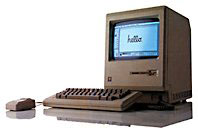 Apple introduced the original Macintosh with
its Graphical User Interface (GUI). Instead of typing in commands,
which had to be done either from memory or from some form of notes or
manuals, one could maneuver around a graphical screen and select
commands from a list of possible alternatives. It was revolutionary, it
was practical, and it was a hit! For eleven years, it was unique.
Apple introduced the original Macintosh with
its Graphical User Interface (GUI). Instead of typing in commands,
which had to be done either from memory or from some form of notes or
manuals, one could maneuver around a graphical screen and select
commands from a list of possible alternatives. It was revolutionary, it
was practical, and it was a hit! For eleven years, it was unique.
Not until Microsoft introduced Windows 95 in late 1995 did any other OS even approach the Mac in simplicity and ease of use. This was extremely important to the consumer/home user. To the business user, however, other factors were just as important, if not more important. Chief among these was the stability of the OS. It did not necessarily matter how easy to use an OS was. If it was unstable and continually crashed, it adversely impacted productivity and was unacceptable for business use.
For eleven years following the introduction of the Mac, Apple stood head and shoulders above other OSes in the stability category as well. In 1995, Microsoft slowly began to close this stability gap. With the introduction of Windows 2000, the race arguably drew dead even.
With the introduction of OS X, Apple once again opened up the stability gap, possibly wider than it has ever been. The foundation of OS X is Unix, and Unix, used primarily on servers, has always represented the Holy Grail of stability in heavy-duty computing environments. It is not unusual to have the uptime of Unix servers measured in years. This is the potential that OS X brings to the desktop. It allows a special privilege to those of us who long ago grew weary of the "three-finger salute." [Probably only you fellow DOS-converts will know that this means. We'll publish the answer next week!] It allows us boast that we run the most stable consumer OS in the world and know that only the technologically illiterate would argue with us.
Our iMac installation of OS X is over four months old and has not crashed - not once. And it is used daily. My installation on the accelerated Power Mac 8500 is about three months old and has only destabilized once. This was while running an application in the Classic environment. It still did not "crash" per se. I was able to successfully reboot using the menu choice, without having to resort to a "hardware reset." No Windows PC in our company can go for more than a few days without having to be rebooted - in addition to being shut down and turned off nightly.
After a few years on the ropes, the Mac once again offers a clear advantage. In order to increase market penetration in the business sector, the Mac must offer exactly this sort of "head and shoulders above" advantage.
Letters, I Get Letters
I sincerely appreciate and look forward to the email I receive each week. Somehow, as I look into my crystal ball, I predict that the volume this week may be heavier than usual. As I said, I like the Classic Mac OS. Yes, it aggravates me that some of the commands in OS X are now in different places. I miss the Chooser (I really do!).
It is certainly not my position that everyone should toss their older Mac and buy a new G4 preloaded with OS X. I plan on keeping my G3-accelerated Power Mac 7500 at home for a long time yet. I have invested a lot of money in upgrades over the years. I currently run OS 9.1, but I keep a dual boot of 8.1 available so I can use my PC-compatibility card!
I realize that some feathers were ruffled when Apple decided that older accelerated Macs would not be supported by OS X out of the box. However, with a number of different manufacturers producing accelerator cards, it could be argued that it would be difficult to support every one, and any impression of favoritism could be disastrous. I am just glad that companies like Sonnet, and even some individuals, have written installers and drivers which will allow users of older Macs to employ the latest OS.
It's the Productivity, Stupid!
I am responsible for supervising a staff whose job it is to insure
that hundreds of computers stay up and running. Downtime adversely
impacts productivity, which in turn adversely impacts profits. Success
is measured in uptime. That is why virtually all of my servers run
either Novell NetWare or Linux. That is also why I hope that someday
all of my workstations run Mac OS X. l may have realized too late
that it was the economy, but I have had a more timely epiphany that it
really is the productivity! 
About LEM Support Usage Privacy Contact
Follow Low End Mac on Twitter
Join Low End Mac on Facebook
Favorite Sites
MacSurfer
Cult of Mac
Shrine of Apple
MacInTouch
MyAppleMenu
InfoMac
The Mac Observer
Accelerate Your Mac
RetroMacCast
The Vintage Mac Museum
Deal Brothers
DealMac
Mac2Sell
Mac Driver Museum
JAG's House
System 6 Heaven
System 7 Today
the pickle's Low-End Mac FAQ
Affiliates
Amazon.com
The iTunes Store
PC Connection Express
Macgo Blu-ray Player
Parallels Desktop for Mac
eBay

