

That 80s Mac
Eric Schwarz - 2002.01.16
Well, I'm back (for the foreseeable future) and have a slew of new things to share with all of you out there. If you have any comments, suggestions, or questions about my articles, feel free to drop me an email.
What better subject to dedicate an article to than the early Macs from the 1980s. After all, they are often under-appreciated, ignored, and just plain forgotten, since more and more Macs are becoming "low-end" - and with all they hype of new Apple products. I know that the Mac II series and the Mac Portable fit in this category (as being made in the 1980s), but I'm going to concentrate on the first Macs (the compact Macs with monochrome screens). For detailed specs, see the profiles.
Macintosh (a.k.a. 128k)
This was the first, simply called Macintosh. For usefulness,
unless you are running MacWrite and 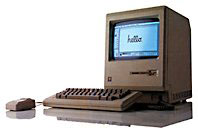 MacPaint with an ImageWriter printer, you
can't get much out of these, unless you have some sort of third-party
upgrade. There are reasons to keep these around. Not only are they cool
to play around with, but they also are highly collectible. Some people
keep them for sentimental reasons (maybe it was their first Mac).
MacPaint with an ImageWriter printer, you
can't get much out of these, unless you have some sort of third-party
upgrade. There are reasons to keep these around. Not only are they cool
to play around with, but they also are highly collectible. Some people
keep them for sentimental reasons (maybe it was their first Mac).
Macintosh 512k (a.k.a. 'Fat Mac')
The Fat Mac was the "high-end" version of the original Macintosh. When it was released, the original Macintosh was renamed Macintosh 128k to reflect how much memory it had. Since the 512k has 4 times as much memory, it was much more expensive ($800 more) and could do more work. Of course, the same theory applies to this Mac as the original 128k in terms of usefulness today.
Macintosh Plus
Ah yes, the Macintosh
Plus. An entire article could be written about this fantastic
computer, but I'll keep it 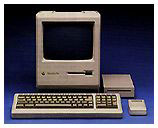 short. The Plus was
the first Mac to feature a lot of things (SCSI, round serial ports,
expandable RAM, a nice platinum color, double-sided floppies, etc.).
And this Mac has a lot of life left in it. You can connect an external
hard drive, max out the RAM at 4 MB, load up System 7.5.5
(although I recommend 6.0.x or 7.1), set it up for email, as a Web
server or a file server, or use it for word-processing and other small
tasks.
short. The Plus was
the first Mac to feature a lot of things (SCSI, round serial ports,
expandable RAM, a nice platinum color, double-sided floppies, etc.).
And this Mac has a lot of life left in it. You can connect an external
hard drive, max out the RAM at 4 MB, load up System 7.5.5
(although I recommend 6.0.x or 7.1), set it up for email, as a Web
server or a file server, or use it for word-processing and other small
tasks.
For a computer that is over 15 years old, these really have a lot of life left in 'em. No wonder so many Mac enthusiasts think they are the #1 Mac of all time.
Macintosh 512Ke
The 512Ke (e for enhanced), although sometimes overlooked, was basically a Mac 512k with enhanced ROMs of the Plus. This allowed the use of an 800k (double-density) disk drive - the previous Macs had used 400k disk drives. This also served as the low end for a short time.
Macintosh SE
My personal favorite (this was my first Mac), the SE was a more powerful version of
the Plus (think of it to the Plus as the slot-loading 350 MHz iMac was
to the 333 MHz tray-loading model). A slightly faster 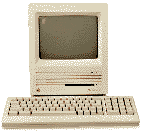 speed (thanks to a more efficient logic board, not a faster
processor - both used the same an 8 MHz 68000), faster SCSI,
internal SCSI, dual internal disk drive capability (two floppies or a
hard drive and a floppy), and ADB were just a few of the
features of the SE.
speed (thanks to a more efficient logic board, not a faster
processor - both used the same an 8 MHz 68000), faster SCSI,
internal SCSI, dual internal disk drive capability (two floppies or a
hard drive and a floppy), and ADB were just a few of the
features of the SE.
The same suggestions that apply to the Plus work here - these are also good for educational purposes and as a second computer. I had one set up as an email machine for my mom until I got her a very stylish PowerBook 170 - more on that later.
Oh, and did I mention these had an expansion slot to add things like ethernet, PC-compatibility cards, accelerators, and other nifty little gizmos? Yep, that's right an SE could be connected to an LCD iMac with a mere ethernet crossover cable. Later versions of the SE contained ROMs and the drives to use 1.4 MB floppies.
Macintosh SE/30
Another favorite among the Mac community, the SE/30 is an SE/Mac IIx hybrid. Like the IIx, it features a 16 MHz 68030 processor and supports up to 128 MB RAM. It also has a PDS expansion slot compatible with the IIsi. These make excellent file servers, educational computers, and word-processors.
SE/30s tend to be worth a lot more than the other Macs of this era. Why? Well, they are becoming harder to find, and they are downright cool. A tiny computer that is still pretty speedy on the Internet and other modern things - who'd have thought?
To sum up...
Well, I think our little trip back to the 80s was good for those of
you who wanted a brief summary of the "first" Macs. Next week I'll be
back in 2002 and writing about music on the Mac. It's great to be back.

About LEM Support Usage Privacy Contact
Follow Low End Mac on Twitter
Join Low End Mac on Facebook
Favorite Sites
MacSurfer
Cult of Mac
Shrine of Apple
MacInTouch
MyAppleMenu
InfoMac
The Mac Observer
Accelerate Your Mac
RetroMacCast
The Vintage Mac Museum
Deal Brothers
DealMac
Mac2Sell
Mac Driver Museum
JAG's House
System 6 Heaven
System 7 Today
the pickle's Low-End Mac FAQ
Affiliates
Amazon.com
The iTunes Store
PC Connection Express
Macgo Blu-ray Player
Parallels Desktop for Mac
eBay

