

Back to School 'Books
Eric Schwarz - 2001.08.09
PowerBooks are very helpful for school use. I should know - I carry my PowerBook with me to all my classes and everywhere else. It's proven to be a lifesaver for lots of assignments and projects.
I've had a few friends trying to decide which PowerBook to use for their classes. They didn't want to spend a lot but wanted a few key features, so here are a few models for school use, along with their pros and cons.
PowerBook 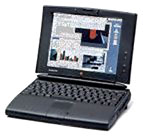 540c
540c
All the 500 series are good, but most students would want a nice color screen (for games after all) :-P. Also, the 540c provides plenty of power for most uses, thanks to its speedy(?) 68LC040 processor (it can be upgraded to a PowerPC 603e at 100 to 183 MHz). It can run up to OS 8.1 (or 9 with the PPC card), so most modern software will work. Playing MP3s is also possible with the PPC card.
Pros
- Built-in modem (19.2k) for easy access to the Internet (slowly)
- Built-in AAUI ethernet port for access to most networks (requires a 10Base-T transceiver)
- Small size compared to newer notebooks
- Trackpad
- 16-bit sound
- Can be bought inexpensively ($40-100)
Cons
- SCSI hard drive (expensive to upgrade)
- Intelligent Batteries (expensive, inefficient)
- Plastic is prone to breaking
- RAM is hard to find
PowerBook 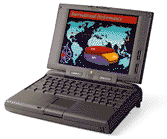 5300c/ce
The 5300c and ce are essentially the same computer, but the CE is slightly faster and has an 800 x 600 screen instead of the 640 x 480 screen on the 5300. The 5300 series are very stable and very powerful for the price, but they do have their flaws (in the cons). The 5300 series offer a expansion bay for either a floppy drive, PC card holder, Zip drive, MO drive, or hard drive. The 5300 series also offer PCMCIA slots, an infrared port, and the possibility for Lithium-Ion batteries, but most (about 95%) have NiMH. These are less "intelligent" than the 500 series batteries, so they tend to work better. Lastly, make sure the one you buy has been through the Apple "REA" program to fix the problems - it expires June 2002.
Pros
- PPC 603e processor as standard equipment
- PCMCIA slots
- Expansion bay
- IDE hard drive for cheaper upgrade
- RAM is easier to find
- 10.4" screen
- "Dumber" batteries than the 500 series: cheaper, tend to work better.
- Cheap PPC PowerBook ($50-200)
Cons
- mono-speaker that sucks; use headphones or external speakers for best sound.
- case that is prone to falling apart (unless it's been through REA).
- motherboard / power system tends to also have problems (unless it's been through REA).
- A Road Apple rating.
Duo 280c
The Duo 280c is a wonderful computer, combining the power of the 540c with a smaller case, more readily available RAM, and less "intelligent" batteries. The 280c features a trackball, as well as an 8.4" active matrix color screen. The 280c is one of the lightest color PowerBooks, but requires a dock. This makes the Duo easy to carry between classes since it weighs less than 5 pounds.
Pros
- 68LC040 processor can run most modern software (OS 8.1)
- RAM is easy to find
- internal modem (although slow)
- use of docks can make it as connectable as you want
- stronger case than 540c
- batteries as dumb as the 5300 series, so they work well.
- clear active matrix 8.4" screen
Cons
- SCSI hard drive (expensive to upgrade)
- limited built-in ports; requires different docks
- small screen
- not cheaply (or easily) upgraded to PowerPC.
- tends to cost more than the 540c
The Duo 2300c is similar, but it has a PowerPC processor, a slightly larger screen, an IDE hard drive, and a trackpad. Otherwise it's about the same.
So, which one?
These PowerBooks are excellent computers in their own right. Sure, other PowerBooks (100 series, other Duos, 1400 and up) are nice, but they either don't have enough power/features or they are too expensive for students that don't need or can't afford a new computer. My favorite is the 540c, but I know many people that swear by their Duo 280c or 5300c. Just be sure to choose a PowerBook that will work for your needs.
Next week: Back to School Software

About LEM Support Usage Privacy Contact
Follow Low End Mac on Twitter
Join Low End Mac on Facebook
Favorite Sites
MacSurfer
Cult of Mac
Shrine of Apple
MacInTouch
MyAppleMenu
InfoMac
The Mac Observer
Accelerate Your Mac
RetroMacCast
The Vintage Mac Museum
Deal Brothers
DealMac
Mac2Sell
Mac Driver Museum
JAG's House
System 6 Heaven
System 7 Today
the pickle's Low-End Mac FAQ
Affiliates
Amazon.com
The iTunes Store
PC Connection Express
Macgo Blu-ray Player
Parallels Desktop for Mac
eBay

