
Mac News Review
Mac mini Still Alive, Migrating with Time Machine, a Portable USB Turntable, and More
This Week's Apple and Desktop Mac News
Compiled by Charles Moore and edited by Dan Knight - 2008.10.31
PowerBook, iBook, MacBook, and other portable computing is covered in The 'Book Review. iPod, iPhone, and Apple TV news is covered in The iNews Review.
All prices are in US dollars unless otherwise noted.
News & Opinion
- Mac mini Still Kickin'
- Is a Mac Right for You?
- Migrate to Another Mac Using Time Machine
- Is Time Machine Good Enough?
- Snow Leopard to Offer Text Auto-correction
- Bloggers More Accurate on Apple Financials than 'Pro' Analysts
Products
Software
- DiskWarrior Version 4.1.1 Provides Mac OS X 10.5.5 Compatibility
- CrossOver Mac Improves Outlook/Exchange Support
Desktop Mac Deals
News & Opinion
Mac mini Still Kickin'
Appleinsider's Kasper Jade reports:
"First on AI: With Apple's recent 'State of the Mac' omitting any mention of the Mac mini and reports surfacing over the current line's discontinuation, there's been some speculation that the diminutive desktop's days may (again) be numbered. That's unlikely the case, say insiders, who are sharing new details."
Link: Informed Players Say Apple's Mac mini Still Kickin'
Is a Mac Right for You?
Entrepreneur's Jason R. Rich reports:
"Not long ago, if you were to ask PC users what they thought about Apple Macs, you'd probably get one of two responses: Either they'd say, 'Oh, those are the computers used by college students,' or you'd hear, 'Aren't Macs used only by creative types, like artists and musicians?'
"What today's business people and entrepreneurs are quickly beginning to understand is that Apple's iMacs (desktop computers) and MacBooks (notebook computers) can not only handle virtually every business application a PC can handle, but also provide a more stress-free computing experience...."
Link: Is a Mac Right for You?
Migrate to Another Mac Using Time Machine
TUAW's Cory Bohon says:
"If you use Time Machine in Leopard, then transferring your stuff to a new Mac might be a bit simpler than you thought. With Migration Assistant, you can easily transfer Applications, Documents, Settings, and more. In this Mac 101, we're going to show you how it's done, and how you can do it yourself!"
Link: 6 Easy Steps to Migrate Your Mac Using Time Machine
Is Time Machine Good Enough?
O'Rellly's Todd Ogasawara says:
"My MacBook's hard drive died back in December 2006. And, my first generation Mac mini (the old G4 model) decided to give it up around August of 2007. Since Leopard didn't arrive until October 2007, neither of these incidents could take advantage of Leopard's Time Machine.
"Since then, I've actually had to use Time Machine twice to recover files that weren't backed up elsewhere. And, I tested a full restore on my MacBook by wiping out the drive (on purpose) and then restoring from a Time Machine backup. This is not enough testing to fully trust the process. On the other hand, Time Machine is batting 100% so far...."
Link: Is Time Machine Enough?
Snow Leopard to Offer Text Auto-correction
Appleinsider's Sam Oliver reports:
"Modern text-handling technologies made popular on Apple's iPhone should turn up on the Mac next year as part of the company's Mac OS X 10.6 Snow Leopard release.
"Purported screenshots making the rounds from build 10A190 of the OS overhaul show that a new version of Apple's TextEdit application will offer preferences for at least three new text handling operations.
"The first, which is already a staple of the company's iPhone interface, offers to correct spelling automatically as a user types."
Link: Apple's Snow Leopard to Offer Text Auto-correction
Bloggers More Accurate on Apple Financials than 'Pro' Analysts
Seeking Alpha reports:
"Fortune magazine wrote a great article Wednesday comparing the efficacy and accuracy of Wall Street research houses that follow Apple and unpaid bloggers doing the same thing. This stems from a gauntlet-style challenge being tossed from the Bloggers to the Pros in the last few days leading up to AAPL's fourth quarter earnings call.
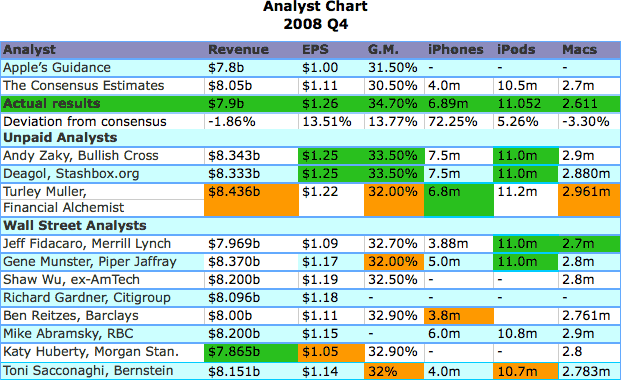
"...the Bloggers kicked the crap out of the 'Pros' (and I use that term lightly) . . . The Bloggers clearly won and there are a couple of cases where the 'Pros' numbers were so far off, they look like they were following RIMM instead...."
Link: Bloggers Far More Accurate on Apple than Analysts
Products
NuMark's Portable USB Turntable
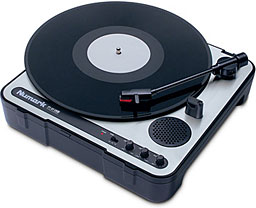
PR: Numark has created a revolutionary portable turntable that enables you to convert your vinyl to WAV or MP3. This rugged, portable turntable can run on either wall or battery power, comes with a cover with integrated carry-handle, and has an internal speaker for total mobility. The most convenient way to digitize your vinyl.
 Using the included recording software, no special drivers are
needed to connect PT-01USB to any Mac or PC via USB and transfer music
from vinyl to hard disk. EZ Vinyl Converter 2 (PC) and EZ Audio
Converter (Mac) software are included to make recording and importing
audio simple. EZ Vinyl Converter 2 imports your songs directly into
your iTunes library, automatically separating tracks, and with a free
download of Gracenote MusicID, it can even automatically name your
tracks. PT-01USB also comes with Audacity software for editing your
tracks. Audacity also helps reduce clicks, pops, and other noises from
your recordings to restore the full quality of your vinyl.
Using the included recording software, no special drivers are
needed to connect PT-01USB to any Mac or PC via USB and transfer music
from vinyl to hard disk. EZ Vinyl Converter 2 (PC) and EZ Audio
Converter (Mac) software are included to make recording and importing
audio simple. EZ Vinyl Converter 2 imports your songs directly into
your iTunes library, automatically separating tracks, and with a free
download of Gracenote MusicID, it can even automatically name your
tracks. PT-01USB also comes with Audacity software for editing your
tracks. Audacity also helps reduce clicks, pops, and other noises from
your recordings to restore the full quality of your vinyl.
PT-01USB has an RCA line input so you can connect other sound sources such as tape decks and convert them to digital files too! RCA line outputs enable connection to your DJ system or home stereo so you can use PT-01USB as a standard record-player. In addition to the internal speaker and RCA outputs, you can also listen with headphones.
With 33, 45, and 78 RPM speeds, PT-01USB works with your entire record collection. There's even a ±10% pitch control to help you optimize your tracks for whatever need you have.
Advanced vinyl-to-digital conversion that's ready to roll when and where you are - PT-01USB.
Minimum System Requirements (Mac):
- Mac OS X 10.4.x*
- available USB 1.1 port
- Audio Recording program (to capture the audio from your vinyl)
Minimum System Requirements (PC):
- Windows 2000/XP/Vista
- available USB 1.1 port
- Audio Recording program (to capture the audio from your vinyl)
*This product includes two Macintosh compatible software recording programs on the CD-ROM. The included EZ Converter software requires Mac OS X 10.4 or higher. However, the included Audacity software is compatible with Mac OS X 10.1 or higher. Customers with computers running Mac OS 9, may download an earlier version of Audacity (v.1.0.0) for free at <http://audacity.sourceforge.net/download/mac>
Link: NuMark PT-01USB Portable Vinyl-Archiving Turntable
Software
DiskWarrior Version 4.1.1 Provides Mac OS X 10.5.5 Compatibility
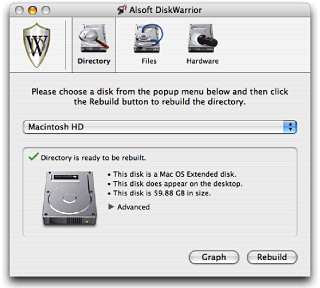
PR: DiskWarrior 4 version 4.1.1 is now available for complete compatibility with Mac OS X 10.5.5 (Leopard). Version 4.1.1 restores the ability to use DiskWarrior to repair permissions while started from Mac OS X 10.5.5.
 Owners of
DiskWarrior 4 version 4.0 and version 4.1 can now download a free CD
updater to update to DiskWarrior 4 version 4.1.1. This free updater
application allows you to create a new startup CD with the latest
version of DiskWarrior using your original DiskWarrior 4.0 or 4.1 CD.
This approach provides you with an instant update while maintaining
your ability to start up from a CD containing the latest version of
DiskWarrior.
Owners of
DiskWarrior 4 version 4.0 and version 4.1 can now download a free CD
updater to update to DiskWarrior 4 version 4.1.1. This free updater
application allows you to create a new startup CD with the latest
version of DiskWarrior using your original DiskWarrior 4.0 or 4.1 CD.
This approach provides you with an instant update while maintaining
your ability to start up from a CD containing the latest version of
DiskWarrior.
The DiskWarrior 4.1.1 CD updater cannot update a CD created by any previous DiskWarrior CD updater. You must update your original (factory) DiskWarrior 4.0 or 4.1 CD. This limitation allows AlSoft to reduce the size and complexity of the updater, and also results in a significantly smaller test suite that permits issuing updates more responsively.
Note that the new startup CD you create will start up the same set of Mac models as your current DiskWarrior CD. Your new CD will not start up any Mac that your current DiskWarrior CD can not. If you need a new DiskWarrior disc that can start up the newest Mac models, please contact our Sales Department to order. Please note that you will receive a DVD instead of a CD (as stated below).
DiskWarrior 4 now ships on DVD instead of CD. With this switch, a new revision scheme has been adopted and the revision of the new DVD is 810. All Mac models meeting the updated system requirements for DiskWarrior can be started from the new DVD. The requirements to start up from the DVD are the same as the requirements to install Mac OS X 10.5 (Leopard). DiskWarrior 4 version 4.1.1 is available, by request, on CD for old Macs that do not have DVD drives. However, these CDs cannot start up any currently shipping Macs models and can only be obtained by first contacting our Technical Support Department.
DiskWarrior is a safe, technologically advanced, powerful utility to eliminate disk directory damage.
DiskWarrior uses a different approach to disk directory repair than other programs. DiskWarrior is not a disk repair program in the conventional sense. Instead of patching the original directory, it uses a patent-pending technology to quickly build a new replacement directory using data recovered from the original directory, thereby recovering files, folders and documents that you thought were lost and that no other program could recover.
DiskWarrior is the only product that finds all of your data.
Its patent-pending method always results in a perfectly rebuilt directory without any errors and that contains all of your file and folder data.
New in Version 4.1.1: Uses your original 4.0-4.1 CD to create a new startup CD containing DiskWarrior 4 version 4.1.1, which adds Leopard compatibility. The new CD will only start up the same Mac models as the original CD. The included Read Me lists details and requirements.
System requirements: Mac OS X 10.3.9 or later.
System support: PPC/Intel
$99.95
Link: DiskWarrior
CrossOver Mac Improves Outlook/Exchange Support
PR: CrossOver Mac allows you to install many popular Windows applications and games on your Intel OS X Mac. CrossOver includes an easy to use, single click interface, which makes installing Windows software simple and fast. Once installed, your application integrates seamlessly in OS X. Just click and run your application directly from the OS X Finder. Clicking a Windows file or document - including email attachments - will launch the appropriate Windows program, allowing you to work on the files. Best of all, you do it all easily and affordably, without needing a Microsoft operating system license.
Adding new Windows software is easy. Just place your install CD in your Intel Mac, and CrossOver will recognize it and offer to begin the installation process. CrossOver then completes the installation and configures your application to run on your Mac. That's all there is to it.
One Application: Two Delicious Flavors!
We've created two versions of CrossOver Mac - Standard and Professional - to serve our home-user/enthusiast and corporate markets even better. CrossOver Mac Standard provides individual users with the ability to run a wide variety of Windows software cleanly and economically. CrossOver Mac Professional provides corporate users with the enhanced deployability and manageability features their environments demand.
Likewise, if you're the kind of customer that likes a one-shot deal to make just one particular Windows application run, Standard is for you. But if you're the sort of customer who likes to stay under support, and get a steady stream of updates, Pro is for you: you'll get a better level of support, longer support, and a lower price over the long haul.
New in version 7.1:
Outlook fixes:
- Restored use of the Rules and Alerts dialog
- Improved connectivity with Exchange servers
- Fixed installation of several custom versions of Outlook
- Improved copy and paste behavior
- Fixed 'reply all' behavior
- Improved printing
- Partial support for signed emails
- Fixed some address autocompleteion in Outlook 2007
- Fixed ability to create new contacts, appointments & tasks
- 2003 & 2007 now exit cleanly on the Mac
- Can now open recurring Calendar Items
Application installation changes:
- Many more versions of Office 2007 (including Enterprise editions) now install properly.
- Office 2003 Service Pack 3 now installs.
- Office 2003 one-shot updates now apply.
- Several more versions of Office 2003 now install.
- MS Office language packs now install
- Visio 2003 sp3 now installs.
Other fixes:
- Office 97 now works better.
- PowerPoint 2003 slide preview improved.
- Bidirectional text behavior is improved.
- Access 2002 reporting is improved.
- Improved Java behavior.
- Use the native FreeType library on Leopard systems.
- On Linux, add the ability to generate Debian bottle packages.
- Fixed a CrossOver installation error specific to Estonian locales.
- Fixed: Word 2003: Can't open Word doc, Out of Memory
- Pull-down menus now appear more than once (WordArt)
- Can now open Project 2007 files with Project 2003 (with the add-on installed)
- Rotating text boxes now works in the proper direction
System requirements: Intel Mac
$69.95 demoware
Link: CrossOver Mac
Desktop Mac Deals
Low End Mac updates the following price trackers once or twice a month:
- Best Intel iMac deals
- Best iMac G5 deals
- Best iMac G4 deals
- Best iMac G3 deals
- Best eMac deals
- Best Mac mini deals
- Best Mac Pro deals
- Best Power Mac G5 deals
- Best Power Mac G4 deals
- Best Power Mac G3 deals
For more deals on current and discontinued notebook models, see our MacBook deals, MacBook Air deals, 15" MacBook Pro deals, 17" MacBook Pro deals, 12" PowerBook G4 deals, 15" PowerBook G4 deals, 17" PowerBook G4 deals, titanium PowerBook G4 deals, iBook G4 deals, PowerBook G3 deals, and iBook G3 deals.
Join us on Facebook, follow us on Twitter or Google+, or subscribe to our RSS news feed
Links for the Day
- Mac of the Day: PowerBook 500 Series, introduced 1994.05.16. 'Blackbird' includes a 25 to 33 MHz 68040 along with smart batteries and grayscale or color displays.
- Support Low End Mac
Recent Content
Go to the Mac News Review index.
About LEM Support Usage Privacy Contact
Follow Low End Mac on Twitter
Join Low End Mac on Facebook
Favorite Sites
MacSurfer
Cult of Mac
Shrine of Apple
MacInTouch
MyAppleMenu
InfoMac
The Mac Observer
Accelerate Your Mac
RetroMacCast
The Vintage Mac Museum
Deal Brothers
DealMac
Mac2Sell
Mac Driver Museum
JAG's House
System 6 Heaven
System 7 Today
the pickle's Low-End Mac FAQ
Affiliates
Amazon.com
The iTunes Store
PC Connection Express
Macgo Blu-ray Player
Parallels Desktop for Mac
eBay

