
Mac News Review
Apple Most Innovative Company, Microsoft Defections Could Double Mac Market, Mac mini with WinXP, and More
This Week's Apple and Desktop Mac News
Compiled by Charles Moore and edited by Dan Knight - 2006.04.21
PowerBook, iBook, iPod, and other portable computing is covered in The 'Book Review. News about Apple's transition to Intel CPUs and other Intel developments is covered in The Macintel Report. iPod news is covered in The iNews Review.
All prices are in US dollars unless otherwise noted.
News & Opinion
- BusinessWeek: Apple Most Innovative Company
- Apple Could Double Market Share on Microsoft Defections
- Free Mac Serial Number Decoder
- My Mac Diagnostic Tool Belt
- 'Repair Permissions' Is Voodoo
- Mac mini Makes a Fun Little Windows XP Machine
- OS X Already Runs on a PC, the Mac mini
Reviews
Products
- Digital Foci Memory Card Reader/Writer for All Memory Cards
- Plextor Portable Hard Drives for On-the-Go Data Storage
- mini SATADock for Easy Access to External SATA Drives
Software
Desktop Mac Deals
News & Opinion
BusinessWeek: Apple Most Innovative Company
BusinessWeek's ranking of "The World's Most Innovative Companies" has Apple in the Number 1 spot.
Other notable rankings:
- 2. Google
- 5. Microsoft
- 10. IBM
- 12. Samsung
- 14. Dell
- 17. Intel
- 34. Pixar
- 42. Hewlett Packard
- Link: The Top 100 Most Innovative Companies Ranking
Apple Could Double Market Share on Microsoft Defections
Macworld's Jim Dalrymple says:
"Consumers are so distrustful of Microsoft that Apple could double its market share due to defections from the Windows operating system, a report by market analysis firm Forrester Research says.
"The remarks come in a report that looks at brand identity and the importance of a company's brand. The report also studies the effect a company's brand has on the pricing of its products and the demographics of those that purchase the products.
"Over all, only Apple and TiVo saw their brand trust rise in the last two years, according to the report. The final tally saw Bose, Dell, Hewlett-Packard, Panasonic and Sony earn the highest marks, while Microsoft, Gateway and LG ranked lowest.
"The low scores for Microsoft could mean good news for Apple as consumers showed their distrust of the Redmond-based software-giant."
Free Mac Serial Number Decoder
The chipmunk.nl site says:
"If you would like to have more information on your Macintosh (model, date of production, etc.) then enter your serial number here. All the information that we can wring from the serial number will be shown to you.
"We support all Apple products including computers, laptops, monitors, printers and batteries."
Here's what it almost instantly returned when I entered my iBook's serial number:
- Name: iBook G3 (Late 2002)
- Model: Mxxxx iBook G3 700 MHz
- Bus speed: 100 MHz
- Screen size: 12 inch
- Factory: UV (Taiwan)
- Model introduced: 2002
- Production year: 2002
- Production week: 42 (October)
- Production number: 174 (within this week)
- There might be a factory recall on this product! (motherboard problem)
- http://www.apple.com/support/ibook/faq/
- So far 0 hardware problems have been entered for this model.
- If you had or have any hardware problems with this machine you can tell them to us. This will over time reveal if particular models have particular problems."
However, it was unable to return any information from the Apple Certified Refurbished serial number of my 1.33 GHz 17" PowerBook G4. cm
My Mac Diagnostic Tool Belt
The Apple Core 's Jason D. O'Grady says:
"I keep a special folder of Mac OS X diagnostic and repair applications on my Mac's hard drive in case of emergency and there are a couple tools that every self-respecting mobile Mac user should have in their arsenal. This is a short list of some of my essential selections:
"The conventional wisdom is to run Disk Utility's a Repair Disk Permissions operation regularly and before and after a Mac OS software update but I'm increasingly starting to agree with John Gruber that Repair Permissions Is Voodoo."
Jason's emergency arsenal of tools includes:
- Disk Utility
- Carbon Copy Cloner (free)
- Synchronize Pro x ($100)
- Preferential Treatment (free)
- FileXaminer ($10)
- Tiger Cache Cleaner ($19)
- Data Rescue II ($99)
He asks: "What's in your Mac tool belt?"
Hmmm. personally, I use:
- DiskWarrior ($80)
- Drive Genius ($99)
- OnyX (free)
- Preferential Treatment (free)
- Data Rescue II (which I've never been obliged to use for data loss)
If there seems to be an issue, I usually boot into Single User Mode and run the fsck -y diagnostic and repair routine first. cm
'Repair Permissions' Is Voodoo
Daring Fireball's John Gruber says:
"Boot Camp mania hasn't caused me to forgot about those of you who, despite last week's '"Repair Permissions" Is Not a Recommended Step When Applying System Updates', still believe, or want to believe, in the voodoo of running 'Repair Permissions' as a periodic maintenance task.
"One problem is the name of the feature itself; either 'Restore Permissions' or 'Reset Permissions' would be a more apt name. 'Repair' makes it sound as though files are broken if their permissions are affected by this process; that's not the case. Files might have perfectly valid permissions but differ from what's expected by the Repair Permissions process....
"If you are not experiencing any symptoms that would indicate permission-related problems, there is no reason to run Repair Permissions. Repair Permissions is not a periodic maintenance task or a preventive measure.
"Arguing that you (a) run Repair Permissions all the time and (b) have no permissions problems, and then drawing the conclusion that there's a cause-and-effect relationship there, is like arguing that your diligent avoidance of sidewalk cracks has a causal relationship to the fact that your mother's back is doing just fine. Troubleshooting computers is science, not magic."
Mac mini Makes a Fun Little Windows XP Machine
Internet-Nexus reports:
"So I purchased an Intel-based Mac mini today so I could test Boot Camp and running XP alongside Mac OS X. I'll be writing up a longer review for the SuperSite for Windows, but the short version is that it works pretty well. It's not perfect, however: There's no boot menu unless you know to hold down the Option key after rebooting, which is silly: That should be there all time. And while most of the Mac mini's hardware is supported, the Device Manager isn't 'clean,' meaning there are at least two devices in there that are not supported (the third is a Kensington mouse, for which I simply haven't yet downloaded the appropriate driver).
"While the initial excitement has worn off a bit - after all, this is a base model Mac mini we're talking about here - it's still a pretty interesting setup. My opinion is that a MacBook Pro with a very large hard drive dual booting between OS X and XP would be much, much neater than this. But I'm happy that this is even possible."
OS X Already Runs on a PC, the Mac mini
metroxing.blogspot.com reports:
"Running Windows on a Mac is really like the cousin who gets out of jail every 5 years - whoop, there he is! It's ALWAYS been there and keeps coming back.
"Every since Macs got an expansion card with the Mac II's - we have had many choices to run DOS/Windows. There were 3rd party NuBus cards with an Intel chip on it, we've had Virtual PC software emulation (or some other choices) software since forever . . . We've even had a choice of buying Macs directly from Apple with an Intel chip on a second card as an add-on feature.
" http://www.everymac.com/systems/apple/mac_performa/stats/mac_performa_640cd. html
"....still, dunderhead people cry out for OS X on a non-Apple PC.
"You obviously have not noticed.
"Apple already sells such a machine - it's called a MINI!
"Perhaps you have heard of it."
- Yes, OS X Already Runs on a PC - It's Called a mini
- Quadra 610 DOS Compatible
- Performa 640 DOS Compatible
Reviews
Apple Mac mini Dual Core 1.66 GHz
designtechnica.com's Jason Tomczak reports:
"The brushed metal and white body of the Intel Mac mini measures 6.5" x 6.5" x 2", smaller than half a loaf of bread - only 84 cubic inches. In comparison, ATX-sized cases for PC computers average 18" x 8" x 16" - a whopping 2,304 cubic inches - 27 times the size of the mini!....
"Upon its release, the Mac mini was the smallest Mac desktop computer ever produced, and without a doubt, it carries similar status in the PC world.
"The sleek format has inspired a rapidly growing number of matching accessories and peripheral devices - all the good things a Mini owner could want to take advantage of the computer's potential....
"System as tested:
- 1.66 GHz Intel Core Duo processor
- 512 MB memory (667 MHz DDR2 SDRAM)
- 80 GB Serial ATA hard drive
- Double-layer SuperDrive (DVD+R DL/DVD±RW/CD-RW)
- Built-in AirPort Extreme and Bluetooth 2.0
- Apple Remote"
Products
Digital Foci Memory Card Reader/Writer for All Memory Cards
Digital Foci has announced Memory Card Gateway, a high-speed USB 2.0 memory card reader/writer for virtually all memory card formats, including CompactFlash Type I/II, MicroDrive, SmartMedia, MultiMedia Card, SD Card, miniSD, Memory Stick, MS PRO, MS Duo, MS PRO Duo, and MagicGate MS.
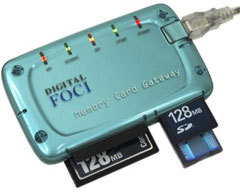 The Digital Foci Memory Card Gateway is the central
access point for your digital camera, MP3 player, cell phone, PDA,
digital video camera, and computer. With USB 2.0 connectivity,
Memory Card Gateway lets you easily access pictures on your digital
camera memory card and transfers those pictures to your computer at
high speed. You can also easily share photos, music, and other data
files with your friends by transferring files from your computer to
their memory card. Available in 3 stylish colors: Lucid Purple,
Midnight Gray, and Crystal Blue, Memory Card Gateway is compact,
lightweight, and completely self-powered via USB port. The included
Velcro mounting pads also let you place it wherever you want.
The Digital Foci Memory Card Gateway is the central
access point for your digital camera, MP3 player, cell phone, PDA,
digital video camera, and computer. With USB 2.0 connectivity,
Memory Card Gateway lets you easily access pictures on your digital
camera memory card and transfers those pictures to your computer at
high speed. You can also easily share photos, music, and other data
files with your friends by transferring files from your computer to
their memory card. Available in 3 stylish colors: Lucid Purple,
Midnight Gray, and Crystal Blue, Memory Card Gateway is compact,
lightweight, and completely self-powered via USB port. The included
Velcro mounting pads also let you place it wherever you want.
Memory Card Gateway features four memory card slots that let you transfer files directly between cards of different formats. The individual LED indicators for each card slot provide assurance of the connection and data transfer status. In addition, the Memory Card Gateway software driver displays picture icons for each memory card format, making it easy to identify memory card drives on the computer.
Simply remove your memory card from the digital camera, insert it into Memory Card Gateway and drag and drop your pictures into your computer. Since you can now transfer files without turning on your digital camera, MP3 player, or PDA, you will also conserve the battery life on those devices.
Digital Foci Memory Card Gateway features:
Directly reads and writes to: CF I / II, MD, SM, MMC, SD Card, MS, MS PRO, MS PRO Duo (miniSD, RS-MMC, MS Duo, and xD with adapter) USB 2.0 connection provides high speed transfer rates of up to 480 Mbps Individual LED indicators for each memory card slot show connection and data transfer status Completely self-powered via USB port (no power adapter needed) Velcro mounting pad lets you place it where you want Compact and lightweight design makes it convenient to carry anywhere 4 memory card slots allow direct card-to-card transfer Customized memory card picture icons and labels make identifying memory card drives on your computer easy PC & Mac compatible
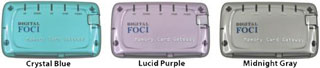 Unique style and color
Memory Card Gateway comes in 3 stylish colors: Lucid Purple, Midnight Gray, and Crystal Blue.
The device measures 3.6" x 2.1" x 0.6" and weighs only 1.8 oz. Memory Card Gateway includes a USB cable, Quick Start Guide, Resource Disc, and Velcro mounting pad.
Priced at $29.95, Digital Foci Memory Card Gateway is available immediately.
- Link: Digital Foci
Plextor Portable Hard Drives for On-the-Go Data Storage
PR: Plextor Corp., a leading developer and manufacturer of high-performance digital media equipment, today announced the immediate availability of the PX-SP family of shock proof, portable hard disk drives (HDD). The external drives are available in two capacities - 80 GB (PX-SP08U) and 120 GB (PX-SP12U). Measuring just 3.33 x 0.74 x 5.51 inches (W/H/D) and weighing less than 8 ounces, these highly portable drives enable users to carry their data with them anywhere, anytime.
PX-SP Series come with a specially designed silicon jacket bumper that helps prevent the unit from crashing if it is accidentally dropped. Compatible with both Microsoft Windows and Apple Macintosh personal computers, the PX-SP features a Hi-Speed USB 2.0 port interface for a maximum data transmission speed of 480 Mbps. Plextor's retail package comes with everything a user needs to get started, including a portable external hard drive, silicon jacket bumper, Hi-Speed USB 2.0 cable, and quick start guide.
"Plextor is rapidly expanding its data storage product line to include innovative devices such as the new PX-SP shock proof portable hard drives," said Michael Arbisi, Vice President, Channel Sales for Plextor. "Our goal is to give customers a wide range of options for dependably and securely storing their valuable data, whether at home or at the office. Like all Plextor products, the PX-SP Series drives are designed and manufactured to the highest levels of quality and reliability."
System Requirements: PX-SP Series drives require a personal computer running Windows 2000/XP or Mac OS 9.1 - 9.2.2 / Mac OS X 10.1 - 10.4.4, with minimum Celeron 466-MHz processor and 64 MB RAM.
Plextor PX-SP series drives will ship to distributors in North and South America in May 2006. The PX-SP08U, with 80 GB capacity, has a Manufacturer's Suggested Retail Price (MSRP) of $169. The PX-SP12U, with 120 GB capacity, has a MSRP of $260.00. All retail packages include two-year full parts and labor warranty and unlimited toll-free technical support.
- Link: Plextor
mini SATADock for Easy Access to External SATA Drives
PR: WiebeTech continues to expand its popular DriveDock series to include a new mini SATADock that allows users to easily attach SATA drives to a computer via a single SATA cable. The mini SATADock is in stock and shipping now with a retail price of $74.95.
"The new mini SATADock takes advantage of fast SATA speed," said James Wiebe, president and CEO of WiebeTech LLC, "and nicely complements the rest of the WiebeTech DriveDock line."
mini SATADock can be used with bare external SATA drives. Attach power, attach the drive, connect to a computer with the included SATA cable, and read/write/access the drive's data just as if it were inside the computer.
The dock includes new Power Status LED indicators for power attached and power on. (Drives not included.)
Smallest Dock yet!
Now you can attach SATA drives to your computer via a single SATA cable. This new mini Dock is incredibly small and very attractive. mini SATADock transfers data at fast SATA speed (up to 3.0 GHz). Check power status with two LED indicators; power attached and power on. Made of rugged aluminum, it nicely complements the rest of the WiebeTech DriveDock line. It uses a +5/+12V DC adapter (included) and includes a power switch to allow for safe power up and down of the drive.
Treat it like any other drive
Use the mini SATA Dock just as you would use a standard external drive. Retrieve data, copy information from drive to drive or access many drives quickly. View or download the entire drive volume with the same performance as any external drive.
Using it is easy! Attach power, attach the drive, connect to your computer with the appropriate cable, and read/write/access the drive's data just as if it were inside the computer.
Rugged design, built to last
Grab it and go - miniDocks are tough as nails and made to last. The small and rugged case is constructed from briefcase-tough aluminum for durability.
Features
- Connection: Directly attaches to any SATA port.
- LED Indicators: 2 LED indicators: power attached, power on.
- +5/+12V DC Power In: Allows powering using the included AC adapter.
- Power Switch: Allows Power Up / Down.
- Aluminum Case: Briefcase tough; excellent heat dissipation.
- Small Size: Fits in a pocket.
- Interface:
- SATA to drive
- SATA to host
- Power: External power supply: 100-240 VAC +12V / +3A (included)
- Power input: +12V DC input jack
- Power output: +12V / +5V
- Power switch: On / Off
- LED Indicators: Power attached, power on
- Data Speeds: SATA port: up to 1.5 GHz
- Operating Temperature: 50° - 85° Fahrenheit (10° - 30° Celsius)
- Operating Humidity: 5% to 95%, noncondensing
- Operating Systems:
- Windows XP
- Macintosh OS X
- Linux supporting SATA
- Shipping Weight: 3 lbs. (including AC adapter)
- Dimensions: 2.8 x 1.15 x 1.0 inch (71 x 29 x 25mm)
- Link: Mini SATAdock
Software
PocketMac for Blackberry: Sync Your Mac to Your Blackberry for Free
PR: Now you can dependably and stably sync your BlackBerry device with your Mac. PocketMac For BlackBerry is the first program to allow Mac users to sync their crucial data between their BlackBerry device and Entourage, Address Book, iCal, Now Contact, Now Up-To-Date, and even Stickies. And it's fully integrated with iSync as well.
14 months of hard work, engineering and testing PocketMac For BlackBerry means you'll never need a Windows-based PC to sync your crucial data with your BlackBerry device and that synching is fast and rock-solid.
PocketMac For BlackBerry takes care of everything for you. Install the software on your Mac in 3 minutes, configure which options you want enabled (Entourage Calendar, iCal, Tasks, etc.), connect your BlackBerry device to your Mac via USB or Serial Cable, and start the sync. That's all that's required. That's literally it.
What's more, PocketMac for BlackBerry was just awarded 4-1/2 of 5 mice by Macworld UK.
Best of all, thanks to Research In Motion (RIM) (designer and manufacturer of the BlackBerry device) licensing PocketMac for BlackBerry, it's free for all BlackBerry users!
And, PocketMac For BlackBerry is a 2-way sync system, allowing you to sync changes in everything from Contacts to Calendar Events to Tasks to Notes. And it's fast - it's built with the same industry-leading technology that made our other PocketMac products the best sellers they are today.
What's more, it's safe for your data. This software has been written, tested, rewritten, retested and then tested again for 14 solid months to make sure your data is being routed perfectly! And now it's ready to run on your Mac!
If you have a BlackBerry and a Mac, PocketMac For BlackBerry is the perfect tool for you! We know you'll love the ease and power of this software.
PocketMac For BlackBerry Features
- Entourage Sync - You can sync Entourage Contacts, Calendar, Tasks, & Notes with your BlackBerry device.
- Address Book Sync - You can sync Address Book Contacts with your BlackBerry device.
- iCal Sync - You can sync iCal Calendar and Tasks with your BlackBerry device.
- Now Contact/Now Up-To-Date Sync - You can sync Now Contact/Now Up-To-Date Contacts, Calendars & Tasks to your BlackBerry device. (Requires Now Contact & Now Up-To-Date.)
- Stickies Notes Sync - You can sync Stickies Notes to your BlackBerry device.
- Daylite Sync - You can sync Contacts, Calendars & Tasks to your BlackBerry device.
- iSync Integration - PocketMac For BlackBerry is fully integrated with iSync on your Mac. You can use iSync to sync, or you can use PocketMac's own software to sync.
- USB/Serial Sync - You can sync your BlackBerry device over USB or Serial (Keyspan USA-19HS Required).
- Password Support - PocketMac For BlackBerry fully supports BlackBerry passwords. Just enter your password and sync - it's that simple.
- USB Charge While Sync - The moment you plug your USB-supported BlackBerry device into your Mac and PocketMac starts to sync, your BlackBerry device will be automatically recharged.
System requirements:
- Mac OS X 10.3 or later
- Apple iSync
- Blackberry 3.x mobile
- 14 MB free disk space on your Mac
- 1 Available USB Port
If you own a RIM 957™ or a BlackBerry 5810™ or a BlackBerry 6710™, please read this! To connect your BlackBerry device to your Mac, a special data cable is needed. The Keyspan High Speed USB Serial Adapter (USA-19HS) will connect your device.
System support: PPC
Free
- Link: PocketMac for Blackberry
Desktop Mac Deals
Low End Mac updates the following price trackers every two weeks:
- Low End Mac's best Mac mini deals
- Low End Mac's best iMac Core Duo deals
- Low End Mac's best iMac G5 deals
- Low End Mac's best iMac G4 deals
- Low End Mac's best iMac G3 deals
- Low End Mac's best eMac deals
- Low End Mac's best Power Mac G5 deals
- Low End Mac's best Power Mac G4 deals
- Low End Mac's best Power Mac G3 deals
For more deals on current, recently discontinued, and older notebooks, see our MacBook Pro deals, 12" PowerBook G4 deals, 15" aluminum PowerBook G4 deals, 17" PowerBook G4 deals, titanium PowerBook G4 deals, iBook G4 deals, PowerBook G3 deals, and iBook G3 deals.
Join us on Facebook, follow us on Twitter or Google+, or subscribe to our RSS news feed
Links for the Day
- Mac of the Day: 12" 500 MHz Dual USB iBook, (2001.05.01. This compact, squared off, all-white, 500 MHz iBook was nicknamed the iceBook.)
- Support Low End Mac
Recent Content
About LEM Support Usage Privacy Contact
Follow Low End Mac on Twitter
Join Low End Mac on Facebook
Favorite Sites
MacSurfer
Cult of Mac
Shrine of Apple
MacInTouch
MyAppleMenu
InfoMac
The Mac Observer
Accelerate Your Mac
RetroMacCast
The Vintage Mac Museum
Deal Brothers
DealMac
Mac2Sell
Mac Driver Museum
JAG's House
System 6 Heaven
System 7 Today
the pickle's Low-End Mac FAQ
Affiliates
Amazon.com
The iTunes Store
PC Connection Express
Macgo Blu-ray Player
Parallels Desktop for Mac
eBay

