

Why I Can't Buy an iPhone, and What I Did About It
- 2007.12.07
My Turn is Low End Mac's column for reader-submitted articles. It's your turn to share your thoughts on all things Mac (or iPhone, iPod, etc.) and write for the Mac web. Email your submission to Dan Knight .
Like many übergeeks, I have long fantasized about owning a cell phone that did more than just take and make phone calls. I wanted one electronic device that played music, synched with my calendar and addresses, and wirelessly surfed the Web. At one time, I thought that I would have to buy a PDA or PIM, an iPod, and a cell phone.
The old adage that great minds think alike was proven true when Apple introduced the iPhone. Like the late, lamented Newton, the iPhone seemed to be many things in one. It was a cell phone, it was a music and video player, it carried your calendar and phone book, it could connect wirelessly to hot spots, and it even had a camera. It was the answer to having to trek about with pockets full of electronic gewgaws.
But I can't buy an iPhone, not even if I had the money.
Why?
Why has Santa Jobs crossed me off his Christmas list?
That deal Jobs made with AT&T.
I happen to live in a rural area, and AT&T doesn't offer coverage this far out in the boondocks. In fact, I've been using the same cellular service from the first time I bought a cell phone.
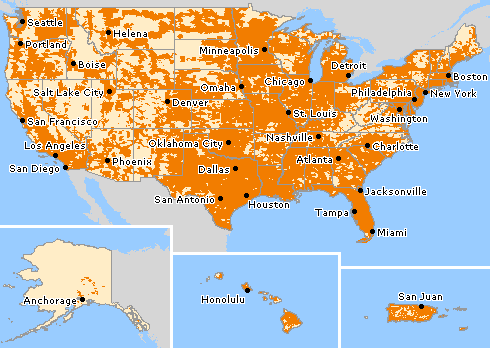
AT&T Wireless Coverage: Light yellow = no iPhone for you.
Now I'm not too far from AT&T's coverage zone, but the whole point of owning a cell phone is being able to make calls from everywhere. I should be able to use my cell phone from my house.
Apparently, I have to wait five years until Apple releases the iPhone to other carriers. The unexpected benefit from this exile is that by the time I can buy an iPhone, it will be a lot cheaper and have more features. But this is no help to someone with a real gadget jones. I don't want to scare the kids, but as you age, your memory has some file storing issues. I need a device to carry my appointments around in and then beep at me when an important appointment is on the horizon.
So I went to my cell service provider and renewed my contract with a Motorola RAZR V3m. According to Apple's website, it will sync using iSync on my Pismo. The RAZR has MP3 file compatibility, a camera, and a mini-USB jack (the RAZR also has Bluetooth, but the Pismo doesn't). Everything should be hunky dory.
Well...
First of all, iSync (Mac OS X 4.10) will sync my Address Book but not my iCal calendar - but 10.4.8 will sync both the Address Book and the calendar. Don't ask me why, but for a while I was contemplating moving back to 10.4.8.
Fortunately, you can find anything on the Web. I got a hold of a forum on Apple that dealt with the RAZR V3m compatibility issue on Tiger 4.10. Long story short, I used a link to the Sprint RAZR V3m iSync Instruction Page that had an older plist that supports calendar sync on 10.4.10. I replaced my current plist and, easy-peasy, my RAZR phone synched with my Pismo, and all was right with the world.
Well...
The Motorola RAZR V3m has that mini USB plug. It's really cool for connecting the phone to the computer. However, it's not so hot for attaching a pair of stereo headphones. I bought a pair of Motorola headphones and modded them with a pair yellow hearing protection plugs. I read about this mod on Low End Mac, but I'll be darned if I can remember the link. (Yes, kids, it's that's aging file storage thing.) However, I like the headphones that I bought before I bought the RAZR.
Motorola used to ship a mini-USB to stereo mini jack, but they didn't include this adapter with the phone I bought. USB-to-headphone jacks are as common as hen's teeth, but even Shadio Rack didn't have any for mini-USB. I guess I'll have to order one from Motorola. Grrrr. Maybe it sells more Motorola headphones, but I still think that it one of those stupid corporate blunders, right up there with changing Coca-Cola's formula.
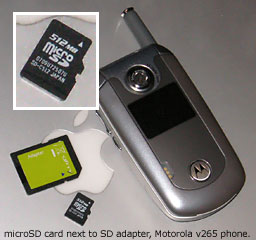 The Motorola RAZR uses a tiny (microscopic to us folks with
bifocals) microSD
memory card that requires the user to remove the battery cover and then
the battery to put in the phone. With the card in place, the phone
appears on your desktop like any USB drive. There is no iTunes
compatibility, but since you have to convert your iTunes files to MP3s
(fortunately iTunes can convert my files to MP3s), it's a simple matter
to copy the files to the ?music? folder on the RAZR.
The Motorola RAZR uses a tiny (microscopic to us folks with
bifocals) microSD
memory card that requires the user to remove the battery cover and then
the battery to put in the phone. With the card in place, the phone
appears on your desktop like any USB drive. There is no iTunes
compatibility, but since you have to convert your iTunes files to MP3s
(fortunately iTunes can convert my files to MP3s), it's a simple matter
to copy the files to the ?music? folder on the RAZR.
Another crazy issue with the RAZR is that you have to remove the memory card to use iSync.
Other than that, it works for me. I have Address Book and calendar sync, I can listen to all that old music, I take pictures, and I can even make phone calls.
I suppose ease of use will have to wait five years.
Share your perspective on the Mac by emailing with "My Turn" as your subject.
Join us on Facebook, follow us on Twitter or Google+, or subscribe to our RSS news feed
Today's Links
- Mac of the Day: PowerBook 500 Series, introduced 1994.05.16. 'Blackbird' includes a 25 to 33 MHz 68040 along with smart batteries and grayscale or color displays.
- Support Low End Mac
Recent Content
About LEM Support Usage Privacy Contact
Follow Low End Mac on Twitter
Join Low End Mac on Facebook
Favorite Sites
MacSurfer
Cult of Mac
Shrine of Apple
MacInTouch
MyAppleMenu
InfoMac
The Mac Observer
Accelerate Your Mac
RetroMacCast
The Vintage Mac Museum
Deal Brothers
DealMac
Mac2Sell
Mac Driver Museum
JAG's House
System 6 Heaven
System 7 Today
the pickle's Low-End Mac FAQ
Affiliates
Amazon.com
The iTunes Store
PC Connection Express
Macgo Blu-ray Player
Parallels Desktop for Mac
eBay

