

MacBook Air: What Do You Do When There's No WiFi?
- 2008.01.22
My Turn is Low End Mac's column for reader-submitted articles. It's your turn to share your thoughts on all things Mac (or iPhone, iPod, etc.) and write for the Mac web. Email your submission to Dan Knight .
I thought that I might as well contribute my thoughts on the MacBook Air now that the reality distortion field has dissipated. Steve Jobs has rolled the rice again and bet the farm on wireless connectivity.
Do you remember all the disappointment when the first iMacs came out? No floppy drives! Shock! Horror! Jobs had looked into his crystal ball and decided that the floppy drive was a technological dead end. And you know, he was right.
With the MacBook Air, Steverino has pulled a Great Karnack and believes that wireless is the way to go. Need to install software? As long as you have a wireless network around, no problemo. Talk to other computers - it's all through the air.
As far as I know, John Connors is still alive, and SkyNet is not operational. So what if there is no air?
This is very similar to the exclusive deal for the iPhone that Apple signed with AT&T. If AT&T has phone service coverage, you can use the iPhone; if not, tough. Now I think that Jobs is betting on the future having accessible WiFi for all. Without the ability to connect to wireless networks, the ordinary activities that we take for granted are compromised.
MacBook Air vs. Pismo
Let's just compare the MacBook Air to, oh, what about an 8-year-old Pismo (PowerBook G3 2000 [FireWire]). The MacBook is the latest in computer tech. The Pismo is the Pismo.
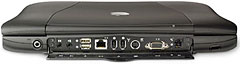
Back panel of Pismo PowerBook
Let's just take a gander at the back of the ol' Pismo. One of the first things you're going to see is a phone jack. The Pismo has a internal modem. So what's the big deal? If you're not in a wireless environment. (Like when you're visiting my 82-year-old father. who didn't buy a color TV when they came out because "you don't need color, you can imagine it". You need to be creative. I had a serious case of Internet jones until I parked outside the local Panera Bread restaurant and used their WiFi.)
If I had signed up for NetZero's free dialup service, I could have relaxed with the knowledge that the Internet was a phone call away. (Baby steps, baby steps.) Now the NetZero free account limits you to 10 hours, but in an emergency, it would be 10 hours you wouldn't normally have.
The phone jack also allows you use the fax software in Tiger to send and receive faxes. If you are in a motel room with just a phone line, you can still connect and interact with the world.
Next, you have you standard monitor jack, followed by an S-video out. This is really a bit a toss up here in that the MacBook Air has a video out which lets you connect to nearly anything. I don't know what you lose by having a Pismo, since you can buy (for big bucks) a DVI and VGA graphics card on a PC Card.
The Pismo has two FireWire ports versus none for the MBA. If you have a wireless network and the right software, you don't need FireWire, do you? Yeah, but if you're in the middle of nowhere, it's nice to be able to backup to a FireWire drive or use FireWire to import data or software from a friend's computer.
I know that the MacBook Air has a USB 2.0 port, and you can boot with USB in Leopard, but what about attaching a FireWire digital camera or video camera? It's all about versatility. I really feel that a portable computer should be able to cope with the occasional "it's the middle of nowhere and all you have is a . . ." situation.
The lack of a FireWire port seems to assume that the MacBook Air will always live in a perfect WiFi world.
Next, the Pismo has an ethernet port. There are still some parts of the computer world living in darkness with wired networks. Not only that, but sometimes the only connection you have in common with another computer is the ethernet port. A crossover cable can save your life (figuratively) in such situations. You ought to be able to MacGyver your way out of a desperate situation, but the lack of connections on the MacBook means you have to operate in a supported environment all the time.
The Pismo has two USB ports. Yes, they are USB 1.1, but since the Pismo has a PC Card slot, you can put in USB 2.0 or FireWire 800. On top of that, the Pismo has two ports. The MacBook has a sad single port.
Both laptops have a stereo mini jack, but the Pismo has a mini jack for an external microphone. The Pismo is uncommonly versatile, but the MacBook Air is a limited laptop that will function only in a wireless environment.
The Pismo is an 8-year-old computer and has the limitations of an 8-year-old computer. But am I the only one who thinks that the MacBook Air is a "putting all your eggs in one basket" sort of product? If you want to strip out the features that we have come to expect in a laptop in the interest of size, why not build another PowerBook Duo?
I have always had a fondness for the Duo concept, but that's another story.
Share your perspective on the Mac by emailing with "My Turn" as your subject.
Join us on Facebook, follow us on Twitter or Google+, or subscribe to our RSS news feed
Today's Links
- Mac of the Day: PowerBook 1400, introduced 1996.10.01. Considered by many the best pre-G3 PowerBook with a small footprint and great keyboard.
- Support Low End Mac
Recent Content
About LEM Support Usage Privacy Contact
Follow Low End Mac on Twitter
Join Low End Mac on Facebook
Favorite Sites
MacSurfer
Cult of Mac
Shrine of Apple
MacInTouch
MyAppleMenu
InfoMac
The Mac Observer
Accelerate Your Mac
RetroMacCast
The Vintage Mac Museum
Deal Brothers
DealMac
Mac2Sell
Mac Driver Museum
JAG's House
System 6 Heaven
System 7 Today
the pickle's Low-End Mac FAQ
Affiliates
Amazon.com
The iTunes Store
PC Connection Express
Macgo Blu-ray Player
Parallels Desktop for Mac
eBay

