

14 Years of Useful Service from a Macintosh LC III
- 2008.02.26
My Turn is Low End Mac's column for reader-submitted articles. It's your turn to share your thoughts on all things Mac (or iPhone, iPod, etc.) and write for the Mac web. Email your submission to Dan Knight .
It started life as a 'multimedia powerhouse.' Purchased in the summer of 1993 along with an external NEC SCSI Multispin CD-ROM drive, this little LC III was placed prominently in a middle school library. It was mainly dedicated to running Grolier's Multimedia Encyclopedia and a few other multimedia titles. It also was loaded with the library's card catalog and several student-made Hyperstudio stacks full of information gathered from field trips and other projects.
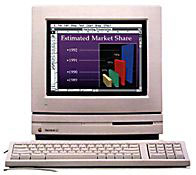
Macintosh LC III
This wonderful pizza box shaped machine served this purpose nicely for two years, until a newer, faster, all-in-one 5200 replaced it and sent the LC III to the corner for word processing. Gradually it was getting less and less use and was starting to gather a little dust.
Jump ahead to the fall of 1996. The school district I was working for was getting its first dedicated Internet service. I needed to put up a mail server quickly and inexpensively. I didn't have the time to teach myself Unix, and I really did not want to purchase another Windows machine and software, though it looked like that was what I would have to do.
A few phone calls gave me a recommendation for the free Apple Internet Mail Server. I grabbed the lonely little LC III, not sure it had enough beef to run email for 100+ clients, but I thought it was worth a try. Within two hours I had the machine loaded with the AIMS software and fired it up. It did not take long before it was moving thousands of email messages every day, and it was up to the task. I attached an external SCSI drive that I used for periodic backups, and the machine required almost no maintenance, just faithfully doing its job without missing a beat.
I did tweak the machine a little bit, installing a minimal configuration of System 7.6.1 and an upgrade to a 1 GB internal drive with 16 MB of RAM. There were very few other changes made or necessary. Apple Internet Mail Server later became Eudora Internet Mail Server, so I did make that change.
This machine did the trick for over three years until spam began to be more of an issue. There was little protection from relaying in the program, so an upgrade to a more powerful program and more powerful machine became necessary. The LC III barely made it to the new millennium, being retired early in 2000.
In 2001 I took a job with a private company providing sales, training, and technical support for school districts. When I went back to visit my old district, there were several old machines being earmarked for disposal. I bought a few of the machines and walked away with the LC III for free, not sure what I would do with it, if anything.
In 2003, I was helping a very small rural school district get their network set up. Their Internet provider promised email service as part of their package, but said it would be at least six months before they could get it set up. I grabbed the LC III and set it up, providing a very nice temporary solution. Later, the Exchange Server in our office went down and the LC III filled the bill for about two weeks. 10 years after its original purchase, this machine was still being useful.
Missing the school setting, I quit the private business and took an elementary teaching job. Almost as an afterthought, I picked up the LC III as I was cleaning out my office, feeling pretty sure that it had outlived its usefulness. My new school was not very high tech and was officially all PC based. I did manage to scrape together a few older iMacs for student use, but I needed a printer for them to print to. I found an old Personal LaserWriter 4/600, but it was a LocalTalk only printer, lacking an Ethernet port, and the iMacs had no LocalTalk port.
The light bulb turned on, and the LC III was once again pulled out of retirement. I knew of a free download from Apple of a control panel called LocalTalk Bridge, and I was able to connect the printer to the LC III and share it across the network using the LC III as a print server. With a wireless router, I was even able to set up wireless printing in my classroom with almost no investment. The printer is slow but reliable, and with the LC III churning away, it eventually printed everything we sent to it.
I did manage to get a faster printer with a built-in Ethernet port, so once again the LC III is sitting on a shelf. It had found use into its fourteenth year, and I would not be surprised if it comes out of retirement once again to fill a need. Though some Apple machines have been more reliable than others, for the most part, Macs outlive their usefulness long before they wear out.
But maybe they never really do outlive their usefulness. It's more a matter of understanding what can be done with a low-end machine. I don't know what use I may find for this 15-year-old computer, but whatever it may be, I'm sure the LC III will be ready and willing.
Share your perspective on the Mac by emailing with "My Turn" as your subject.
Join us on Facebook, follow us on Twitter or Google+, or subscribe to our RSS news feed
Today's Links
- Mac of the Day: PowerBook 500 Series, introduced 1994.05.16. 'Blackbird' includes a 25 to 33 MHz 68040 along with smart batteries and grayscale or color displays.
- Support Low End Mac
Recent Content
About LEM Support Usage Privacy Contact
Follow Low End Mac on Twitter
Join Low End Mac on Facebook
Favorite Sites
MacSurfer
Cult of Mac
Shrine of Apple
MacInTouch
MyAppleMenu
InfoMac
The Mac Observer
Accelerate Your Mac
RetroMacCast
The Vintage Mac Museum
Deal Brothers
DealMac
Mac2Sell
Mac Driver Museum
JAG's House
System 6 Heaven
System 7 Today
the pickle's Low-End Mac FAQ
Affiliates
Amazon.com
The iTunes Store
PC Connection Express
Macgo Blu-ray Player
Parallels Desktop for Mac
eBay

