

Bigger, Faster, More: Enough Already!
- 2005.05.16
My Turn is Low End Mac's column for reader-submitted articles. It's your turn to share your thoughts on all things Mac (or iPhone, iPod, etc.) and write for the Mac web. Email your submission to Dan Knight .
 Back
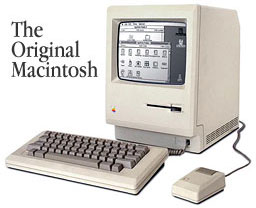
when the Macintosh
first came out in 1984, it was considered the most advanced personal
computer in the world. The Macintosh system included the following:
Back
when the Macintosh
first came out in 1984, it was considered the most advanced personal
computer in the world. The Macintosh system included the following:
- 68000 CPU running at 8 MHz
- 128 KB of RAM
- 400 KB 3.5" floppy
- 512 x 342 resolution 9" black and white (no grays) display.
- Keyboard and mouse.
- All for just $2,495 back in 1984.
It did more than any other computer at that price point ever did. It did more than anyone could ever want - or did it?
In this era of computers with 3+ GHz processors, gigabytes of RAM, 250 GB hard drives, 16x DVD burners, 256 MB graphics cards, and displays with resolutions of 2560 x 1600, even a first generation Quicksilver G4 seems limited.
Does any user really need all of this power? Why do we feel so compelled to buy it all?
I can understand that computers can make some things a lot easier, but what I can't understand is why we all want it to be so much faster and better.
The Internet doesn't go any faster just because you have a faster computer. Your CDs and DVDs don't play any better just because you have a faster computer. The human eye cannot tell the difference between 40 frames per second and 500.
The only real reason we need faster computers with more memory and more storage capacity is because the program designers keep making the programs and operating systems more and more bloated.
When they say that a new program is faster than ever, what they really mean is that it's faster than ever before only if you have a state of the art system.
The only people who need the best of the best all of the time are the gamers. They go out and buy $1,000 worth of new equipment every six months just so they can play the latest game.
Graphics professionals: You all got by on Power Mac 9600s back in 1997. Couldn't you get by using them now?
Internet, video, and presentation designers: You all got by on Power Mac 7300s and 8600s back in 1997. Couldn't you get by using them now?
Schools and basic users: You all got by on 5500s and 6500s Macs back in 1997, couldn't you get by using them now?
I run a computer lab out of my house in Denver, Colorado. There are two servers, one admin, and six client machines in it.
- One Power Mac 8600 router/print server
- One Power Mac 9600 file/Web server
- One Power Mac G3 admin machine
- One Power Mac G3 for Internet and games
- One Rev D iMac for Internet and games
- One Power Mac 6500 for Internet and A/V
- One Power Mac 5500 for Internet and A/V
- One Mac Classic II for basic stuff
- One Mac SE for basic stuff
What I am getting at: Don't let them sucker you into buying all of this new stuff - you can still get by on all of the stuff that you once had or still have.
If you have an older machine, break it out and use it for awhile. You will be surprised at what you can really do with it (even if it is a little bit slow). And if you don't have one, go on eBay and buy one; they are dirt cheap these days.
I know that it is fun to look at the new stuff and want it, but if
you take a good look at what you can do with the old stuff, you'll
realize you don't need the new stuff as much as you thought.

Share your perspective on the Mac by emailing with "My Turn" as your subject.
Join us on Facebook, follow us on Twitter or Google+, or subscribe to our RSS news feed
Today's Links
- Mac of the Day: PowerBook 170, introduced 1991.10.21. At 25 MHz, the 170 was at the top of the original PowerBook line.
- Support Low End Mac
Recent Content
About LEM Support Usage Privacy Contact
Follow Low End Mac on Twitter
Join Low End Mac on Facebook
Favorite Sites
MacSurfer
Cult of Mac
Shrine of Apple
MacInTouch
MyAppleMenu
InfoMac
The Mac Observer
Accelerate Your Mac
RetroMacCast
The Vintage Mac Museum
Deal Brothers
DealMac
Mac2Sell
Mac Driver Museum
JAG's House
System 6 Heaven
System 7 Today
the pickle's Low-End Mac FAQ
Affiliates
Amazon.com
The iTunes Store
PC Connection Express
Macgo Blu-ray Player
Parallels Desktop for Mac
eBay

