

Multimedia on Vintage Macs, Part 2
Integrating Vintage Macs into a Home Studio
- 2002.09.18
My Turn is Low End Mac's column for reader-submitted articles. It's your turn to share your thoughts on all things Mac (or iPhone, iPod, etc.) and write for the Mac web. Email your submission to Dan Knight .
In my previous article, I detailed the ways I have used my hot rodded IIci for audio/video work, and the response from readers has been wonderful. I have received many responses that have been both informative and friendly. Thank you to everyone who wrote about their experiences with multimedia work on vintage Macs. I hope to continue to provide useful ideas for all of you that use vintage Macs for this purpose.
My interest in vintage Macs springs from my interest in audio production and music in general. The Macintosh has been used for this type of work more often than any other widely available platform. While the Macintosh was the choice of audio/video professionals for many years, PCs didn't gain widespread acceptance for serious production work until more recently.
These days, vintage Macs that are capable of multimedia work are going for peanuts. Like many Low End Mac readers, I have quite a few vintage Macs that I have saved from various fates, and frequently use eBay to gather the bits and pieces to make them useful again. Each project has given me new insights into why Mac users are so loyal to their machines.
However, I have found it difficult to find uses for all of my Macs and justify the space in my apartment that they occupy. I also have a home studio that occupies a lot of space, so I decided to try and find a niche for every Mac I own and allow them to perform a function within my home studio setup.
As an owner of both vintage 68k Macs and older Power Macs, I needed to find functions for each Mac and software for the tasks I deemed them capable of.
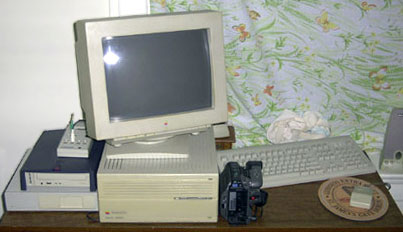
The IIci is better suited for video work because of it's superior Spigot II Tape capture card. It captures at full 30 frames per second and has been upgraded recently with an external SCSI A/V drive.
I chose my Radius 81/110 for audio work because newer versions of Digidesign Pro Tools are Power Mac only, and it contains a Digidesign Audiomedia II card that is far superior to the PAS 16 in the IIci.
These machines could be networked via AppleTalk, so I could move files around at my discretion, although it is just as easy to move external hard drives to different machines.
To physically link all of their audio inputs and outputs, I use standard 1/4" patchbays with cable adapters as needed. This gives me the flexibility to patch any signal in or out of any of my Macs or analog equipment in my studio. They also make patchbays that are video specific, but my video signals are on mixed connectors, so I am limited to using the IIci and patching directly between it and video equipment.
Sometimes I use a combination of two machines for audio work. This is the case when I use something like Virtual Drummer to create a wacky low-fi drum beat. I patch the outputs of the IIci's PAS 16 into the Radius audio inputs on the patchbay and record the beat. I can then edit and use it within my multitrack recording software.
Because both are already wired into the patchbay, it is a simple patch from one point to the other on the patchbay. A patchbay can really help you stay organized when working with multiple audio sources and saves a lot of time you would spend connecting and reconnecting your equipment.
For other multimedia studio related tasks, I have a few more Macs involved. I have been using a Power Computing PowerBase 180 for organizational duties. I keep the schedule of studio related work on it and inventory tape stock and other items. It is also used for Internet access in the studio area.
I also have a Classic II that stores names and addresses that are related to studio work or music. In addition, it sits next to the telephone and looks cute.
A Few Words about the Radius 81/110
The Radius 81/110 is the newest acquisition in my vintage Macintosh A/V arsenal. A quick rundown of it's features is probably in order here, because it performs the bulk of my computer audio functions.
- 82 MB RAM
- 2 GB system drive
- 4 GB A/V drive(controlled by Jackhammer)
- RasterOps Paintboard Prism video card
- FWB Jackhammer SCSI card
- Digidesign Audiomedia II card
- Opcode Translator Pro 2 In 6 Out MIDI interface
I can't say enough good things about this Mac clone. It is a seriously overbuilt machine meant for A/V work. The power supply is huge, and the case seems pretty indestructible. It has completed replaced a much newer Pentium III PC and the IIci for all my audio production work. I am running a lot of intense audio applications on it, and it never seems to freeze or cause audio glitches the way my PC did.
The Digidesign Audiomedia II card has excellent sound quality for audio mastering work or additional tracks for a project. The best part is that the entire system cost me less than buying a comparable sound card for a PC or newer PCI Power Mac.
It's important to be creative when thinking of the ways your vintage Macs can perform multimedia functions. I have a friend who uses an LC just for the QuickTime 2.5 instruments and its speech synthesizer. You may find that one Mac makes a great MIDI sequencer, while another is perfect for CD quality audio use.
I have found so many uses for my vintage Macs that I may yet find peace of mind when buying more of them. Use your best judgment, and don't be afraid to experiment and push the limits of your vintage Macs. Finding uses for them justifies their continued existence in your home and makes a good argument for adding more to the collection.
Share your perspective on the Mac by emailing with "My Turn" as your subject.
Join us on Facebook, follow us on Twitter or Google+, or subscribe to our RSS news feed
Today's Links
- Mac of the Day: Lombard PowerBook G3, introduced 1999.05.10. This was the first PowerBook with USB, first to hit 400 MHz, and trimmed almost 2 lb. from WallStreet
- Support Low End Mac
Recent Content
About LEM Support Usage Privacy Contact
Follow Low End Mac on Twitter
Join Low End Mac on Facebook
Favorite Sites
MacSurfer
Cult of Mac
Shrine of Apple
MacInTouch
MyAppleMenu
InfoMac
The Mac Observer
Accelerate Your Mac
RetroMacCast
The Vintage Mac Museum
Deal Brothers
DealMac
Mac2Sell
Mac Driver Museum
JAG's House
System 6 Heaven
System 7 Today
the pickle's Low-End Mac FAQ
Affiliates
Amazon.com
The iTunes Store
PC Connection Express
Macgo Blu-ray Player
Parallels Desktop for Mac
eBay

