

The Next Step for Mac OS X, Part 1
- 2002.04.18
My Turn is Low End Mac's column for reader-submitted articles. It's your turn to share your thoughts on all things Mac (or iPhone, iPod, etc.) and write for the Mac web. Email your submission to Dan Knight .
Apple released Mac OS X in March 2001. Having used computers for almost twenty years, I can say that this new operating system is the best ever - certainly better than my first Commodore VIC-20. Yet, there is an undercurrent of disappointment; there is something wrong with this OS.
It's not the Mach microkernel, the Unix core, or the fluid motions of the Aqua GUI....
Well, actually it is the GUI. Before you stop reading, I'd like to point out that this isn't another one of those articles bemoaning the dock. No, this is a lot more serious. The Mac OS X interface isn't bad - it's probably the best yet - but isn't is about time we stopped pointing and clicking?
The Graphical User Interface emanates, famously, from the Xerox PARC and was copied by Apple, then by Microsoft, then by Digital Research, then.... It's now 2002, and the GUI hasn't seen many changes since then. It's had facelifts and the odd major improvement, such as on-the-fly previewing and drag-and-drop, but the fact remains that the concept remains unchanged.
GUIs expanded the user base for computers because they allowed ordinary people to use them. Command lines lend themselves only to those with an understanding of software architecture. Few users today realise that by clicking on "Macintosh HD" they are programming the computer. Linux users may be slightly more aware, but this is emblematic of the failure of the Linux GUIs to hide the underlying complexity.
In Mac OS X, we've been give a new finder view - one which allows a hierarchical view of the drive. This illustrates exactly what's wrong with the GUI as a concept: Try finding a file that's buried thirteen subfolders down without a GUI, and you could be there for hours. The command line, the GUI, the mouse - they allowed us to perform tasks using the best technology of the times.
Those times are gone, but the technology is still with us.
Steve Jobs and Co. have been regaling us with tales of the digital hub for several months now. The older term for this concept was pervasive computing. The basic idea is to put processors into nearly every device in out home and offices, even our clothes, and allow them to communicate with one another. When you run out of milk, your fridge orders more. We've all heard this stuff before.
The problem is that point-and-click is the wrong interface for all of this, as Sony's disastrous BeOS-based eVilla shows. Of course, information appliances are a half-baked idea anyway, a strange halfway point between the final marriage of your PC and television set. Computer owners don't want half of a computer, nor do technophobes want the other half. Information appliances fall between two stools, and the interface has a lot to do with it - they're too computer-like but not powerful enough.
Jobs has pointed out that he sees a long future for the PC, perhaps in recognition of the failure of information appliances to gain any serious ground in the marketplace. Thus, when it came to creating the center of the digital hub, the Apple team were to start from first principles. They didn't.
Certainly, there's been a radical review of the Mac's interface, but it's based on the same concepts. We can be thankful that Apple decided against going the whole Unix-hog and giving us MIT's X-Window system, which is not only extremely ugly, but is also probably the best way to slow an expensive SGI or Sun workstation to a crawl.
When Apple introduced the
Lisa in 1983, people said that the GUI was tacky, it wouldn't wash,
it wasn't 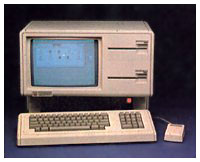 serious, it was a toy. Nowadays you can
barely buy a computer without some "Mac-a-like" windowing system. For
the most part, the command line is a thing of the past - there if you
want it, but not necessary.
serious, it was a toy. Nowadays you can
barely buy a computer without some "Mac-a-like" windowing system. For
the most part, the command line is a thing of the past - there if you
want it, but not necessary.
Isn't it about time we decided to do the same to the GUI?
Why aren't we communicating with our computers in a more sensory rich fashion? Never mind virtual reality: Why can't your computer see you? What about speaking? At a much more basic level, why doesn't your mouse know when your pushing it?
None of these things require artificial intelligence. They simply require a willingness to, as Steve used to say, think different.
Share your perspective on the Mac by emailing with "My Turn" as your subject.
Join us on Facebook, follow us on Twitter or Google+, or subscribe to our RSS news feed
Today's Links
- Mac of the Day: Classic II (Performa 200), introduced 1991.10.21. The last b&w compact Mac put a 16 MHz 32-bit CPU on a 16-bit bus.
- Support Low End Mac
Recent Content
About LEM Support Usage Privacy Contact
Follow Low End Mac on Twitter
Join Low End Mac on Facebook
Favorite Sites
MacSurfer
Cult of Mac
Shrine of Apple
MacInTouch
MyAppleMenu
InfoMac
The Mac Observer
Accelerate Your Mac
RetroMacCast
The Vintage Mac Museum
Deal Brothers
DealMac
Mac2Sell
Mac Driver Museum
JAG's House
System 6 Heaven
System 7 Today
the pickle's Low-End Mac FAQ
Affiliates
Amazon.com
The iTunes Store
PC Connection Express
Macgo Blu-ray Player
Parallels Desktop for Mac
eBay

