

Monitoring Your Older Mac
James Brock Clark - 2001.04.20
My Turn is Low End Mac's column for reader-submitted articles. It's your turn to share your thoughts on all things Mac (or iPhone, iPod, etc.) and write for the Mac web. Email your submission to Dan Knight .
Got a touch of upgrade fever but can't afford the cure? Or maybe you're just feeling restive, a tad dissatisfied. Old Mac goes everywhere I want to go, but oh, I don't know....
Low-end Medicine
If you're using a Power Mac or other modular machine, the low-end answer might be a new monitor. You don't have to reach for an Apple or Sony. There are a number of feature laden monitors out there - KDS, Panasonic, and Mitsubishi among them - capable of significantly improving your sensory experience for around Can$400 (significantly less in the US).
Case History
The key term here is "sensory experience."
Remember the first Mac you laid eyes on? For me it was a little all
in one Plus my neighbor, a
science writer, had just carried 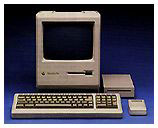 in from his car and set up on
the kitchen table. It was different, but it wasn't until he fired it up
that I realized what a huge improvement it was over everything I had
seen up to that point. The small screen was dazzling white. On it were
amazingly crisp black letter characters and lines. (The competition at
the time was offering colors on black. Each character seemed to have
four or five lines through it.)
in from his car and set up on
the kitchen table. It was different, but it wasn't until he fired it up
that I realized what a huge improvement it was over everything I had
seen up to that point. The small screen was dazzling white. On it were
amazingly crisp black letter characters and lines. (The competition at
the time was offering colors on black. Each character seemed to have
four or five lines through it.)
From that day, Macintosh meant an easy reading high quality image. It was the standard by which all others would be judged.
Looking at the Options
There are at least 75 computers in the school where I work. In some ways, it's like one of those endurance testing facilities, and believe me, the techies are there a lot. When it came time to buy a monitor for my recently acquired Power Mac 7600/132, I took a good look around. What I saw was pretty shocking: lab benches lined with domed and fuzzy, eye-torturing screens.
It wasn't until I got down to the office and saw the 17-inch monitor on the secretary's desk that I stopped for a close look. It was a Korean Data Systems unit from a couple of years ago. The shape of the glass, slightly curved from side to side, straight vertically, reminded me of my Sony Trinitron television set. The monitor's box was still in the storeroom, and, sure enough, the KDS was made with "Trinitron technology" (three separate electron guns, one for each of the base colors, as opposed to the standard design where a single gun serves up the three colors in rotation). My previous Mac, an LC 520, had a Trinitron screen which I had always admired for its rich colour and relatively fine resolution.
The KDS was on the short list.
A quick check of Web sources and a hasty confab with the school board technicians led me to include the Mitsubishi Diamondtron and the Panasonic PanaSync in the comparison. My local Mac source, Mark Gilchrist of Phoenix Network Systems, filled in the picture with some realistic Canadian prices. All three units would be classed as mid priced with the Panasonic costing a few dollars more, and the Mitsubishi a few dollars less than the $400 (Canadian) KDS. All three monitors had the full range of onscreen controls and were within .01 mm of the KDS's .24 mm aperture grille center pitch.
In other words, each would provide a very fine lined texture when set to resolution limits (1024 x 768 with a 75 MHz refresh rate for my 7600).
Definitely Different
I settled on the 17-inch KDS AV-7TF primarily on the basis of my previous experience with Trinitron monitors. It was at that point Mark informed me that the "TF" in the model designation stood for, "true flat." Even so I wasn't prepared for what came out of the box. It was the usual tapered off-white plastic case, but this one had a dark gray rectangle on the front that was flat from top to bottom and side to side.
Definitely different.
Hooked up to my 7600 running OS 8.6, this monitor provides a uniquely pleasant visual experience. There are no discernible resolution lines. It's as if my chosen dark Bondi desktop with its colorful icons is painted on the backside of the glass - rich and satisfying. And because of the flat surface, there are few annoying reflections.
Making the Change
The larger 17-inch screen took a little getting used to. The ClarisWorks word processing page size, as displayed on my 15-inch LC 520 screen, was significantly smaller on 17-inch monitor set for it's maximum resolution. Drop back to the 800 x 600 resolution, as used by the LC 520, and everything was big again. Scan lines, however, were discernible.
Operating the 17-inch monitor at the maximum resolution (1024 x 768) has more to offer than dense black typefaces and creamy smooth colors. The larger desktop provides more room to arrange icons, the control strip, and Finder buttons as well as greater convenience when working from multiple windows. Bumping up the font size from 10 point to 12 made the adjustment in word processing easy. Within three days I was completely at home in my new and spacious hi-res environment.
And remember, that new monitor will still be there next time you succumb to a serious case of upgrade fever.
Share your perspective on the Mac by emailing with "My Turn" as your subject.
Join us on Facebook, follow us on Twitter or Google+, or subscribe to our RSS news feed
Today's Links
- Mac of the Day: PowerBook 500 Series, introduced 1994.05.16. 'Blackbird' includes a 25 to 33 MHz 68040 along with smart batteries and grayscale or color displays.
- Support Low End Mac
Recent Content
About LEM Support Usage Privacy Contact
Follow Low End Mac on Twitter
Join Low End Mac on Facebook
Favorite Sites
MacSurfer
Cult of Mac
Shrine of Apple
MacInTouch
MyAppleMenu
InfoMac
The Mac Observer
Accelerate Your Mac
RetroMacCast
The Vintage Mac Museum
Deal Brothers
DealMac
Mac2Sell
Mac Driver Museum
JAG's House
System 6 Heaven
System 7 Today
the pickle's Low-End Mac FAQ
Affiliates
Amazon.com
The iTunes Store
PC Connection Express
Macgo Blu-ray Player
Parallels Desktop for Mac
eBay

