
Mac Musings
Why I Bought a Low End iPod
Dan Knight - 2005.02.24 - Tip Jar
Mac 360 ran a poll last week asking how many Macs and how many iPods site visitors had purchased. The original poll didn't have a zero option, so I quickly fired off a note. I may have owned many Macs over the years, but I had never owned an iPod.
Until now.
If visitors to Mac 360 are typical of people who visit Mac-related websites, only 1% of you have never purchased a Mac while just 13% have never bought an iPod. One-third of those surveyed had purchased a single iPod, and 54% had purchased more than one.
That pales a bit in comparison to Mac buyers - 51% of those surveyed had purchased at least five Macs over the years. With all those Macs out there, it's no wonder Low End Mac has a loyal readership.
Why Buy an iPod?
I've never had a Walkman. I once had a Discman, but I never used it as a portable device - only in the office. I prefer to listen to the radio or pop in a CD, so what use do I have for an iPod?
I came up with two reasons to own an iPod: file backup and synchronizing my iTunes library.
Files To Go
I use three different computers. I have a 1.25 GHz eMac with a SuperDrive at the house, a 1.25 GHz eMac with a Combo drive at the apartment, and my faithful old 400 MHz PowerBook G4 for use anywhere.
Each machine is configured similarly. When I got my first eMac, I essentially cloned the PowerBook's hard drive to an external 7200 rpm 80 GB FireWire drive, which I later used with my second eMac.
When I got my third eMac, I cloned the drive from eMac #2, so for a day or so I had identical setups.
I run backup at least once a week using SuperDuper and three different external FireWire hard drives - one for each computer. If I were to do it over, I think I'd go with a single 200-250 GB hard drive, partition it, and have all my backups in one place.
Anyhow, I take these external drives from place to place with me and use File Synchronization (Nemesys Software) to synchronize copies of this website and my other work files to each of the computers.
It's a bother lugging around multiple 3.5" hard drives, AC adapters, power cords, and FireWire cables. How much simpler to buy a pocketable iPod!
Of course, I could do the same thing for less with a 2.5" bus-powered FireWire hard drive, but that wouldn't deal with my other issue.
iTunes Synchronization
I've ripped a lot of CDs to iTunes. I've purchased an audio book and several music tracks from the iTunes Music Store. And I've used File Synchronization to clone the iTunes collection from my master computer to the other two.
That's okay, but there are some problems if you've ripped CD #1 on one Mac and CD #2 on the other one since the last synchronization.
Apple's software makes it easy to sync the iPod with a single computer, but I want to be able to rip CDs or buy iTunes on any of my Macs and use the iPod to keep things synchronized between them - all I need now is the right software. I'm looking at iPodRip (shareware), but if any of you have suggestions, please email them my way.
Which iPod Did I Buy?
I don't need a lot of storage space for my music or my work files. My iTunes library is just 2.72 GB at present, and the work files I'm storing in the iPod take up less than 400 MB of space, so any hard drive iPod would be big enough.
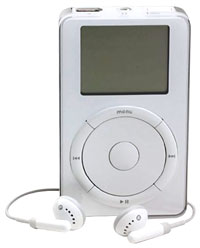 I've been watching prices on used iPods, and
Small Dog Electronics has
often had used 5, 10, 15, and even 20 GB iPods - not a lot of them,
but enough to notice. The one that caught my eye was a "B
condition" 10 GB iPod for just US$149 - the same price as the
1 GB iPod shuffle and only $10 more than they usually get for
an "A condition" 5 GB iPod.
I've been watching prices on used iPods, and
Small Dog Electronics has
often had used 5, 10, 15, and even 20 GB iPods - not a lot of them,
but enough to notice. The one that caught my eye was a "B
condition" 10 GB iPod for just US$149 - the same price as the
1 GB iPod shuffle and only $10 more than they usually get for
an "A condition" 5 GB iPod.
The iPod, a first generation model, arrived Tuesday complete with a FireWire cable, ear buds, slip case, AC adapter, pouch, and two small dog toys. This iPod is a bit beat up. The screen and back are scratched, but everything works perfectly. I plugged it in, updated the firmware, synchronized my iTunes library, and let it charge. The battery seems to be in great shape.
After that, I copied my work folders to the iPod and then used File Synchronization to set up sync scripts. Now I'll be able to move my work from one computer to another with nothing more than the iPod and a FireWire cable - that beats 3.5" drives with AC adapters and power cables hands down.
And I've enjoyed listening to it, letting it shuffle through music by genre or choosing one of the audio books. It definitely beats listening to the radio or popping in a CD.
The age of the low-end iPod is upon us - if you value utility and don't mind an iPod that doesn't look brand new.
Join us on Facebook, follow us on Twitter or Google+, or subscribe to our RSS news feed
Dan Knight has been using Macs since 1986, sold Macs for several years, supported them for many more years, and has been publishing Low End Mac since April 1997. If you find Dan's articles helpful, please consider making a donation to his tip jar.
Links for the Day
- Mac of the Day: WallStreet PowerBook G3, introduced 1998.05.04. WallStreet came in three screen sizes along with speeds from 233 to 292 MHz.
- Support Low End Mac
Recent Content
About LEM Support Usage Privacy Contact
Follow Low End Mac on Twitter
Join Low End Mac on Facebook
Favorite Sites
MacSurfer
Cult of Mac
Shrine of Apple
MacInTouch
MyAppleMenu
InfoMac
The Mac Observer
Accelerate Your Mac
RetroMacCast
The Vintage Mac Museum
Deal Brothers
DealMac
Mac2Sell
Mac Driver Museum
JAG's House
System 6 Heaven
System 7 Today
the pickle's Low-End Mac FAQ
Affiliates
Amazon.com
The iTunes Store
PC Connection Express
Macgo Blu-ray Player
Parallels Desktop for Mac
eBay

Advertise

Advertise
