
The Mac OS: Two Out of Three Ain't Bad
Dan Knight - 2003.02.24 - Tip Jar
Speed. Ease of use. Stability.
Choose two of three.
Once upon a time, there was the command line. Computer users would sit down, stare at a blinking cursor, and type instructions for the computer to execute.
We learned these commands. We controlled our computers. They served us efficiently. And it was good.
A decade later came the Macintosh
with its graphical user interface. It looked funny. 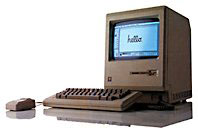 It didn't accept typed in commands. It had
something called a mouse. Geeks looked down on it.
It didn't accept typed in commands. It had
something called a mouse. Geeks looked down on it.
But non-geeks discovered that they could now use computers without learning cryptic DOS or Unix commands. They could see what they were doing and actually view their documents as they would appear on paper.
That Mac was a bit underpowered, severely lacking in RAM, and really did look kinda funny. But users discovered the power to use computers without reading lots of books and memorizing lots of commands.
And this, too, was good.
Over time, DOS computers got Windows, which made them "almost as easy to use as a Macintosh." And everyone got more powerful computers.
Efficiency
How we used to laugh at those early versions of Windows, just a graphical shell sitting on top of MS-DOS. It was ugly, angular, and practically hostile in comparison with the Mac. Windows users sometimes had to quit or shell out of Windows to run DOS programs. And Windows made everything much slower.
The Mac OS, on the other hand, was efficient. There was no underlying command line operating system. The 1-bit b&w interface worked very nicely even on 8 MHz computers, especially ones with 512 KB or more memory. The file system was updated to support double-sided floppies and hard drives. The hardware got SCSI, making it easy to add hard drives.
And it was very good.
Ease of Use
But users wanted more. They wanted to have two or more programs open at the same time. That meant more memory. That meant hacking the OS. There were a plethora of memory managers for DOS machines, and the Mac acquired MultiFinder. With enough memory - and the Plus could handle a whopping 4 MB - you could have a bunch of programs all open at the same time.
This was also very good, except that some programs didn't play well with others, the overhead of managing several programs slowed down the computer, and system crashes became more common.
Still, for a small loss in efficiency, you could be more productive.
Stability
On the other end of the computing world from personal computers was the world of servers, where operating systems such as Unix were designed to be incredibly stable and prevent any user or program from crashing the computer. This required very clever programming, very clever processors, and lots of memory and storage space.
This was also very good.
Pick Two
But there's no such thing as a free lunch. Unix has more system overhead than DOS. Windows has a lot more system overhead than DOS. Single-user systems are generally more efficient than multiuser systems.
Ease of use. Stability. Efficiency.
You can't have it all.
MS-DOS and System 6
Because both were designed for a single user on not very powerful hardware, MS-DOS and Macintosh System 6 were remarkably efficient operating systems. No overhead for fancy color graphics. No juggling programs. No need for memory protection.
They were fast. They loaded quickly. And they hardly ever crashed.
MS-DOS wasn't easy to learn, but it was stable and efficient. The Mac gave up some efficiency (not much) to power the GUI and was very stable and pretty easy to learn.
Windows
Microsoft decided to graft ease of use onto DOS with Windows, which was actually a program that ran on DOS originally. Windows definitely sacrificed stability and efficiency for ease of use. From Windows 1.0 through 3.0, nobody really took it seriously.
Then came Windows 3.1, which remains in use to this day. It was enough like the Mac and the hardware had grown powerful enough that it was a reasonable alternative to DOS. For a lot of computer users, Windows 3.1 was their first graphical user interface.
Windows grew beyond its roots as a DOS shell and learned how to use the special modes of the 80386 processor. It could handle vast amounts of memory and run lots of programs at the same time. It was slower than DOS, but it was friendlier.
It was also far more crash prone. Ease of use completely trumped stability and efficiency.
Windows NT
That wasn't good, but people got used to it. Reinstalling Windows became a common solution to computer problems.
And then Microsoft decided to make a better Unix than Unix. Really. That was their stated goal in creating Windows NT, a server OS that would rival the stability of Unix. It took a long time, but with Windows 2000 and XP, Microsoft managed to create a pretty darn stable operating system that was as easy to use as the consumer version of Windows.
Sure, it lacks quite a bit in the efficiency department (can you imagine what it might be like to use DOS 3.3 on a 3.06 GHz Pentium 4?), but it added stability to ease of use.
System 7 to Mac OS 9
System 6 was fast. Very little slowed it down, unless you used TrueType fonts or Type 1 Postscript fonts with Adobe's Type Manager (ATM). Those pretty fonts could slow an 8 MHz Mac to a crawl, but they were otherwise very efficient. Use bitmapped fonts and you'd be happy.
With System 7.0, Apple made MultiFinder part of the operating system, reducing efficiency compared with System 6. They also added color icons, which meant more system overhead. TrueType was on by default, and soon the Mac OS shipped with a copy of ATM as well. The screen looked prettier, but efficiency suffered. Those old 8 MHz Macs could run System 7, but unless you turned off TrueType and disabled ATM, you probably didn't want to.
Then came Open Transport networking, which was much easier to use, ate up about a half megabyte of additional memory, and wouldn't even function on 68000-based Macs. And then came Appearances and Kaleidoscope and 24-bit color - all gorgeous, but all slowing things down.
Through it all, the Mac OS remained pretty stable, very easy to use, and just a bit less efficient than the last time around. (Of course, Windows was also growing less efficient.)
Mac OS X
A long time ago, Apple decided that the classic Mac OS would have to be replaced, just as Windows replaced DOS and Windows NT/2K/XP is slowly supplanting consumer versions of Windows. Apple had two or three OS projects, talked with MS and IBM about porting Windows and OS/2 to the PowerPC, and finally chucked the whole thing and bought NeXT for their operating system.
As much as some of us wish Apple had purchased Be - whose BeOS seemed to offer an incredible blend of efficiency, ease of use, and stability - the decision was made for us. Apple got NeXT, the OpenStep operating system, Web Objects, and Steve Jobs. Jobs was probably the most crucial part of the deal in the long run, at least until the next generation Mac OS reached the point that Mac users were willing to adopt it.
Of the three options - ease of use, efficiency, and stability - Mac OS X made stability the most important. The new OS is rooted in the BSD variant of Unix. That pedigree makes it one of the most rock solid operating systems on the planet, at least as far as personal computers go.
Next most important is Apple's legendary ease of use. Apple created the Quartz engine to display beautiful graphics with transparency, scalability, flavor, and who knows what else. And they created the Aqua interface to use the power of Quartz.
Efficiency was sacrificed a bit by choosing a rock solid core - and a whole lot with that candy coated interface.
What's the Best Mac OS?
There is no best Mac OS. (There is no spoon.) There is only the perception of a best Mac OS.
And there are not just three choices - there's a continuum between System 6 and 9, then a discontinuity with the leap to Mac OS X.
I've been trying to come up with a way to visualize three axes in two dimensions and then represent approximately where the Mac OS fits. This is what I've come up with:
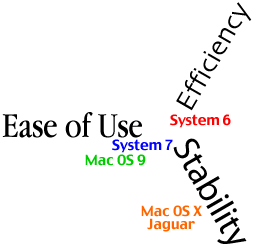
This is very approximate. Very approximate. You can't directly measure any of these; they really exist as a relationship between one OS and another. System 6 was the most efficient, OS X is the most stable, and 9.x was probably the easiest to use.
System 6 was very stable and very efficient. It was easy to use, but not as easy as System 7.0 and beyond. They sacrificed some efficiency and stability for a friendlier operating system.
By Mac OS 8.5, stability was becoming a real concern, and while OS 8.6-9.2 are more stable than 8.0-8.5, they don't seem as stable as System 7.0-7.6.1. With 8.6 and later, Apple made a concerted effort to improve stability.
Mac OS X is for stability first and foremost. I've had it installed for a year and had one kernel panic (during an OS upgrade last summer) and one time when I needed to do a force restart. Under OS 9, I could do several restarts a day.
Although Aqua is a world prettier than the classic Mac OS, it comes at a severe cost in efficiency. Quartz Extreme helps. But especially for the longtime Mac user, the relocation of familiar things like printer and server selection negatively impact ease of use while the learn the new OS.
Over time, OS X will become more efficient and we will find it more comfortable, but that still won't change the realities of System 6 efficiency and stability vs. 7-9 ease of use vs. OS X sacrificing so much performance for the sake of efficiency and a gorgeous interface.
Ease of use. Efficiency. Stability. Unless you want to go back to System 6, you won't come close to getting all three in a single operating system.
You don't really have to pick two, but you do have to realize that there's a tradeoff between the three factors.
And there's no wrong choice. There are only different choices. And what is most important is that you make the choice that's right for you.
Join us on Facebook, follow us on Twitter or Google+, or subscribe to our RSS news feed
Dan Knight has been using Macs since 1986, sold Macs for several years, supported them for many more years, and has been publishing Low End Mac since April 1997. If you find Dan's articles helpful, please consider making a donation to his tip jar.
Links for the Day
- Mac of the Day: PowerBook 1400, introduced 1996.10.01. Considered by many the best pre-G3 PowerBook with a small footprint and great keyboard.
- Support Low End Mac
Recent Content
About LEM Support Usage Privacy Contact
Follow Low End Mac on Twitter
Join Low End Mac on Facebook
Favorite Sites
MacSurfer
Cult of Mac
Shrine of Apple
MacInTouch
MyAppleMenu
InfoMac
The Mac Observer
Accelerate Your Mac
RetroMacCast
The Vintage Mac Museum
Deal Brothers
DealMac
Mac2Sell
Mac Driver Museum
JAG's House
System 6 Heaven
System 7 Today
the pickle's Low-End Mac FAQ
Affiliates
Amazon.com
The iTunes Store
PC Connection Express
Macgo Blu-ray Player
Parallels Desktop for Mac
eBay

Advertise

Advertise
