
Miscellaneous Ramblings
Free OmmWriter Dana Creates a Tranquil, Non-Distracting Writing Environment
Charles Moore - 2011.04.12 - Tip Jar
Rating: 
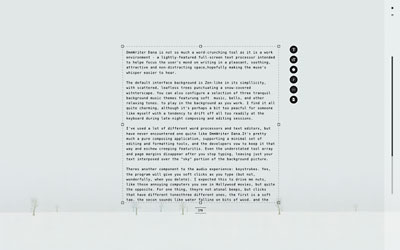
OmmWriter Dana is not so much a word-crunching tool as it is an alternate work environment - a lightly-featured fullscreen text processor intended to help focus the user's mind on writing in a pleasant, soothing, attractive, and non-distracting space, hopefully making the muse's whisper easier to hear.
Zen-like is a sometimes overused or misapplied descriptor, but it applies appropriately here. The default interface background is Zen-like in its simplicity, with scattered, leafless trees punctuating a barren, snow-covered winterscape.
If that's not minimalist enough for you, there are also plain white and textured gray backgrounds a button-click away. You can additionally configure a selection of three tranquil background music themes featuring soft music, bells, and other relaxing tones to play in the background as you work or opt for no music.
One of OmmWriter Dana's chromatherapy backgrounds.
The base version of OmmWriter Dana is freeware. There is a paid upgrade that offers more background options - seven audio and eight visual experiences, including two new visual chromatherapy backgrounds created in consultation with a color therapy expert that employ dynamically-changing color techniques to subconsciously promote tranquility and to stimulate creativity.
Another visual experience is intended to stimulate writer creativity through use of subliminal inspirational text that changes with every session. The additional audio experiences have been designed to provide background sounds that promote concentration. One reproduces the background noise typically heard in a library, while the other tries to simulate the sounds that an unborn child would hear inside the mother's womb. I only tested the free version, which aside from fewer audiovisual options, is identical to the paid edition.
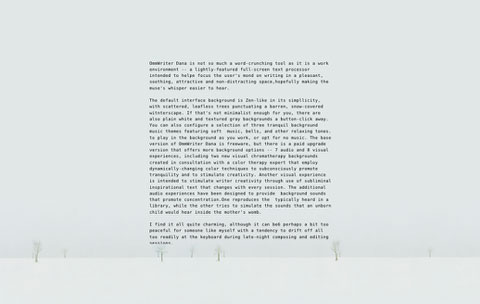
OmmWriter Dana provides a soothing, distraction-free writing
environment.
I find it all quite charming, although it can be perhaps a bit too peaceful for someone like myself with a tendency to drift off all too readily at the keyboard during late-night composing and editing sessions.
I've used many different word processors and text editors but had never encountered one quite like OmmWriter Dana. It's pretty much a pure composing application, supporting a minimal set of editing and formatting tools, and the developers vow to keep it that way and eschew creeping featuritis.
Text formatting options like bold, italic, and underline are not supported, although you can display text in sans-serif, serif, italic, and monospaced type - and in four different point sizes using the button toolbar to the right of the text entry field, which has six rows of commands that let you:
- Specify one of three type styles
- Change the point size of your text
- Choose among three levels of screen brightness
- Adjust the volume of the background music track
- Adjust the volume of the keyboard click sound
- Perform file operations
OmmWriter Dana's contextual menu.
Text editing and proofing commands are accessed by right-clicking in the text field which makes contextual submenus appear.
OmmWriter does not offer its own spell checker. However, you can configure the spell-checking feature of your Mac to work with Ommwriter by choosing the built-in Mac OS X spell checker under Spelling and Grammar in the Edit menu (or just right-click and choose it from the contextual menu), with options including Check Spelling While you Type, which will underline misspelled words using your system settings language.
OmmWriter Dana's text cursor is an unorthodox horizontal dash (the developers say that's better; I remain unconvinced), and a small running word count monitor lives below the bottom margin of the text box, which can be resized by dragging the box's corner and side handles.
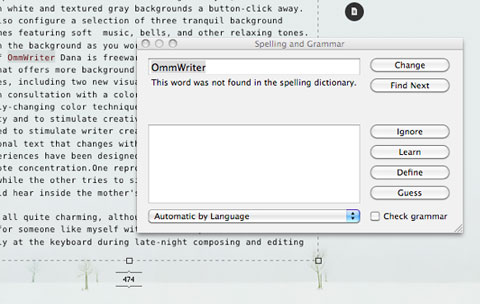
OmmWriter Dana can be configured to use your Mac's built-in spell
checker.
The program's understated tool array and page margins disappear after you stop typing, leaving just your text interposed over the "sky" portion of the background picture. OmmWriter Dana completely commandeers your entire display surface, without even the Dock or a menu bar showing, although you can summon the menu bar by mousing to the top of the window. You can hide the interface by clicking a tiny en-dash below the close X in the upper right-hand corner of the window.
If you like the rhythmic accompaniment provided by older "clicky" keyboards, OmmWriter Dana's sound generator can add a range of "clicking key" sounds for feedback as you type. I can live without that: My abiding quest is for as dead silent computing as is possible, and I've always preferred quiet keyboards with short, light-effort key travel. You can turn the clicking sound off as well if you'd rather work in silence.
OmmWriter Dana saves in several different formats.
OmmWriter Dana can save documents as basic .omm or .txt files, as .rtf for opening in Microsoft Word or other formatting software, and as .pdf for printing. The .omm and .txt file formats are the same, the only difference being the file extension.
OmmWriter Dana does not support printing. As an alternative to printing from PDF, you can also copy and paste your text into your favorite full-featured text-editor or word-processor and print from it.
I haven't encountered any obvious bugs or instability, and OmmWriter Dana gives the impression of being polished and professional in its execution. I've found I like it enough that I'll be keeping it around. It's, as advertised, a pleasant and relaxing work environment for writing that's a nice place to be, and I share the developers belief that adding a load of features would ruin the ambiance.
New and improved features in the current version of OmmWriter Dana include:
- Monospace font support.
- Larger text size option to improve accessibility and for visually-challenged users.
- Access to Menu bar from within OmmWriter by scrolling to top of the screen.
- Ability to create a new file using the File menu or with Command - N.
- Compatible with OS X Spaces.
- Dual screen support that blanks out the second screen when in use.
- Ability to return to the original text box size (in view menu).
- New file formats to save to: .pdf and .rtf.
- Improved user experience with horizontal cursor.
- Many minor refinements and tweaks
System Requirements:
- OmmWriter Dana supports Mac OS X 10.5 and newer
- Mac OS X 10.6 or newer is recommended
The paid OmmWriter Dana II version has no fixed price. You are left to decide, based on what you think OmmWriter is worth to you, with a minimum of $4.11.
Dana, by the way, is a Sanskrit and Pali word meaning giving. Sometimes it is also referred to as the practice of cultivating generosity.
I give OmmWriter Dana a four out of five rating.
Join us on Facebook, follow us on Twitter or Google+, or subscribe to our RSS news feed
Charles Moore has been a freelance journalist since 1987 and began writing for Mac websites in May 1998. His The Road Warrior column was a regular feature on MacOpinion, he is news editor at Applelinks.com and a columnist at MacPrices.net. If you find his articles helpful, please consider making a donation to his tip jar.
Links for the Day
- Mac of the Day: PowerBook 500 Series, introduced 1994.05.16. 'Blackbird' includes a 25 to 33 MHz 68040 along with smart batteries and grayscale or color displays.
- Support Low End Mac
Recent Content
About LEM Support Usage Privacy Contact
Follow Low End Mac on Twitter
Join Low End Mac on Facebook
Favorite Sites
MacSurfer
Cult of Mac
Shrine of Apple
MacInTouch
MyAppleMenu
InfoMac
The Mac Observer
Accelerate Your Mac
RetroMacCast
The Vintage Mac Museum
Deal Brothers
DealMac
Mac2Sell
Mac Driver Museum
JAG's House
System 6 Heaven
System 7 Today
the pickle's Low-End Mac FAQ
Affiliates
Amazon.com
The iTunes Store
PC Connection Express
Macgo Blu-ray Player
Parallels Desktop for Mac
eBay

