
Miscellaneous Ramblings
Free Glide OS: Computing in the Cloud
Charles Moore - 2010.01.25 - Tip Jar
Rating: 
A new report from Deloitte Canada says tablet devices and cloud computing will be two of the brightest stars in the technology, media, and telecommunications (TMT) sectors for 2010, thanks to something of a revolution underway in portable Internet access. This year's Deloitte TMT Predictions report - based on research, in-depth interviews, and input from Deloitte clients and alumni, industry analysts, and leading global TMT executives - suggests that consumers and enterprises want to access data anywhere, anytime, and on any screen, and they want to do so economically.
If its new tablet computer arrives on Wednesday, as is widely anticipated, that would put Apple in position to ride this wave, but what about the cloud computing part? Deloitte says that cloud computing will grow faster than almost all other tech sectors, but it is not quite ready to take over the world yet, with concerns over reliability and security continuing to make large enterprises and governments cautious about adopting the cloud. By contrast, the Deloitte analysts see individual consumers and small enterprises are logical early adopters, with the global cloud computing industry is predicted to grow almost 50% this year.
It's difficult to nail down "cloud computing" with a simple definition, as it it such a multifaceted category. Google is arguably a major player - if not the major one - with its congery of Web apps, and if you have a Gmail account (or, for, that matter any webmail account with storage privileges), you're already dipping your toes in "cloudy" waters.
Glide OS
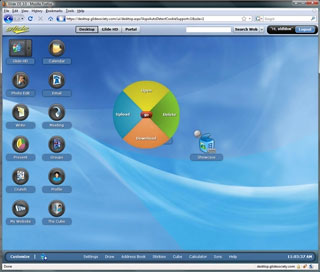 However, there's a
lot more to the cloud than email and online data storage. Google is
working on a Chrome OS, to be
spun off its Chrome browser technology and targeting the netbook
sector. If you want a taste of the cloud's more comprehensive potential
right now, you can get it on most any Internet capable computing
platform in the form of TransMedia Corp.'s Glide OS, a browser-accessed environment
for executing a spectrum of production and communication tasks - and
the basic service is free.
However, there's a
lot more to the cloud than email and online data storage. Google is
working on a Chrome OS, to be
spun off its Chrome browser technology and targeting the netbook
sector. If you want a taste of the cloud's more comprehensive potential
right now, you can get it on most any Internet capable computing
platform in the form of TransMedia Corp.'s Glide OS, a browser-accessed environment
for executing a spectrum of production and communication tasks - and
the basic service is free.
Glide equips provides with file synchronization and automated file format translation that can support multiple remote Windows, Mac, Linux and Solaris desktops and all mobile platforms including Android, Blackberry, iPhone, Palm Pre, Symbian and Windows Mobile, offering Web content capture, a rights based file management system to manage data across desktops and mobile devices, word processor, presentation, spreadsheet, and photo editor modules, a Webmail email client, an online meeting app, a drawing tool, a web publishing app, a contact manager, a calendar and more, effectively transforming virtually any major browser into an OS client, although it's particularly oriented to Chrome.
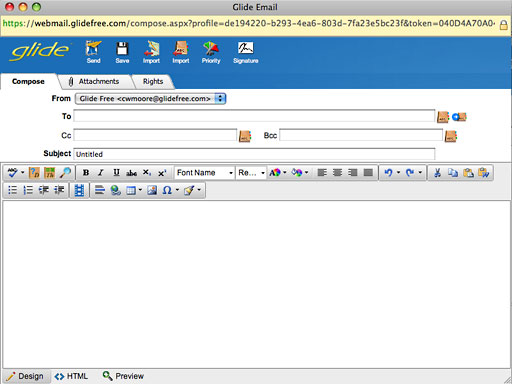
Glide's email client.
 The free
version of the The Glide cloud computing solution is ad-free, and comes
with
The free
version of the The Glide cloud computing solution is ad-free, and comes
with 300 MB 30 GB* of online storage.
So, what's the Glide OS like to use?
Well, I found signup pretty quick and painless. Just go to the Glide OS homepage, click the Register button, fill out the required information fields, and you're done. There's nothing to download and nothing to install, although optionally a free Glide OS sync app called Glide One can be downloaded for Windows, Mac OS X, Linux, or [Open]Solaris that will automatically synchronize of all of your files and information with Glide, upload your photos, music, video, documents, contacts, calendars, and bookmarks, and thereafter automatically sync files you create and edit online in Glide and on your local desktops, keeping all of your files in sync all of the time.
Files synched to Glide are automatically converted into compatible previews, and the OS supports more than 250 file formats.
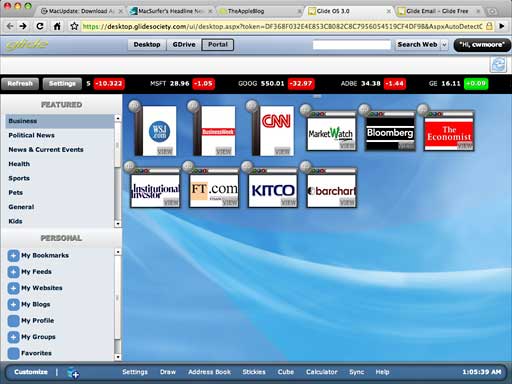
Glide's Portal module.
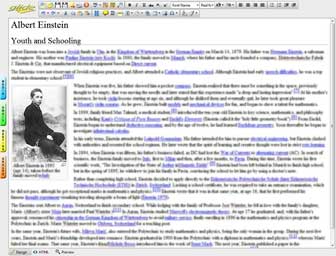 Back to basics. The Glide
Desktop background image by default displays 14 icons that offer click
access to the various Glide OS functions. There's a word processor
called Write (left), a presentation module called Present, an image
editing module called Photo Edit (below), a webmail interface, drawing,
Web authoring, and blog-writing modules, a handy calculator, and so
forth.
Back to basics. The Glide
Desktop background image by default displays 14 icons that offer click
access to the various Glide OS functions. There's a word processor
called Write (left), a presentation module called Present, an image
editing module called Photo Edit (below), a webmail interface, drawing,
Web authoring, and blog-writing modules, a handy calculator, and so
forth.
I particularly am smitten with the module called "Portal" (above), which gives you clickable access to the websites of a variety of Web resources, such as magazines, other news media, music, photos, and so on.
The Write word processor has a comprehensive selection of formatting and editing tools, and it saves documents by default in HTML format, but optionally as Word or PDF files.
I found the Photo Edit module disappointingly rudimentary; there are several online image editing sites that offer a lot more power and versatility.
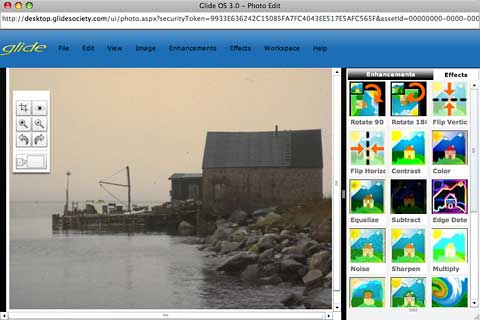
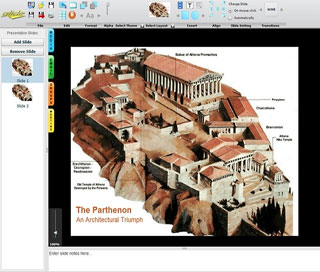
Glide's Image Edit app.
There is also GDrive, your private cloud storage solution with 30 GB of free storage. Users who want additional storage can upgrade to Glide Premium with 250 GB for $50 a year. Store your photos, music, videos, documents, contacts, calendars, and bookmarks in your GDrive. There are virtually no restrictions on file types that can be stored.
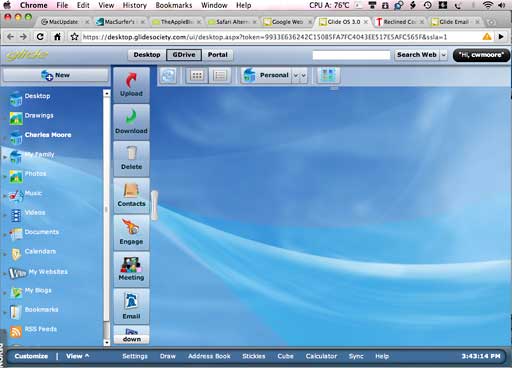
GDrive
Any data created or uploaded is stored on Glide's servers rather
than your hard drive. The rub is that the 300 MB of free storage is
essentially just a teaser, and for serious capacity you'll need to
upgrade to one of the range of for-fee packages priced from $4.95 a
month or $49.95 a year for 250 GB of storage and on up.
Is it worth the money? That's largely a subjective judgment. Personally, while I think the Glide OS has plenty of potential, especially for folks who want to work from multiple machines and locations, at its current stage of development and sophistication, its reach far exceeds its grasp as a satisfactory production platform. As I said, it gives you more like a taste of what cloud computing will no doubt offer someday than a serious work tool right now.
Other points of critique are a not very intuitive and often confusingly organized user interface, that the Glide OS is pretty sluggish* in response on my 2.0 GHz Core 2 Duo MacBook with 4 GB of RAM and 45 GB of free space on my boot partition over my wireless broadband connection. You spend a lot of time watching progress bars as modules and function load, and it's something of a resource hog.
To be fair, the developers say Glide is a work in progress, and they're busily at work to improve the service.
Glide Desktop Mac System Requirements:
- Mac OS X 10.6 Snow Leopard
- Mac OS X 10.5 Leopard
- Mac OS X 10.4 Tiger
- 256 MB RAM (more is highly recommended)
- 25 MB Disk Space
- 1024 x 768 Screen Resolution (or better)
Low End Mac rating at this stage of the game - two out of four.
Happily, it costs nothing to try it out for yourself.
* Publisher's note: It's also very sluggish on the dual 1.0 GHz (2 GB of RAM, OS X 10.4) and dual 1.6 GHz (1.25 GB of RAM, OS X 10.5) Power Macs at Low End Mac headquarters. dk
* This article was updated to reflect updated storage levels. Glide OS currently provides 30 GB of free storage with a 250 GB upgrade option for $50 per year.
Join us on Facebook, follow us on Twitter or Google+, or subscribe to our RSS news feed
Charles Moore has been a freelance journalist since 1987 and began writing for Mac websites in May 1998. His The Road Warrior column was a regular feature on MacOpinion, he is news editor at Applelinks.com and a columnist at MacPrices.net. If you find his articles helpful, please consider making a donation to his tip jar.
Links for the Day
- Mac of the Day: PowerBook 1400, introduced 1996.10.01. Considered by many the best pre-G3 PowerBook with a small footprint and great keyboard.
- Support Low End Mac
Recent Content
About LEM Support Usage Privacy Contact
Follow Low End Mac on Twitter
Join Low End Mac on Facebook
Favorite Sites
MacSurfer
Cult of Mac
Shrine of Apple
MacInTouch
MyAppleMenu
InfoMac
The Mac Observer
Accelerate Your Mac
RetroMacCast
The Vintage Mac Museum
Deal Brothers
DealMac
Mac2Sell
Mac Driver Museum
JAG's House
System 6 Heaven
System 7 Today
the pickle's Low-End Mac FAQ
Affiliates
Amazon.com
The iTunes Store
PC Connection Express
Macgo Blu-ray Player
Parallels Desktop for Mac
eBay

